Best Production Scheduling Software for Manufacturing in 2027: 7 Tools Compared
Last updated on : November 3, 2026
Production scheduling software is a planning system that turns customer orders into a time-based production plan. It assigns work orders to machines, lines and shifts using finite capacity, material availability and routing data, so manufacturers can promise realistic delivery dates and respond quickly when demand or capacity changes.
Here is the uncomfortable truth. Most production plans look fine on Monday and fall apart by Thursday.
Not because planners are careless. Because the plan was built on assumptions. Machines running 24/7. Routings that are complete. Rush orders that never arrive.
The right production scheduling software removes those assumptions. This guide compares seven tools manufacturers are shortlisting for 2027, with a clear view of what each one does well and where each one stops.
(All information is gathered from publicly available sources at the time of writing)
Why Do Production Schedules Keep Failing on the Shop Floor?
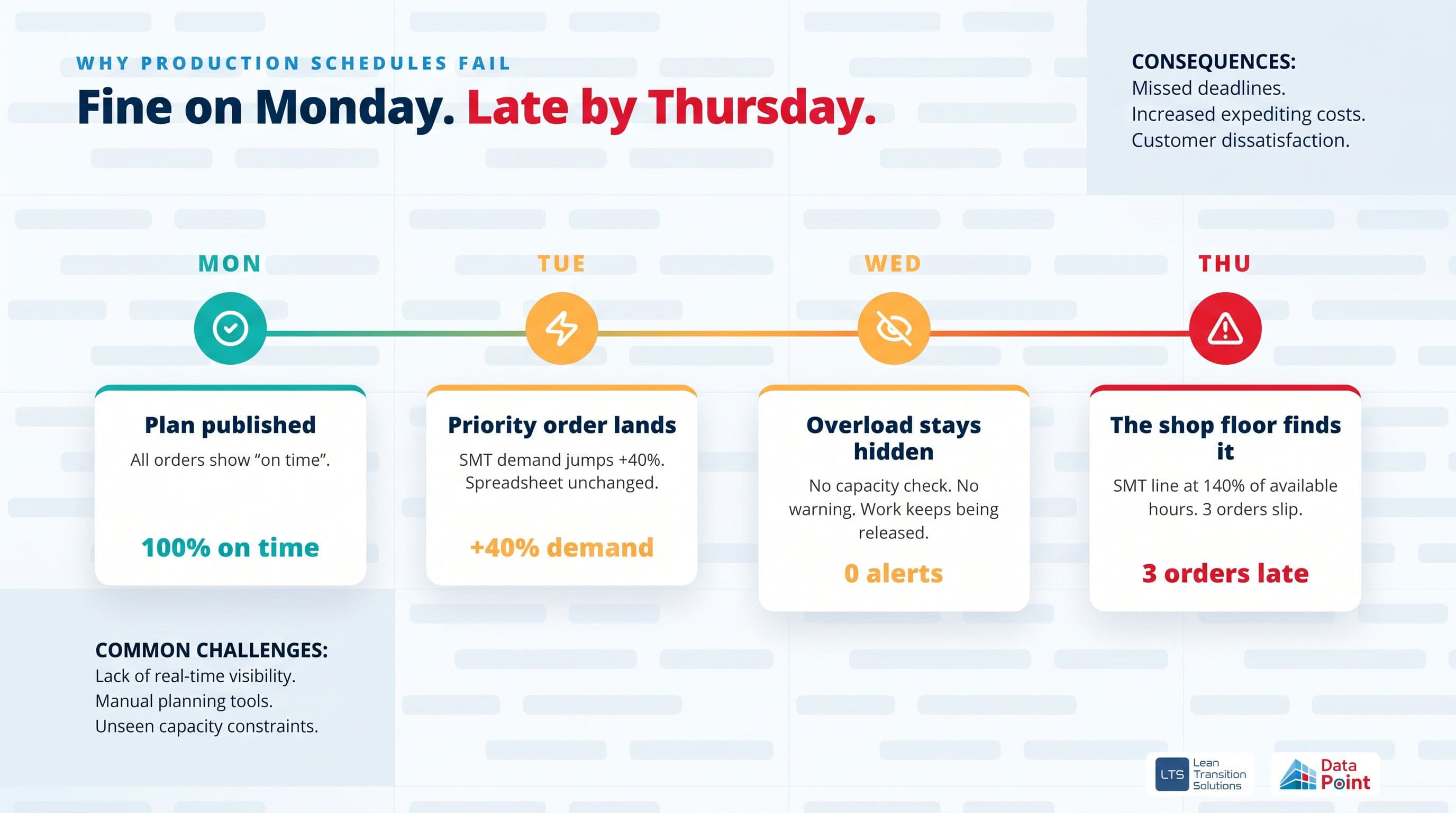
Why Do Production Schedules Keep Failing on the Shop Floor? A schedule fails long before anyone notices. It fails when a work order gets a date without anyone checking the routing. It fails when the plan ignores Friday’s planned maintenance. It fails when a priority order lands, and the overload stays hidden until the line is already late.
Take a production planning manager at a Tier-1 automotive supplier in the West Midlands. On Tuesday, the customer adds a priority order that lifts SMT demand by 40%. The spreadsheet still shows every order “on time”. By Thursday night, the SMT line is running at 140% of available hours, and three orders are slipping.
Nobody lied on purpose. The plan simply had no way to tell the truth.
The same pattern plays out across US discrete manufacturing and pharma. In a New Jersey contract manufacturer, a batch gets scheduled before the material master is complete. The schedule says ready. QA says otherwise.
These are the real failure points:
- Fake dates. Orders are scheduled before master data is validated.
- Infinite capacity. Plans assume machines run around the clock.
- Hidden overloads. Bottlenecks only show up on the shop floor.
- Slow replanning. Every rush order means hours in spreadsheets.
- No feedback loop. Actual output never flows back into the plan.
You must read this: Why Production Schedules Fail: 7 Ways to Improve Production Schedule Adherence
Production Scheduling vs Master Production Scheduling vs APS: What Is the Difference?
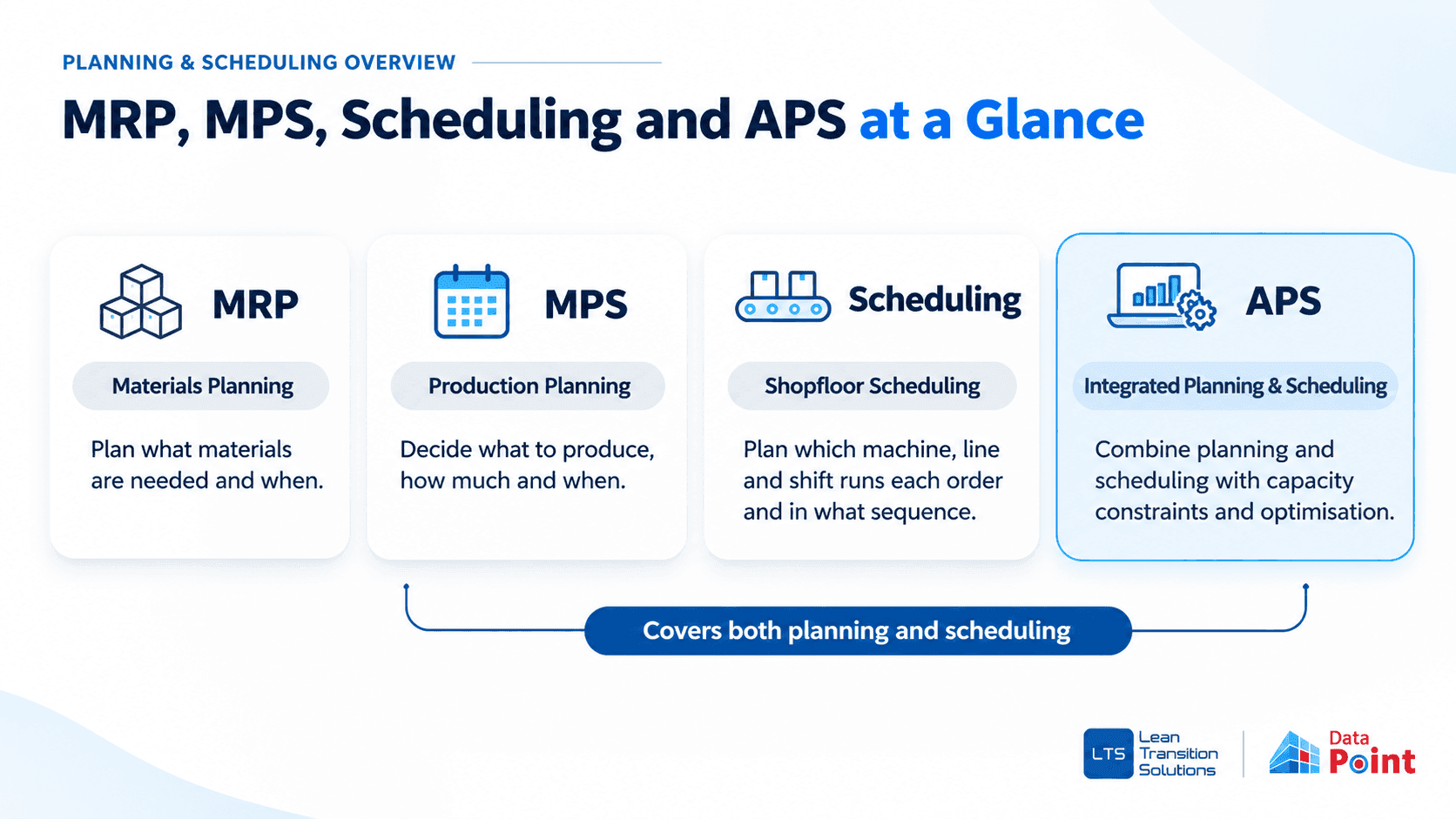
These terms get used interchangeably. They shouldn’t be.
Your ERP owns orders, materials and MRP. It was never designed to sequence a constrained line hour by hour. That is the gap master production scheduling software and APS tools fill.
The best tools now do both. They build the master production schedule and the detailed shop floor schedule in one place.
For a deeper breakdown, see our guide to master production schedule vs production schedule.
What Must the Best Production Scheduling Software Have in 2027?
Feature lists are long. These are the seven capabilities that decide whether a schedule survives contact with the shop floor.
1. Real-time scheduling
The schedule must update when reality changes. A breakdown, a late material delivery or a new priority order should show its impact in minutes, not after the next planning meeting.
2. Capacity planning built on real working time
Capacity is not 168 hours a week. Look for finite capacity scheduling software that models shift patterns, breaks, holidays, planned downtime and OEE. Otherwise every date is optimistic by design.
3. Resource allocation across lines, machines and people
The software should assign orders to the right work centre based on routing, cycle time and availability. Drag-and-drop replanning helps planners act fast. Order splitting helps when one line cannot carry the full quantity.
4. Handling complex resource constraints
Real factories have multi-level BOMs, dependent operations, changeovers and firm orders that cannot move. Advanced planning and scheduling software must sequence around all of them, forwards (as soon as possible) or backwards (just in time)
5. Scalability from one line to many sites
Start with a single value stream. Grow to every line and every site. Leaders should see schedule adherence and capacity across plants without rebuilding the system.
6. Short Interval Control and lean daily management integration
This is the capability most tools miss. A schedule only works if the shift can see it. The best manufacturing scheduling software turns the approved plan into hourly targets, flags deviations during the shift and feeds results into the daily huddle.
Read more: Short Interval Control: Plan vs Actual
7. Integration with ERP, MES and other business systems
Your ERP stays the system of record. Scheduling software should read production orders from it, sync materials, BOMs, routings and inventory, and connect with MES, LIMS, CRM and quality systems through APIs. No rip-and-replace. See how Data Point handles MES and ERP integration.
7 Best Production Scheduling Software: Quick Comparison
Pricing reflects public listings at the time of writing. Always confirm with the vendor.
Capability checklist
“Not highlighted” means the capability is not a publicly documented feature. Check with each vendor during evaluation.
1. Data Point MPS: The Production Plan Your Factory Can Actually Run
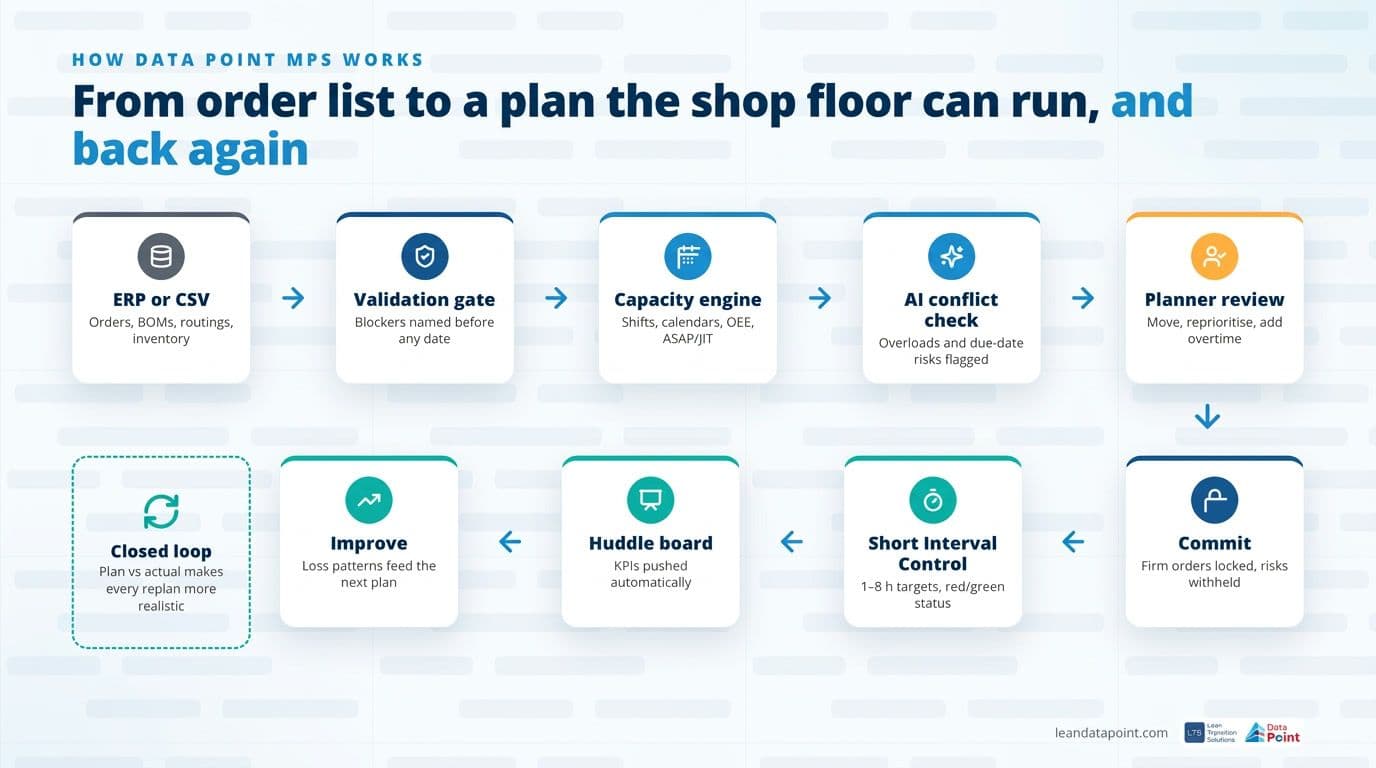
Data Point Master Production Scheduling Software turns customer orders into a capacity-feasible production plan. Then it keeps that plan honest on the shop floor.
Most APS tools treat scheduling as the finish line. Data Point treats it as the starting point. The master schedule, the shift-level targets and the daily huddle KPIs all live in one connected platform.
What it does differently Master data validation gate. Every order is checked against material master, BOM, routing, cycle time, work centres, shifts, OEE and inventory before a date is calculated. Blockers are named. No false promises.
- Capacity the engine can trust. One-click shift and calendar generation across a 26-week horizon, covering breaks, holidays, planned downtime and exceptions.
- A planning engine built for operational reality. Forward (ASAP) and backward (JIT) scheduling, multi-level BOM dependency sequencing, routing-based durations, OEE-aware capacity and order splitting when required.
- One view of capacity, load and delivery risk. A live capacity grid shows booked versus available hours by line, day and shift. Drag-and-drop replanning shows the consequence of every change before the shop floor feels it.
- Conflicts in front of the planner, not the shop floor. Blockers (missing routing, invalid work centre) are separated from warnings (overload, due-date miss, material shortage, firm-work collision). Recommended actions follow: move the order, change priority, add overtime or withhold the risk.
- Automation proposes. The planner decides. Proposal, review and commit, with locks on firm orders, a full audit trail and optional auto-commit for clean runs. Only executable orders reach the shop floor. Problem orders stay visible but are not published.
- Site planning policy. Scheduling direction, priority rules, commit policy and late-order policy are agreed once per site and applied consistently.
Where Data Point pulls ahead: closing the loop
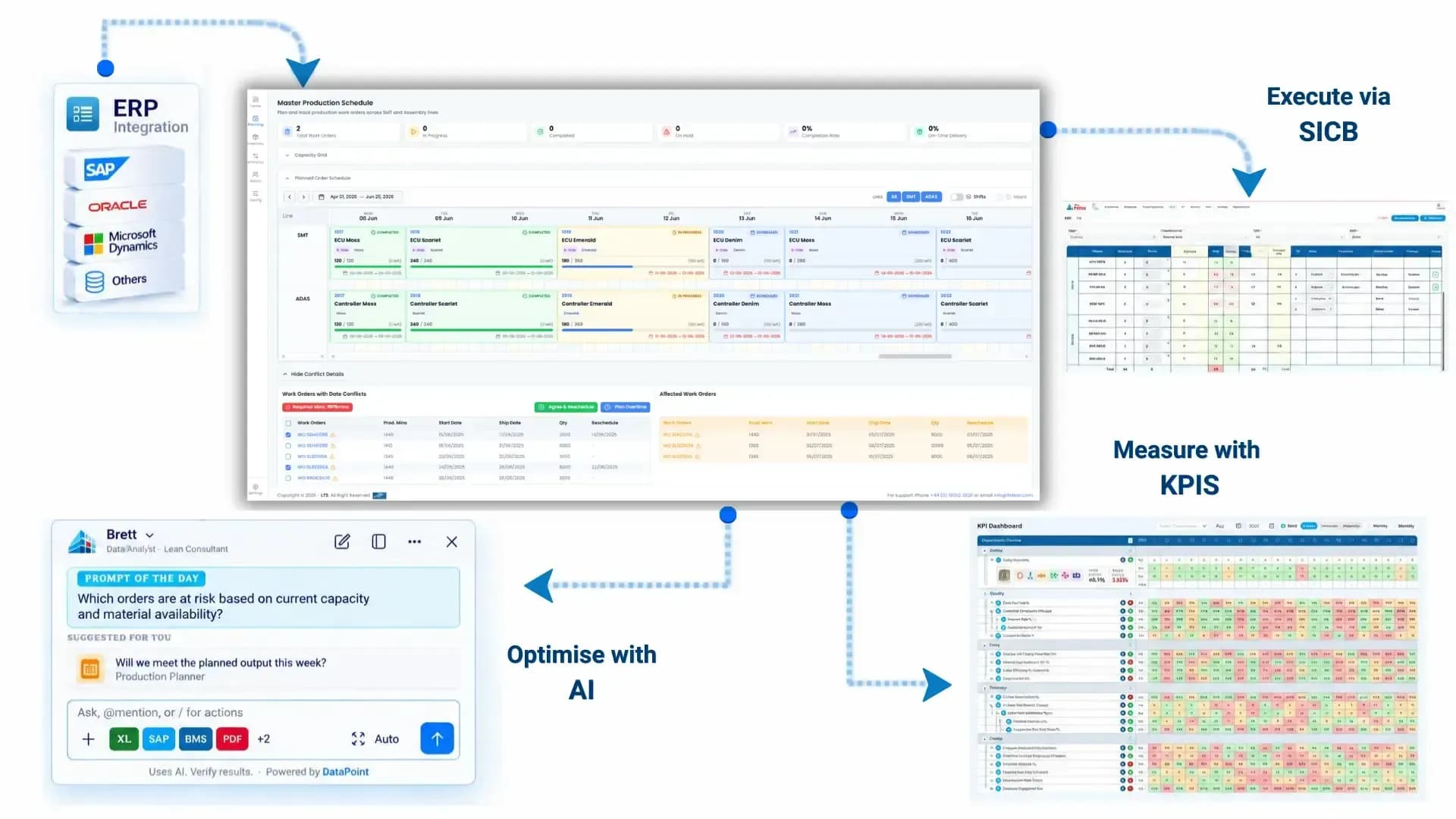
The committed plan becomes the input for the Short Interval Control Board (SICB). Shift supervisors get 1, 2, 4 or 8-hour targets with red and green status. Breakdown reasons, scrap and downtime are captured at source. KPIs flow automatically to the digital huddle board, so nobody compiles a production report by hand.
Plan versus actual, completions, good units and OEE feed back into the schedule. The next plan is more realistic than the last one.
AI that understands your operation:
Data Point AI flags capacity clashes, overloads and due-date risks before the planner commits. It supports conflict resolution and surfaces recurring loss patterns from shift data. It is an AI that understands your full lean and operational context, not a generic assistant.
ERP and integration:
Data Point MPS reads production orders from your ERP and keeps it as the system of record. Teams can start with a CSV or Excel upload, then connect ERP, MES and LIMS through APIs when ready. Sync monitoring keeps master data quality visible.
Best for:
Mid-to-large manufacturers in automotive, pharma, aerospace, food and beverage and industrial manufacturing that want planning, execution and lean daily management connected. It is especially strong in regulated environments, where audit trails and controlled release matter.
Not ideal for:
Companies looking only for network-wide supply chain optimisation across suppliers and distribution, or very small job shops that need a free, standalone Gantt tool.
Pricing: Year 1 covers implementation plus subscription. From Year 2 onwards, subscription only. Most teams run a live schedule within days of onboarding.
Cut planning admin. Hit more of your plan.
Manufacturers using Data Point MPS report faster conflict resolution and higher plan adherence within the first year.2. Siemens Opcenter APS: Deep Optimisation for Complex Sequencing
Siemens Opcenter APS (formerly Preactor) is one of the most established names in APS software. It covers long and mid-term planning, master schedule proposals and detailed order-based scheduling.
Key strengths
- Multi-constraint scheduling across resources, materials and ranked orders.
- Sequence-dependent changeovers, campaigning and changeover minimisation rules.
- Tiered editions, from Standard to Ultimate, with a developer licence for custom rules.
- Free Preactor Express edition to get started.
- Part of the wider Siemens manufacturing operations portfolio.
Watch-outs: Advanced tiers need specialist configuration. Shop floor execution and lean daily management sit in separate Siemens products, so connecting the plan to shift-level targets usually means a wider programme.
Best for: Large plants with complex sequencing rules and in-house scheduling expertise.
3. PlanetTogether APS: ERP-Friendly Scheduling for the Mid-Market
PlanetTogether positions itself as an APS layer that complements the ERP rather than replacing it.
Key strengths
- Finite capacity scheduling across machines, labour, materials, setups and changeovers.
- Scenario planning to compare options before promising dates.
- Integrations with SAP, Microsoft Dynamics, Oracle, NetSuite, Infor, Epicor and QAD, plus MES connections.
- Typical integration timeline of four to eight weeks, according to the vendor.
Watch-outs: Strong on the schedule, lighter on what happens during the shift. Short interval control and huddle-level KPIs depend on other systems.
Best for: Mid-sized manufacturers that want APS on top of an established ERP.
4. DELMIA Ortems: Virtual-Twin Planning from Dassault Systèmes
DELMIA Ortems synchronises demand, supply and production across long, mid and short-term horizons using a virtual twin of machines, materials and workforce.
Key strengths
- Finite capacity optimisation with multi-level BOM synchronisation.
- What-if simulation and rapid rescheduling after disruptions.
- AI-powered optimisation and DELMIA Scheduling Intelligence for plan versus actual deviation analysis.
- Modular: Manufacturing Planner, Production Scheduler and Synchronised Requirements Planner.
Watch-outs: A powerful but substantial implementation. Best value comes when you are already invested in the Dassault Systèmes ecosystem.
Best for: Multi-line manufacturers that want advanced optimisation and simulation depth.
5. SkyPlanner APS: Cloud-First Automated Scheduling
SkyPlanner is a cloud AI production scheduling software platform built around its Arcturus AI engine.
Key strengths
- Automated finite capacity scheduling across machines, workforce, shift calendars and setup times.
- Autopilot rescheduling when shop floor conditions change.
- Browser-based shop floor app for operators to log times and quantities.
- Connectors for Dynamics 365, Business Central, SAP S/4HANA Cloud and Odoo, plus a REST API.
- Transparent pricing, from €199 per month for five workstations.
Watch-outs: Focused on automated scheduling. Master data validation, structured planner commit governance and lean daily management integration are not part of its core positioning. Enterprise multi-site governance is lighter.
Best for: Small and mid-sized manufacturers that want fast, automated scheduling with minimal setup.
6. Asprova APS: Detailed Sequencing for High-Mix Production
Asprova is a long-standing finite capacity scheduler, with strong adoption in automotive and high-mix manufacturing.
Key strengths
- Detailed scheduling that respects calendars, setups and sequencing rules.
- What-if analysis and capacity planning.
- Broad functional scope, including MRP and MES modules.
- High user ratings on review platforms.
Watch-outs: Windows-based and on-premise. Modern cloud collaboration and shift-level visibility are less prominent.
Best for: High-mix manufacturers that need precise sequencing and have planning specialists in-house.
7. frePPLe: Open-Source Planning for Budget-Conscious Teams
frePPLe is an open-source planning and scheduling tool, best known for its tight integration with Odoo.
Key strengths
- Finite capacity planning and scheduling.
- Free community edition, with paid cloud plans.
- Native Odoo connector and flexible data model.
Watch-outs: Needs technical capacity to configure and maintain. Shop floor execution, governance and lean daily management are outside its core scope.
Best for: Smaller teams, especially Odoo users, who want finite capacity planning at low cost.
How Do You Choose the Right Production Scheduling Software?
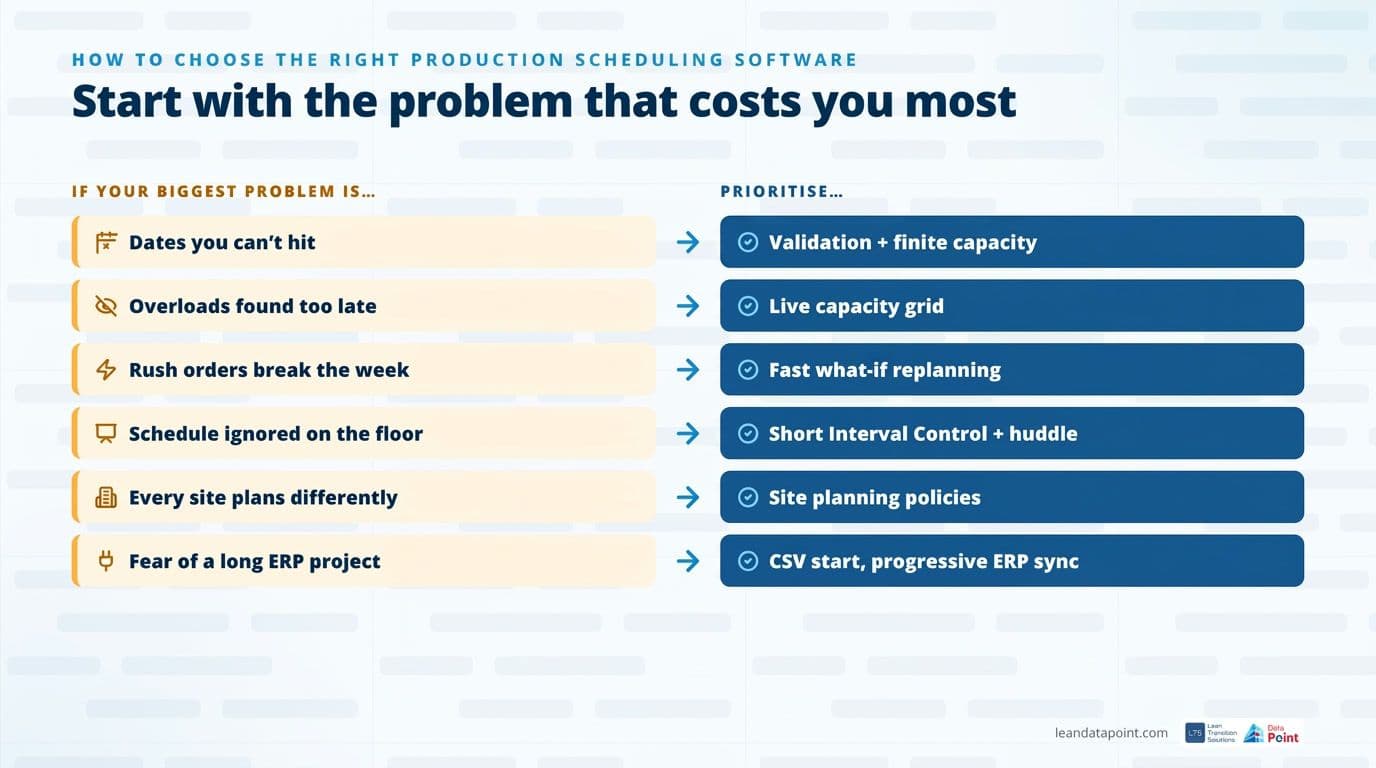
Start with the problem that costs you the most. Then match the tool to it.
A practical way to evaluate. Don’t judge any tool on demo data. Take your worst production week from last quarter. Run it through each shortlisted system. Count how many manual touches it takes to get from order intake to a committed plan. Then ask one question: who owns the plan after go-live?
Roll out in phases. The fastest wins come from a focused scope:
- Discover. Agree demand sources, capacity and priorities for one value stream.
- Configure. Set up materials, routings, BOMs, shift calendars and planning policies.
- Validate. Test the plan with your planners against real orders.
- Embed. Go live, connect Short Interval Control, then extend to more lines and sites.
Still finding overloads on Thursday?
Put conflicts in front of the planner, not the shop floor.Where Scheduling Fits: Plan, Execute, Assure, Improve
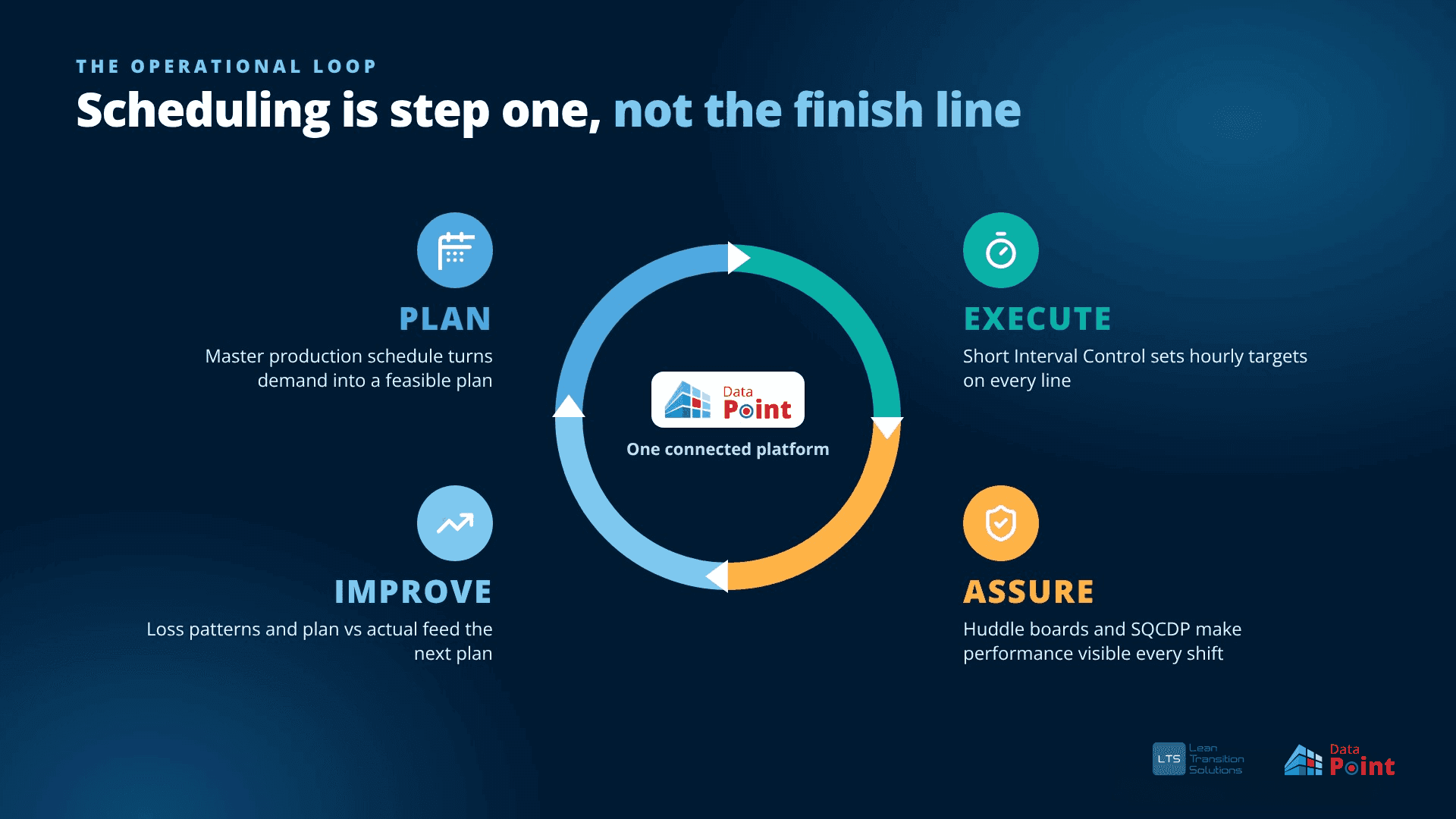
The best production scheduling software is not an island. It is the first step in a closed operational loop.
- PLAN. The master production schedule turns demand into a feasible plan.
- EXECUTE. Short Interval Control turns that plan into hourly targets on every line.
- ASSURE. Huddle boards and frameworks such as SQCDP make performance visible every shift.
- IMPROVE. Loss patterns, downtime reasons and plan versus actual data feed continuous improvement and the next plan.
Data Point is built around this loop. The MPS module connects with lean daily management, OEE, problem solving and strategy deployment in one connected operational intelligence platform, from global dashboards down to frontline teams.
In India’s fast-growing pharma manufacturing sector, this matters even more. Plants supplying UK and US markets need schedules that survive regulatory checks and audits. Governed commits and a full audit trail turn the schedule into a controlled record, not a spreadsheet anyone can overwrite.
Summary: Which Production Scheduling Software Should You Choose?
The best production scheduling software isn’t the one with the most features. It’s the one that turns your real orders and real capacity into a plan your shop floor can deliver, week after week. Data Point MPS comes out ahead because it connects master scheduling, shift-level execution and daily performance in one platform. Test it the practical way: run your toughest production week through it and see how quickly you get a plan you can trust.
FAQs
1. What is the best production scheduling software for manufacturing?
It depends on what breaks your plan today. If dates slip because overloads appear late and the shop floor works from a different picture, Data Point MPS is the strongest fit because it connects the master schedule to Short Interval Control and huddle KPIs. For pure optimisation depth, Siemens Opcenter APS and DELMIA Ortems are common choices.
2. Do I need to replace my ERP to use production scheduling software?
No. Modern scheduling tools sit alongside your ERP. The ERP keeps owning orders, materials and MRP. The scheduling layer turns that demand into a finite capacity plan and can sync back once integrated.
3. What is the difference between MRP and a master production schedule?
MRP calculates which materials you need and when. A master production schedule decides what you will produce, in what quantity and in which period. MPS drives MRP, not the other way round.
4. What is finite capacity scheduling?
Finite capacity scheduling only loads work up to the real hours available on each machine, line or shift. It accounts for breaks, holidays, downtime and OEE. Infinite capacity planning ignores those limits, which is why so many plans look feasible but are not.
5. How long does it take to implement production scheduling software?
It varies widely. Enterprise APS projects can take months. Data Point MPS teams typically run a live schedule within days by starting with CSV or Excel uploads, then adding ERP integration progressively.
6. How much does production scheduling software cost?
Prices range from free open-source editions to enterprise licences. SkyPlanner publishes plans from €199 per month. Most enterprise tools, including Data Point MPS, Siemens and DELMIA, are quote-based. Data Point uses implementation plus subscription in Year 1, then subscription only.
7. What ROI can manufacturers expect from production scheduling software?
The biggest returns usually come from less planning admin, faster conflict resolution and better schedule adherence. Data Point publishes benchmarks of 40 to 60% less planning administration time and 50 to 70% faster schedule conflict resolution. Results depend on data quality and adoption.
8. Can production scheduling software handle multiple sites?
The better tools can. Look for site-level planning policies plus a leadership view of schedule adherence, capacity and performance across plants. This keeps every site planning consistently.
9. What is Short Interval Control in production scheduling?
Short Interval Control breaks the shift plan into short targets, usually every one to eight hours, and compares actual output against them. Deviations are visible during the shift, so supervisors can act before the day is lost.
10. Is production scheduling software suitable for regulated industries like pharma?
Yes, provided it supports controlled release and traceability. Features such as order firming, planner commit and a full audit trail of who changed what and when are essential in GMP environments.

Amer Jumah, Senior Lean Consultant
Amer is co-founder of Agile Solutions and a certified Six Sigma Black Belt, Lean Black Belt, and PMP, with over nine years of experience implementing Lean, Six Sigma, and Agile principles across diverse industries. He specialises in process optimisation, waste elimination, and delivering cost savings through organisational change.