How to use Pharmaceutical Manufacturing Software to ensure continuous improvement?
Last updated on : November 25, 2025
If you're steering operations in a pharmaceutical company, you're likely well aware of the mounting challenges in today’s industry. From navigating strict regulatory demands and managing complex production workflows to the constant push for greater efficiency and quality, the pressure is real. Relying on manual systems and outdated methods often leads to errors, delays, and compliance risks — all of which can affect productivity and patient safety. That’s where using a pharmaceutical manufacturing software makes a real difference. But how to use a Pharmaceutical Manufacturing Software?
By automating key processes, tracking pharma KPIs, improving traceability, and offering live insights, this technology helps streamline operations and drive continuous improvement across the board. In this guide, we’ll explore what pharma manufacturing software is, its core functions and types, why it’s essential, what to look for when choosing a solution, and how to implement it effectively. We’ll also cover how to prepare your team beforehand, train them after rollout, test and validate the system, and finally, how LTS Data Point stands out as a powerful tool — with real-world examples to show its impact.
See why LTS Data Point pharma manufacturing software solutions is the best choice
Maximising results with pharma manufacturing software
By using pharmaceutical manufacturing software like LTS Data Point effectively, teams can streamline processes, ensure regulatory accuracy, reduce errors, and gain real-time visibility across production. Here's how to use it in a practical, results-focused way.
Preparing your team and infrastructure: What all should you do?
Executing a pharma manufacturing software solution requires both people and systems to be ready. Proper training, hardware setup, and change management assure a smooth and compliant transition.
1.Team training
- Role-based sessions: Train staff by function – production, QA/QC, supply chain, and IT.
- Compliance focus: Support GMP, data integrity, and e-signature practices.
- Hands-on practice: Utilise test environments for real workflow simulations.
- Super users: Develop in-house experts to support others post go live.
- Continuous learning: Refresh training after updates or new rules.
2. Infrastructure readiness
- Hardware and network: Verify servers, scanners, printers, and connectivity meets system specifications.
- Data security: Establish access controls, backups and validation per 21 CFR Part 11 / CDSCO standards.
- Integration: Assure compatibility with existing systems (LIMS, MES, SCADA).
- Scalability: Plan for storage and system growth as data volumes increase.
3. Change management
- Early communication: Clarify the purpose and benefits of change.
- Leadership support: Drive adoption through management involvement.
- User involvement: Engage teams in testing and feedback.
- Phased rollout: Begin small, refine, then expand.
- Feedback and recognition: Motivate input and celebrate quick adopters
Want to know more about LTS Data Point pharma manufacturing software?
Data migration and system integration: How to transfer existing data and integrate with other systems?
What may seem complicated to the employees will be on how to effectively transition from their old methods to their new methods. Furthermore, transferring already existing data and integrating with other systems seems like another complicated one. Let's learn how to do both one by one.
1. Data migration
- Assessment and cleansing: Begin by auditing existing data – materials, batch histories, suppliers, quality records – and eliminate duplicates or outdated entries.
- Data mapping: Align old data fields with the new system’s structure (e.g., lot numbers, equipment IDs, QC results).
- Validation: Trial migrated data in a sandbox environment to verify accuracy, completeness, and regulatory compliance.
- Phased migration: Move critical data first (master data, quality records), followed by secondary datasets.
- Documentation: Maintain detailed records of migration steps for audit and validation purposes.
2. System integration
- ERP integration: Sync financials, gains, and inventory data for unified visibility and cost tracking.
- MES: Connect production planning, batch scheduling, and shop-floor data capture to improve process control.
- LIMS and SCADA: Link laboratory and equipment systems for automatic data capture, minimising manual entry errors.
- APIs and middleware: Use secure, validated APIs or middleware to allow real-time data exchange between systems.
- Data security and compliance: Ensure integrations comply with 21 CFR Part 11 and sustain data integrity through audit trails and access controls.
How to customise the software according to your needs?
Even though every pharma company looks alike from the outside, they work differently internally. Customising your pharmaceutical manufacturing software according to your industrial needs will assure that it aligns with your workflows, KPIs, and compliance goals, instead of demanding teams to adapt to rigid templates.
1.Tailoring dashboards and KPIs
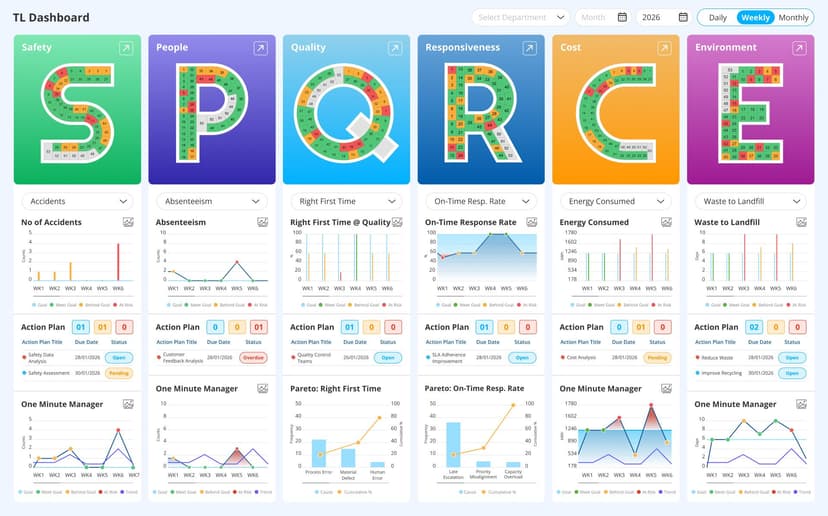
- Role-based dashboards: Frame views for production, QA, maintenance, and management – each showing quality pharma KPIs such as environmental monitoring, batch record review and approval status, open deviations and investigations, critical equipment calibration and maintenance status, in process control results and trends, CAPA effectiveness, and complaints per product.
- Real-time tracking: Use live dashboards for monitoring deviations, CAPA status, and equipment usage.
- Regulatory metrics: Include compliance indicators like RFT rate, batch rejection trends, and deviation closure times.
- Visual simplicity: Keep dashboards intuitive – colour codes, alerts, and trend graphs assist teams in acting quickly.
2. Adapting workflows to match operations
- Process mapping: Record current actions (batch approval, QC sampling, deviation handling) and align them with software modules.
- Configuration, not over-customisation: Modify workflows through configuration settings rather than heavy coding – this sustains system stability and compliance validation.
- Approval hierarchies: Set up digital approval chains and e-signature levels based on SOPs and GMP standards.
- Automation: Automate recurring tasks like batch record generation, expiry alerts, and CAPA notifications to reduce manual effort.
3. Continuous improvement and feedback
- Pilot and refine: Run pilot phases to test custom dashboards and workflows; adjust based on operator and QA feedback.
- Evolve with needs: As operations grow or new regulations emerge, periodically review and update system configurations
Discover your customisable pharmaceutical management software with LTS Data Point
Testing and validation: Verification of the software efficiency
1. Pilot runs and testing
- Sandbox environment: Start with a test setup replicating real production information to analyse workflows and data accuracy.
- Pilot projects: Run limited, real-world pilot batches to analyse usability, data capture, and reporting under actual operating conditions.
- Functional testing: Verify core features such as batch tracking, QC workflows, and e-signatures.
- User Acceptance Testing (UAT): Involve end-users from production, QA, and IT to validate usability and ensure the system meets operational needs.
- Issue resolution: Log findings, correct errors, and re-test before moving to full rollout.
2. Validation protocols
- Validation planning: Develop a Validation Master Plan (VMP) outlining scope, responsibilities, and timelines.
- Installation Qualification (IQ): Verifies correct system setup and arrangement.
- Operational Qualification (OQ): Assures that all processes operate as intended.
- Performance Qualification (PQ): Confirms the system performs steadily in real-time production conditions.
- Documentation: Maintain detailed validation records for regulatory audits (21 CFR Part 11, GAMP 5, or CDSCO compliance).
- Change control: Any updates post-validation must follow recorded change control and re-validation procedures.
After testing and validating, it is important to launch the pharma manufacturing software into action. This is where you get to know more about the software and how efficiently it helps you run your business smoothly. Let's see how that can be done.
Launching the software: Pharma manufacturing software on the run
1. Go-Live preparation
- Final readiness check: Verify that all validations, data migrations, and user trainings are complete.
- Phased rollout: Begin with one department, product line, or plant to reduce risk before expanding organisation wide.
- Support team on-standby: Keep technical and process experts available to resolve issues quickly.
- Communication plan: Inform all stakeholders about the go-live date, responsibilities, and escalation process
2. Initial monitoring and stabilisation
- Performance tracking: Track system speed, data accuracy, and integration performance with ERP, MES, or LIMS.
- Error logs and alerts: Analyse exceptions or failed transactions daily to address issues quickly.
- User feedback: Gather input from operators and QA teams to spot usability or workflow concerns.
- Early KPIs: Monitor short-term indicators such as batch release time, deviation rate, and data entry accuracy.
- Continuous support: Maintain heightened vendor and IT support during the first 4–6 weeks for quick troubleshooting.
A well-planned go-live and tracking phase assures stability, user confidence, and compliance from day one. Careful oversight during this stage sets the foundation for long-term efficiency and system reliability in pharma manufacturing.
Want to know more about your ideal Pharma Management Software?
How to train and support?
Training your team is never a one-time process. It should be continued regularly, and care must be taken to ensure they are aware of the ongoing changes and updates. Just as how you offered training before implementing the software, training should be provided after implementation as well. This ensures that your team stays prepared all the time and your business runs smoothly.
1. Ongoing Training
- Refresher sessions: Conduct periodic training to strengthen GMP practices, system updates, and new features.
- Role-based learning: Offer tailored training for different functions – production, QA/QC, supply chain, and IT.
- New employee onboarding: Integrate software training into induction programs to assure consistency.
- Performance tracking: Monitor user proficiency and detect areas needing additional guidance.
- Knowledge sharing: Motivate internal super users to mentor others and lead quick problem-solving sessions.
2. Support systems
- Helpdesk and ticketing: Build a dedicated support channel for quick resolution of technical or process-related issues.
- Vendor support: Sustain active communication with the software provider for bug fixes, patches, and upgrades.
- Service-level agreements (SLAs): Describe response times and escalation protocols to assure timely assistance.
- Documentation access: Keep user manuals, SOPs, and troubleshooting guides readily available.
- Feedback loop: Use user feedback to drive improvements in both system layout and training content.
If this regular training is done effectively, tracking their progress and assigning further training sessions to ensure staff growth and proper running of the software.
Let's see a real-world example where PCI Pharma, one of the top pharma companies utilised pharma manufacturing software by LTS Data Point.
Real-world example: How PCI Pharma’s Bridgend facility tackled their challenges with LTS Data Point pharmaceutical manufacturing software?
At PCI Pharma’s Bridgend facility, traditional paper-based and spreadsheet methods for daily stand-up meetings and tracking metrics across Safety, Quality, Delivery, Cost and People (SQDCP) were replaced by a fully digital balanced scorecard using Data Point. This shift enabled real-time visibility of KPIs, streamlined communication of strategic goals, and aligned day-to-day operations more tightly with the site’s vision. As a result, the site achieved clearer process-alignment, improved data capture and analysis, better-informed action-planning, and enhanced continuous improvement capability across all key operational domains.
For more details, read our blog: Streamlining Continuous Improvement | Data Point | PCI Pharma
It’s time to bring your vision alive
FAQs
1. What is pharmaceutical manufacturing software?
Pharma manufacturing software is a digital solution designed to manage, monitor, and optimise the production processes in the pharmaceutical industry. It helps ensure compliance with regulations, improves quality control, and streamlines operations through automation and real-time data tracking.
2. Why is it important to implement this software in pharma companies?
Implementing this software helps reduce manual errors, ensures regulatory compliance (like GMP and 21 CFR Part 11), improves traceability, and boosts overall efficiency. It also supports continuous improvement by providing insights into key performance indicators (KPIs) and operational bottlenecks.
3. How can you choose the right pharma manufacturing software?
Look for features such as compliance support, electronic batch records, quality and inventory management, scalability, integration capabilities (with ERP, LIMS, MES), and strong vendor support. It’s also important to consider your company’s specific needs and future growth plans.
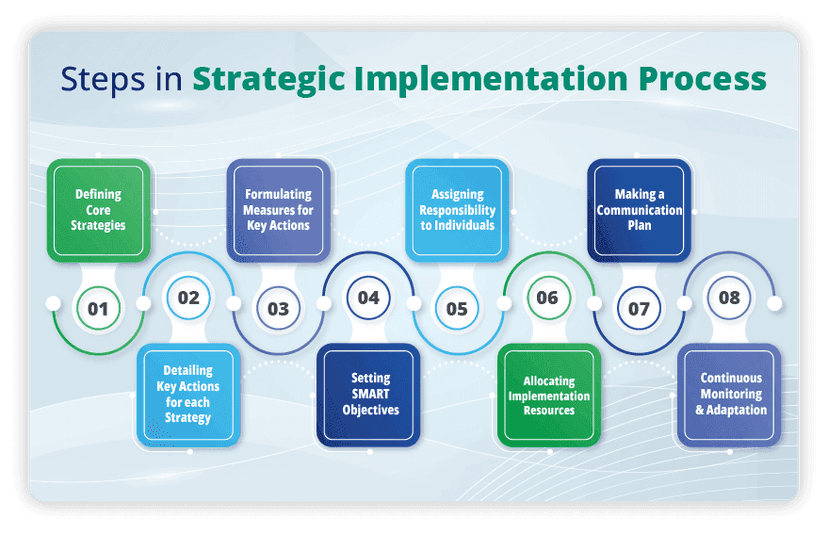
4.What are the key steps in implementing the software?
- Setting clear goals
- Selecting the right software
- Preparing your team and infrastructure
- Migrating data and integrating systems
- Customising workflows and dashboards
- Testing and validating the system
- Going live and monitoring performance
- Providing ongoing training and support
5. How long does implementation usually take?
The timeline can vary depending on the size of the organisation, the complexity of existing systems, and the level of customisation required. On average, implementation can take anywhere from a few weeks to several months.
6. Can the software be customised to fit your process?
Yes, most pharma manufacturing software solutions offer configurable dashboards, workflows, and approval hierarchies. This ensures the system aligns with your existing processes rather than forcing you to adapt to rigid templates.
7.How do you measure the success of the software after implementation?
Success can be measured through improved KPIs such as reduced batch release time, fewer deviations, better compliance scores, and increased operational efficiency. Many platforms offer built-in dashboards and reporting tools to help track these metrics.
8. What happens if you face issues after going live?
A good implementation plan includes a support system with vendor assistance, internal super users, and a helpdesk. It’s also important to have a feedback loop in place to continuously improve the system based on user input.
9.Is this software suitable for mid-sized pharma companies?
Absolutely. Many solutions are scalable and offer cloud-based options, making them accessible and cost-effective for smaller organisations. It’s all about choosing a solution that fits your current needs and can grow with your business.

Amer Jumah, Senior Lean Consultant
Amer is co-founder of Agile Solutions and a certified Six Sigma Black Belt, Lean Black Belt, and PMP, with over nine years of experience implementing Lean, Six Sigma, and Agile principles across diverse industries. He specialises in process optimisation, waste elimination, and delivering cost savings through organisational change.