From Correction to Prevention: How CAPA Software Dashboards Drive Continuous Improvement
Last updated on : November 11, 2025
In today’s fast-moving and quality-driven industries, it is important to guarantee consistent compliance, and continuous improvement is more serious than ever. Corrective and Preventive Action (CAPA) management software plays a vital role in helping organisations identify, address, and prevent issues that could impact product quality, safety, or regulatory compliance. By automating and streamlining the CAPA process, this software equips teams to respond swiftly to discrepancies, analyse root causes effectively, and execute long-term solutions. This blog further explores what CAPA management software is, how it functions, and why it has become a crucial tool for businesses committed to operational excellence.
Finding it hard to ensure continuous improvement in your workplace?
What is CAPA?
The acronym CAPA stands for Corrective and Preventive Action. CAPA is a structured approach used in Quality Management Systems (QMS) to identify, inspect, and put an end to causes of issues (discrepancies) and prevent their recurrence or occurrence.
It is one of the most vital components of continuous improvement and regulatory compliance frameworks such as:
- ISO 9001 (Quality Management Systems)
- ISO 13485 (Medical Devices)
- FDA 21 CFR 820.100 (Quality System Regulation for Medical Devices)
- Good Manufacturing Practices (GMP)
In spirit:
CAPA = Systematic problem-solving + Risk-based prevention.
Let's split this open and investigate it in detail.
Breaking down CAPA: What it means
The acronym CAPA revolves around its core components – Corrective Action and Preventive Action.
1. Corrective Action (CA):
- Goal: Resolve the root cause of an identified problem or discrepancy.
- When used: After an issue has already happened.
- Example: If a batch of faulty products is found due to an inaccurate machine, the corrective action would be to reset the machine and preserve the operator.
2. Preventive Action (PA):
- Goal: Identify potential problems and take proactive measures to prevent them.
- When used: Before the issue happens.
- Example: Setting up regular maintenance schedules or automated computation alerts to avoid future equipment errors.
Simply getting awareness on the two pillars of CAPA process is not enough. It's important to identify what CAPA process steps are. Let's see some of the CAPA process steps in detail.
What are CAPA process steps?
- Identify the problem: Detect a discrepancy, fault, or potential problem through audits, customer complaints, inspections, or performance data.
- Evaluate the problem: Analyse the intensity, impact, and urgency of the problem to determine whether a CAPA is necessary.
- Inspect root cause: Use root cause analysis tools – 5 Whys, Fishbone Diagram – to find out why the issue occurred in the first place.
- Develop an action plan: Create a detailed plan that defines what corrective, and preventive actions will be taken, who is responsible and when.
- Execute actions: Implement the corrective and preventive actions as per the plan – resolve the immediate issue and address the root cause.
- Verify effectiveness: Examine whether the actions taken successfully fixed the issue and prevented the recurrence through audits, data reviews, or testing.
- Document and close: Note down all the findings, actions, and results in the CAPA log or system. Officially close the CAPA once the effectiveness is verified.
Now that you have got an idea about what CAPA process is and what steps to follow, let’s see what CAPA management software is and how it makes the CAPA process easy to tackle.
Take control of quality before it controls you
What is a CAPA software?
CAPA management software indicates digital tools designed to automate and manage the full cycle of corrective and preventive actions (CAPAs) in a quality management setting. These are mostly common in governed industries – manufacturing, medical devices, pharmaceuticals – to help meet standards and managerial requirements.
Key Features: What makes CAPA software unique?
Some of the key features of CAPA software are as follows:
- Issue capture and initiation: Enables users to log discrepancies, complaints, or deviations from audits or production, ensuring consistent issue logging and early problem detection.
- Workflow automation and task management: Automates task assignments, approvals, alerts, and escalations, allowing speeding up of resolution and maintaining accountability.
- Root cause analysis tools: Supports organised inspection methods like 5 Whys or Fishbone Diagrams, enabling industries to find the real cause to prevent recurrence.
- Action planning and execution: Tracks corrective and preventive actions, responsibilities, and deadlines, ensuring issues are addressed systematically.
- Verification and closure: Justifies that the actions taken are effective before closing CAPA which prevents premature closure and ensures true resolution.
- Integration with QMS and other modules: Connects with audits, training, supplier management, and change control offering transparency across quality processes.
- Documenting and dashboards: Real-time dashboards for CAPA status, overdue items, and trend analysis which help improve decision-making and encourages continuous improvement.
- Audit trail and compliance: Tracks every change along with timestamps and electronic signatures like FDA, ISO etc., ensuring full traceability and regulatory compliance.
- Risk assessment and prioritisation: Examines risk levels to focus on high-impact problems helping allocate resources efficiently.
- Customisation and mobility: Adaptable workflows, user roles, and mobile access for remote teams which help increase user adoption and flexibility.
Benefits: Why organisations use CAPA software?
- Improve quality and reduce defects: CAPA software helps recognise, correct, and prevent quality issues by addressing their root causes. This results in fewer defects, better product reliability, and higher customer satisfaction.
- Ensure regulatory compliance: Several industries (like pharmaceuticals, medical devices, manufacturing) require strict CAPA recording and traceability. CAPA management software ensures every step – from problem detection to verification – is auditable and compliant.
- Streamline and automate workflows: It automates task assignments, approvals, reminders, and escalations, reducing manual follow-up. This saves time, enhances efficiency, and ensures accountability.
- Strengthen root cause analysis: With built-in tools like the 5 Whys or Fishbone Diagrams, teams can easily inspect and eliminate the true cause of problems. This leads to permanent problem-solving instead of temporary stitches.
- Improve visibility and control: CAPA dashboards and reports provide live visibility into open problems, trends, and risks across departments or sites. This makes it easy for managers to make data-driven decisions and monitor progress effectively.
- Promote continuous improvement: By analysing patterns and repeating problems, CAPA software encourages a culture of continuous improvement. Organisations can proactively prevent issues and enhance overall performance.
- Improves collaboration and communication: Centralised CAPA systems make it easy for multiple teams, suppliers, or locations to collaborate. This enhances coordination and ensures everyone works from the same data.
- Reduce costs and operational risks: Lesser defects and faster resolutions mean lower rework, scrap, and warranty costs. This helps minimise business risk and protects brand reputation.
Choose the best CAPA software in town
Real-world example: CAPA software in action
Let's take an example of a global pharmaceutical company that produces sterile injectable drugs. During an internal audit, multiple batches were showing particulate contamination in the final vials. This issue posed a risk of product recall, regulatory violations, and potential FDA warnings.
This pharmaceutical company utilised CAPA software in the following manner:
- Identification of issue: This deviation was logged in the company’s digital QMS which automatically triggered a CAPA record. The software then linked the problem to the set of batch numbers, production line, and operators involved.
- Root cause analysis: The quality team identified the root cause as worn-out filters in the sterile filtration unit and inadequate inspection frequency by using root cause analysis tools like Fishbone Diagrams and 5 Whys. Supporting evidence such as lab reports, photos and maintenance logs were attached directly to the CAPA record.
- Corrective action: Filters in the affected units were immediately replaced, contaminated batches were quarantined and disposed securely, and maintenance staff on filtration system checks were retrained.
- Preventive action: CAPA software created automated reminders for scheduled filter inspections every 7 days, updated the sterile filtration SOP to require dual-operator verification, and linked actions to the training management module to ensure staff compliance.
- Verification and closure: Quality control used trending data from the CAPA dashboard to confirm zero contamination incidents in subsequent 10 production cycles, and then formally closed after Q&A review and electronic approval.
- Continuous improvement: Data from this CAPA was analysed for patterns across production sites. Seeing this effective, the company implemented similar preventive actions across all sterile lines worldwide.
The pharmaceutical company was able to bag good results such as:
- Contamination incidents reduced by 95% within two months
- Improved GMP compliance and audit readiness
- Reduced risk of FDA warning letters or product recalls
- Enhanced cross-department accountability and record traceability
CAPA management software aided the pharmaceutical company move from a reactive to proactive quality culture, securing regulatory compliance, product safety, and continuous improvement.
Sustaining Excellence: CAPA Software as a Catalyst for Improvement
CAPA management software makes operational functions of an organisation much easier and effective. This makes CAPA software widely chosen by several large companies.
CAPA tools contribute to long-term business excellence in the following ways:
- Encourages a culture of continuous improvement: Builds a continuous improvement mindset where every issue becomes an opportunity to improve quality and performance.
- Prevents recurrence and reduces waste: Leads to lower rework costs, fewer product recalls, and reduced operational waste, enhancing profitability.
- Strengthens quality and compliance: Guarantees regulatory confidence, smooth audits, and long-term trust with customers and executives.
- Improves decision-making through data: Leaders can make data-driven decisions that enhance processes and strategic planning.
- Creates cross-functional collaboration: Encourages collaboration, accountability, and knowledge sharing across the organisation.
- Encourages operational excellence: Fosters Lean, Six Sigma, and Total Quality Management (TQM) principles – all hallmarks of business excellence.
- Preserves brand reputation and customer trust: A strong CAPA process shows that the organisation takes quality seriously, preserving its brand image.
- Supports long-term strategic growth: This alignment of quality, compliance, and performance is key to achieving long-term business excellence.
In short, CAPA tools modify short-term problem-solving into a long-term strategic advantage – nurturing continuous improvement, compliance, efficiency, and customer trust, which are the core areas of business excellence.
Are you still doubting whether you need a CAPA software or not?
LTS Data Point CAPA software: Your easy choice
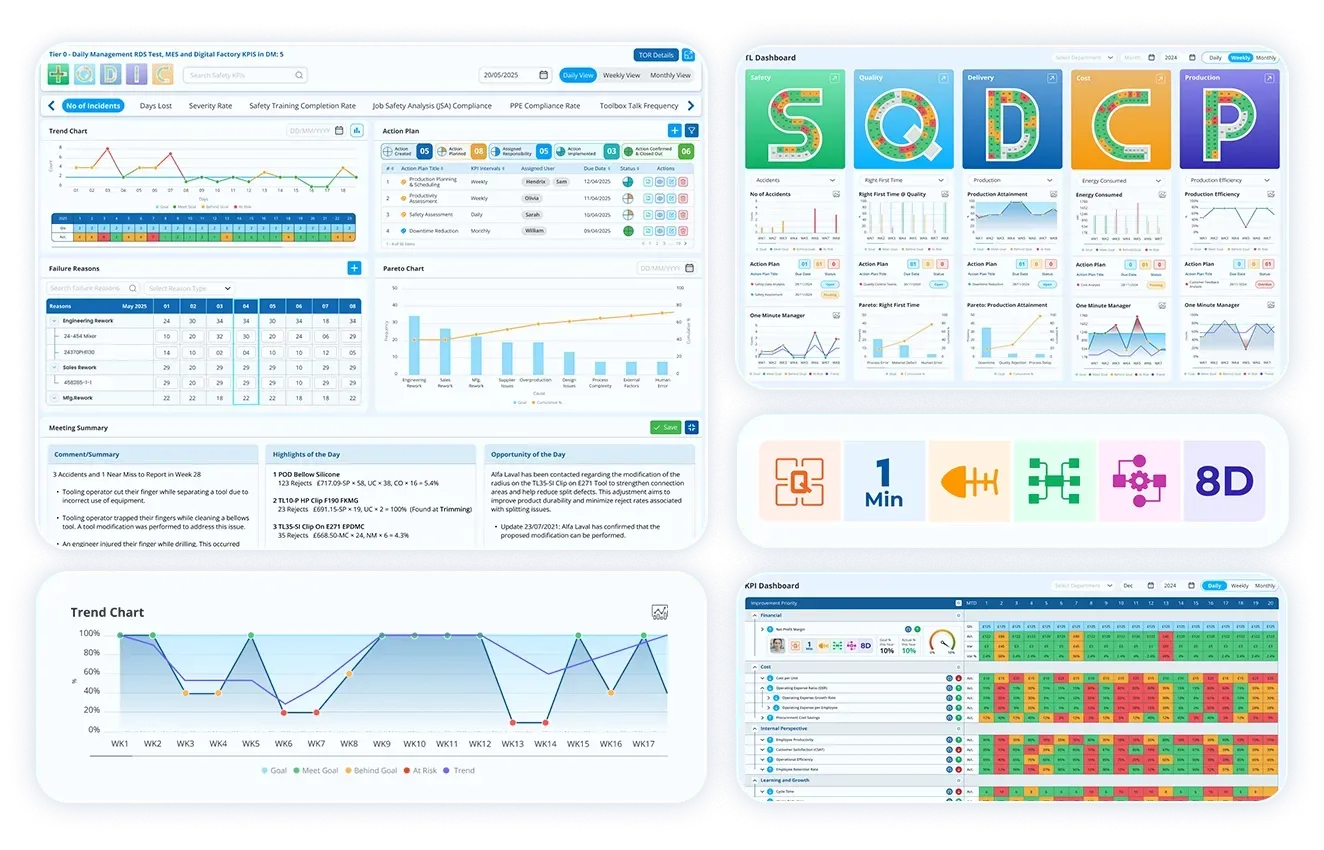
When it comes to choosing CAPA management software that truly delivers results, LTS Data Point rises above the rest. It’s not just a tool—it’s a strategic partner in your journey toward quality excellence. Designed to simplify complex CAPA workflows, LTS Data Point empowers organisations to act faster, smarter, and more confidently. With its intuitive interface, powerful automation, and seamless integration with quality systems, it transforms reactive problem-solving into proactive improvement. If you're serious about reducing risks, boosting compliance, and driving continuous growth, LTS Data Point is the smart, future-ready choice.
LTS Data Point CAPA solution guides teams through a structured process to uncover root causes, apply corrective strategies, and proactively eliminate recurring issues—driving long-term operational excellence.
This is exactly why you should choose LTS Data Point’s CAPA tool:
Detecting KPI deviations
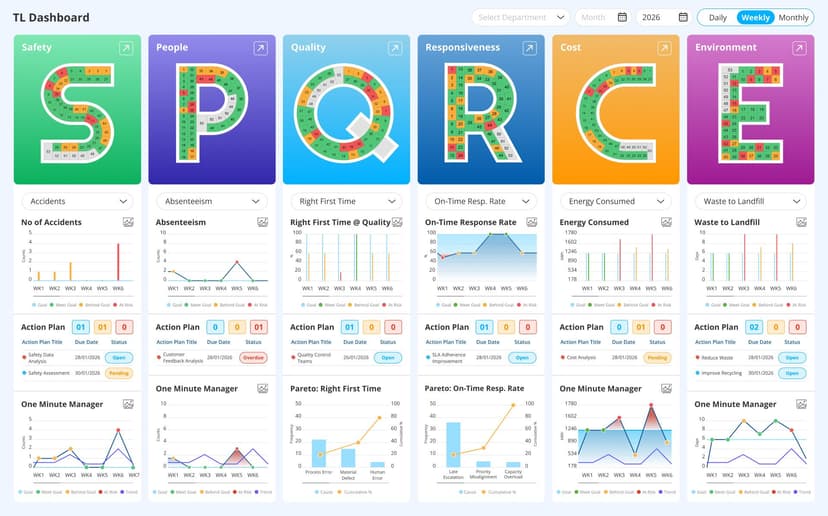
- Live KPI deviation tracking with interactive trend graphs: Instantly monitor performance metrics and detect anomalies as they occur.
- Quad Charts for combined visual and narrative insights: Present data in a format that blends graphical summaries with contextual explanations.
- Target vs actual performance dashboards: Quickly compare expected outcomes with real-time results to identify gaps.
- Visual scorecards and digital huddle boards: Use colour-coded indicators and collaborative boards to highlight and address issues immediately.
Root cause analysis
- Dynamic Fishbone (Ishikawa) diagrams for root cause mapping: Visually explore contributing factors and uncover hidden issues with interactive cause-and-effect analysis.
- Pareto charts to spotlight recurring failure patterns: Prioritise the most impactful problems by identifying the vital few among the trivial many.
- Instant drill-down into failure trends: Access detailed insights with a single click to trace issue history and support data-driven decisions.
Rectify the root cause
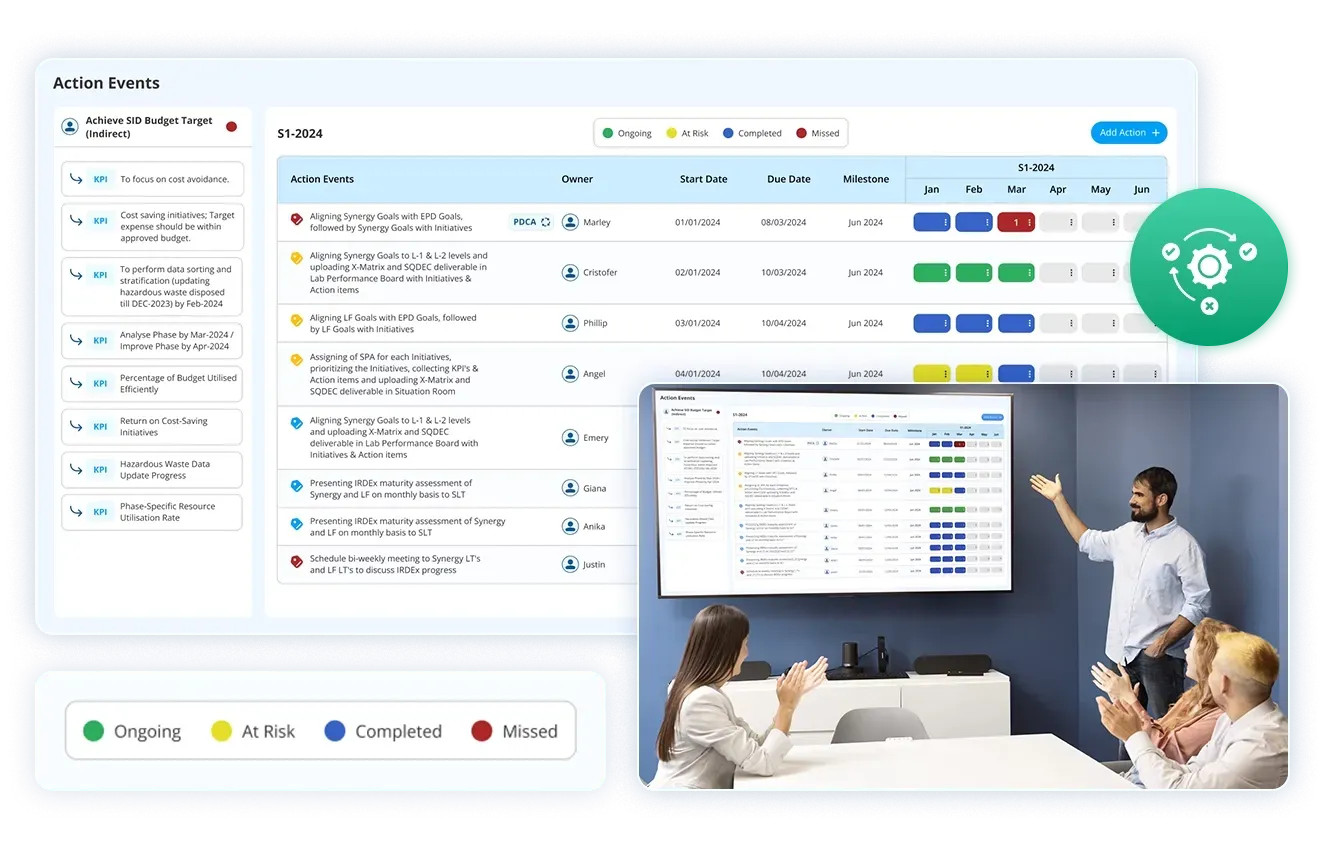
- Centralised corrective action log: Maintain a structured record of all resolutions with full traceability and status tracking.
- Collaborative action planning: Assign owners, set deadlines, and monitor progress with real-time updates and accountability.
- Automated reminders and escalations: Ensure timely execution of corrective actions through smart follow-ups and alerts.
End recurrence
- Lessons learnt documentation: Capture insights from resolved issues to prevent recurrence and strengthen future processes.
- Preventive action planning with accountability: Define proactive measures with clear ownership, timelines, and follow-through.
- Structured CAPA review sessions: Facilitate regular evaluations to identify improvement opportunities and reinforce quality culture.
Ensure continuous improvement
- Live KPI dashboards for performance tracking: Monitor progress in real time with visual indicators that highlight deviations instantly.
- Automated performance reporting: Generate timely reports to evaluate the effectiveness of corrective and preventive actions.
- Continuous monitoring with smart alerts: Stay ahead of issues with custom notifications that flag anomalies as they occur.
In today’s fast-paced and regulated industries, CAPA management software is more than just a helpful tool—it’s essential. It helps businesses fix problems quickly, stop them from happening again, and improve how things are done overall. By automating tasks, improving teamwork, and making it easier to follow rules, CAPA software supports a culture of continuous improvement. Choosing a reliable solution like LTS Data Point means your organisation can stay ahead of issues, meet compliance needs, and build a stronger, more efficient future.
So, what are you waiting for?
FAQs
1. What does CAPA stands for?
CAPA stands for Corrective and Preventive Action. It is a structured approach used in quality management systems to identify, resolve, and prevent issues that could affect product quality or compliance.
2. Why is CAPA important in regulated industries?
CAPA is essential in industries like pharmaceuticals, medical devices, and manufacturing because it ensures compliance with standards such as ISO 9001, ISO 13485, FDA 21 CFR 820, and GMP. It helps prevent product recalls, regulatory penalties, and quality failures.
3. What are the main steps in CAPA process?
The CAPA process typically includes:
- Identifying the problem
- Evaluating its impact
- Performing root cause analysis
- Planning corrective and preventive actions
- Executing the actions
- Verifying effectiveness
- Documenting and closing the CAPA
4. What is CAPA software?
CAPA management software is a digital tool that automates and manages the entire CAPA lifecycle. It helps organisations streamline issue tracking, root cause analysis, action planning, and compliance documentation.
5. What are the key features of CAPA software?
Some standout features include:
- Issue logging and workflow automation
- Root cause analysis tools (e.g., 5 Whys, Fishbone Diagrams)
- Action tracking and verification
- Integration with QMS modules
- Real-time dashboards and audit trails
6. How does CAPA software improve quality and compliance?
By automating CAPA workflows and ensuring traceability, the software helps reduce defects, improve product reliability, and meet regulatory requirements efficiently.
7. Can CAPA software help prevent future issues?
Yes. Preventive actions are a core part of CAPA software. It enables proactive measures like scheduled inspections, training updates, and SOP revisions to avoid recurrence of problems.
8. What industries benefit more from CAPA software?
Industries with strict quality and compliance needs — such as pharmaceuticals, medical devices, automotive, aerospace, and food manufacturing — benefit significantly from CAPA tools.
9. Is CAPA software suitable for small businesses?
Yes. Many CAPA tools, including LTS Data Point, offer customisable workflows and scalable solutions that can be tailored to the needs of small and medium-sized enterprises.

Geandra Queiroz, Operations Management Consultant
Geandra is an Operations Management Consultant at Lean Transition Solutions, specialising in Lean philosophy, Lean Six Sigma, and strategic planning across manufacturing and healthcare. She is currently completing her PhD in Industrial Engineering at the Federal University of São Carlos, researching the integration of Operations Strategy, Lean, and Green Manufacturing.