Digital huddle boards: Transforming your daily team huddle meetings with ease
Last updated on : November 13, 2025
If you’re the one running daily team huddles and juggling updates, issues, and KPIs on a whiteboard or spreadsheet, you’ve probably wondered if there’s an easier way. Good news – there is. Digital huddle boards are here to take the hassle out of your morning meetings, helping you keep everything in one place, accessible to everyone, and updated in real time. This blog discusses more on what a huddle board is and why you need them, advantages of digital huddle boards over traditional ones, how to set up digital huddle boards, common mistakes and how to avoid them, real-world examples, and bonus tips on how to maintain your digital huddle boards.
Let’s explore how they can make your huddles smoother, smarter, and more effective.
Get the best huddle board software for your daily team huddles
Why daily huddles need a smarter board
A huddle board is a clear, visual tool that helps teams track performance, share updates, and quickly spot issues needing attention. One of many visual management tools used to start and sustain a culture of continuous improvement. It acts as a central hub for communication, displaying KPIs, project updates, and action items to keep everyone aligned and accountable.
While verbal updates are helpful, they can often be interpreted differently by each person. That’s where huddle boards shine — by visually presenting key data and updates, they ensure everyone is on the same page, making it easier to align team efforts toward shared goals.
Let's visualise the purpose of a huddle board it in detail:
- Enhances communication and team alignment: Huddle boards make sure every member of the team has a clue on present goals, priorities, and progress. By revising the huddle board during the daily huddles, the team attains a shared understanding of what needs attention, avoiding miscommunication and guaranteeing alignment across various departments or shifts.
- Offers real-time visibility of performance: A huddle board visually exhibits key performance indicators (KPIs) like safety, quality, delivery, cost, and productivity. This live visual assists teams to spot trends, monitor daily performance, and observes growth towards targets.
- Assists quick problem spotting and resolution: The huddle board allows teams to identify problems early by underlining issues, delays, or bottlenecks. This is then discussed during the team huddle and assigned for quick corrective action, preventing small problems snowballing into severe obstacles.
- Encourages accountability and ownership: The huddle board exhibits various tasks and responsibilities and to whom it is assigned to. This clarity motivates individual accountability, as each member can see their role in achieving the team’s objectives.
- Prompts continuous improvement: The board regularly includes sections which highlights improvement ideas and follow-ups on past actions. This inspires learning and continuous improvement culture, where teams often reflect on performance and execute small but meaningful changes.
- Assists data-driven decisions: When connected with digital tools or performance data, a huddle board aids leaders and teams make informed decisions based on current metrics rather than assumptions or outdated reports.
In short, the purpose of a huddle board is to create transparency, foster collaboration, and allow proactive problem-solving. It transforms daily meetings into focused, action-oriented sessions that keep teams engaged, accountable, and aligned toward shared goals, ultimately enhancing operational performance.
Key elements: What makes your huddle board effective?
A huddle board is used to make your team huddles easy and focused. It should be purposeful and effective in a team huddle.
Let's look at some of the key elements of a huddle board that makes it productive.
- Team goals and objectives: Defines what the team focuses on achieving, aligning organisational targets such as safety, quality, delivery, and cost.
Example: “Achieve 98% on-time delivery this month.”
- Key performance indicators (KPIs): Monitors measurable outcomes – defects, downtime, output – to visualise performance trends using colour codes or charts.
Example: a red mark beside “Quality” alerts deviation from target.
- Action items / Task board: Records tasks decided during the huddle, with responsible persons and due dates encouraging ownership and follow-up.
Example: “Fix Line 3 motor – Assigned to Maintenance – Due by Friday.”
- Issues and escalations: Underlines problems affecting performance identifies items needing higher-level support.
Example: “Delay due to raw material shortage – escalated to purchasing.”
- Continuous improvement ideas: Captures and monitors small improvement suggestions (Kaizen) to improve safety, quality, or competence.
Example: “Add colour-coded bins to improve sorting.”
- Daily / Weekly performance summary: Displays visual charts or scorecards to review performance trends and progress toward goals.
- Identification and announcements: Recognise team achievements and communicates updates or safety reminders.
Example: “Zero defect streak – Team Alpha recognised!”
A well-designed huddle board integrates goals, metrics, actions, and feedback in one view. It supports quick, focused discussions that drive alignment, accountability, and continuous improvement.
Does your huddle board include these key elements?
Traditional huddle board vs Digital huddle board: Which is better?
A huddle board is never a tough concept to understand. It can be as simple as a whiteboard, colourful markers and sticky notes or an effective huddle board software. What concerns is that your huddle board should be visual for every participant.
Even then, in today’s digital century, digital huddle boards have an upper hand. Let’s see which fits in better with the survival-of-the-fittest principle.
Traditional huddle boards
A traditional huddle board can be a simple whiteboard, magnetic board, or a wall chart placed in the most visible area of the workplace, on which data is entered manually.
1. Key characteristics:
- Makes use of markers, sticky notes, magnets, or printed charts.
- Usually placed in a common area – shop floor, nursing station etc.
- Updated manually by team members during or before the huddle.
- Ideal for face-to-face discussions and fast visual understanding.
2. Advantages:
- High visibility – can see updates in real-time during the team huddle.
- Inspires personal interaction and group discussion.
- No software or training required.
- Easy to grasp at first sight.
3. Limitations:
- Manual updating leads to errors and spending of too much time.
- Only visible to people who are physically present.
- Separate recording of metrics and trends is needed.
- Variation of format and detail across departments makes it difficult to standardise.
Digital huddle boards
A digital huddle board is a software-based visual management system that recreates the function of a traditional huddle board while integrating real-time data, analytics, and remote collaboration tools.
1. Key characteristics:
- Cloud-based and accessible across desktop, tablet, or mobile devices.
- Automatically updates using real-time data feeds (e.g., from ERP, MES, or KPI dashboards).
- Enables remote and hybrid teams to participate simultaneously.
- Usually includes dashboards, alerts, trend graphs, and reporting features.
2. Advantages:
- Live data integration by automatically drawing up performance metrics.
- Allows virtual team huddles across locations and time zones.
- Captures data trends for reviewing and reporting.
- Ensures a standard format across multiple teams or sites.
- Supports root cause analysis (RCA) and performance tracking.
3. Limitations:
- Requires setup and training.
- Requires stable internet and devices.
- Less personal interaction.
Nevertheless, use of digital huddle boards increases day-by-day. Sticking onto traditional huddle boards will only slow down your business. Let's learn how to set up a virtual huddle board using huddle board software tools.
Step-by-step instructions: How to set up your digital huddle board
A digital huddle board helps team members connect in real time by exhibiting live performance data, problems, and actions in one visual workspace. Setting it up correctly is crucial for the smooth running of your business ensuring easy communication, quicker problem-solving, and continuous improvement.
Define the purpose and scope:
- Spot the key objectives (monitor KPIs, discuss issues, track projects).
- Choose the frequency of the review (daily, weekly).
- Assess the team level (department, project, side-wide board)
Example: A production team might use it for daily performance tracking, while management uses a weekly summary board.
Choose the right digital platform:
- Choose the right digital platform according to your needs.
- Make sure it enables real-time data updates, user access control, and mobile compatibility.
Design the board lay out:
- Exhibit key metrics (SQDCP).
- Use live charts or scorecards which are updated automatically.
- Allot space to record and monitor ongoing problems.
- Record responsibilities, due dates, and completion status.
- Capture Kaizen or process improvement suggestions.
- Post updates and celebrate wins.
Tip: Keep the layout as simple as possible and make it consistent across teams for easier assessment.
Combine real-time data sources:
- Allows teams to view current performance without manual input.
- Lowers errors and saves time in data entry.
- Enables trend tracking for better decision-making.
Assign roles and responsibilities:
- Team leaders assist daily team huddles and guarantee accuracy.
- Team members update assigned tasks and alert issues.
- Team managers investigate trends and offer support for escalated issues.
Standardise and simplify:
- Use same colour codes (green = on target, red = off target).
- Confine data to key metrics to maintain focus.
- Use simple templates to make set up faster for new teams.
Motivate team engagement:
- Motivate every member to contribute during huddles.
- Use visuals, charts, and icons to make data easy to interpret.
- Celebrate small wins to keep morale high.
Analyse and improve regularly:
- Collect feedback from users.
- Add or remove sections as the company transform.
- Use analytics to spot issues and improvement opportunities.
Need guidance to set up the best huddle board software for your team huddles?
Benefits: Why use a huddle board for daily team huddle meetings
Using huddle boards for daily huddles have its own benefits. It exhibits every data visually in a very simple manner for everyone to understand. Some of the notable benefits are as follow:
- Encourage open communication: Each member briefly reports growth and obstacles during a 10-minute morning huddle.
- Make performance visible: Seeing quality metrics in green supports positive performance.
- Create ownership and accountability: Team members update their own sections inspiring them to propose and monitor solutions increasing their engagement and pride in their work.
- Acknowledge achievements: Underlining wins boosts morale and encourage desired behaviours.
- Motivate continuous improvement: Every member should share improvement ideas, and their implementation should be monitored on the huddle board.
- Keep team huddles short and focused: Follow a simple schedule: examine metrics – discuss issues – allocate actions – identify growth.
- Use digital boards: Allows remote or multi-site teams to unite using real-time data and shared dashboards.
Huddle boards drive engagement by making work visible, giving teams a voice, and celebrating progress. Through open communication and shared accountability, they turn daily meetings into engines of motivation, teamwork, and continuous improvement.
Common mistakes while using huddle boards: Tips to avoid them
1. Lack of clear purpose:
- Mistake: Not setting up the right goals in the huddle board.
- Impact: Teams lose focus and meetings become routine rather than meaningful.
- Tip: Clearly define the board’s objective whether to track KPIs, discuss issues, or drive improvements, and align it with organisational goals.
2. Overloading the huddle board with information:
- Mistake: Adding too many metrics, charts, or details.
- Impact: Huddle board becomes cluttered and hard to read, reducing engagement.
- Tip: Keep it simple by focusing only on critical KPIs and productive information that inspires discussion.
3. Inconsistent updates:
- Mistake: Not updating data or action items often.
- Impact: Out-of-date data causes trust to fade and lowers the board’s value.
- Tip: Update the board daily or before every team huddle so discussions are based on updated data.
4. Ignoring team involvement:
- Mistake: Allowing only managers to update or speak during a team huddle.
- Impact: Teams are reduced to passive observing rather than becoming action contributors.
- Tip: Ensure team involvement by encouraging everyone to share updates, issues, and improvement ideas.
5. Stressing only on issues:
- Mistake: Using the huddle board only to point out failures or problems.
- Impact: Creates a negative tone and reduces morale.
- Tip: Bring about a balance in discussions by identifying achievements and growth along with challenges.
6. Poor follow-up on action items:
- Mistake: Logging actions but not analysing their status.
- Impact: Accountability reduces, and recurring issues go unresolved.
- Tip: Monitor each action’s progress and analyse completion during every team huddle.
7. Lack of standardisation across teams:
- Mistake: Each team has their own structure for their huddle board which causes inconsistency.
- Impact: Tougher to compare performance or align objectives across various departments.
- Tip: Standardise board formats, colour codes, and metric definitions for consistency.
8. Treating it as one-time set up:
- Mistake: Setting up the board once and not revising it over time.
- Impact: The board becomes irrelevant as priorities change.
- Tip: Analyse and update board structure, metrics, and visuals periodically to keep it applicable and effective.
9. Ignoring training or onboarding:
- Mistake: Assuming everyone is aware of how to use the board.
- Impact: Misuse or shortfall of participation.
- Tip: Offer short training sessions so every team member comprehends how to read, update, and discuss board data.
You're almost prepared to run your team huddle meetings on your own with the right huddle board software and tools that incorporates all your business needs. Great going. But it seems like there’s still some indecisive thoughts running on your mind on whether you still need a huddle board software or not.
No worries. Nothing clears that doubt except a real-world example story where huddle board software and tools ensured the smooth-running of the industry.
Let's jump right in.
Still unsure of which huddle board software to use that aligns with your budget?
Real-world examples: Huddle board lifting team huddles to success
Let’s take the example of a busy pharmaceutical manufacturing company where teams faced a challenge of information silos. Production details tracked manually, quality recorded deviations separately, and maintenance logged breakdowns in another system. This resulted in a communication lag, and the problems were solved very slowly.
To tackle this hurdle, the company introduced digital huddle boards as part of its daily management routine. This enabled the cross-functional teams – operators, engineers, and quality staff – come together for a 10-minute huddle around a shared screen that displayed real-time metrics such as batch yield, OEE, deviations, and open actions.
This made things easy and simple. After using digital huddle boards, team huddle meetings brought together various departments, aligning them together. Problems were identified early, responsibilities were made clear, and discussions became focused on solutions rather than updates. Maintenance could respond immediately to equipment faults, and quality teams could act before deviations escalated.
Within a few months, they were able to achieve the following results:
- Reduced equipment downtime
- Quicker deviation closure
- Enhanced batch quality and on-time delivery
- Higher engagement and ownership among teams
What began as a simple digital tool evolved into a daily communication hub – a space where visibility, accountability, and teamwork came together. The huddle board transformed routine meetings into productive conversations, building a culture of continuous improvement that sustained measurable performance gains.
Tips: How to maintain and evolve your huddle board?
A huddle board is a breathing tool – it must be regularly updated and enhanced to stay relevant and effective.
- Keep data latest: Update metrics, problems, and actions regularly. Outdated data lowers trust and engagement, automate updates wherever possible to secure accuracy.
- Review and refresh metrics: Analyse KPIs often to make sure that they align with your business goals. Remove data that seem unimportant and introduce new measures as functions evolve.
- Collect team feedback: Motivate input from team members to enhance board layout and content. Even simple visual changes such as colour codes or charts can improve clarity and engagement.
- Celebrate and acknowledge: Note down achievements, completed actions, and milestones on the board to keep motivation high and reinforce accountability.
- Integrate digitally: Link the board with live data systems for automated updates and remote access, ensuring consistency across sites.
- Align with evolving goals: Adapt the board as organisational priorities shift – whether focusing on quality, sustainability, or innovation.
Keep your huddle board accurate, engaging, and evolving. Regular updates, team involvement, and alignment with strategic goals ensure it remains a driving force for communication, accountability, and continuous improvement.
LTS Data Point: Best huddle board tools for smart team huddles
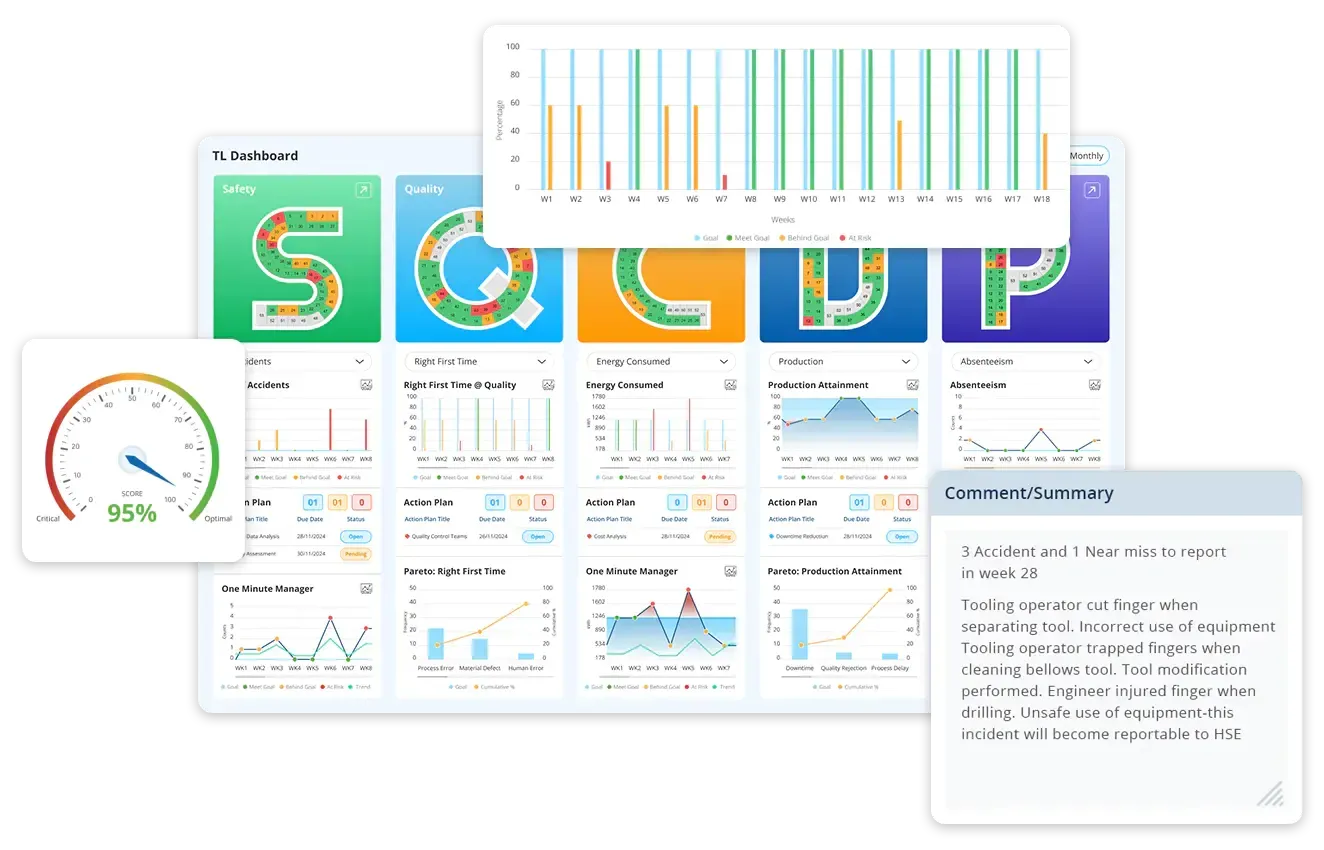
Getting the easy customisable huddle board software for your company sounds like a fantasy, doesn’t it? Well, not any longer. Make your dream come true with LTS Data Point huddle board software and tools.
This is why LTS Data Point is a better solution:
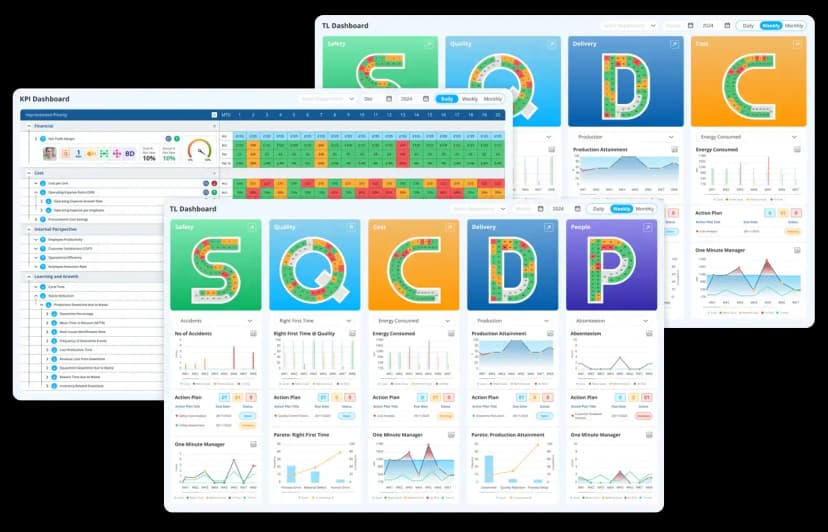
- Real-time KPI dashboards: Enables tracking of key metrics against targets, using colour indicators, charts, and trend lines.
- Huddle board templates & daily stand-ups: Includes modules like “One Minute Manager Board” which facilitate quick structured stand-up meetings around the board.
- Issue / Action tracking and escalation: Teams can record issues, assign owners, track due dates, escalate when needed. Supports accountability.
- Tiered visibility & governance: Allows different levels (shopfloor, supervisory, management) to view their relevant boards or total views, aligning daily operations with broader strategy.
- Digital vs physical board support: Because it’s digital, it supports remote access, historical tracking, multiple team boards, archives of past huddles — things physical boards struggle with.
Huddle boards are a great way to help teams stay organised, focused, and connected. Whether you use a whiteboard or a digital tool, a good huddle board makes daily meetings more useful by showing goals, tracking progress, and helping teams solve problems quickly. Digital huddle boards are especially helpful because they show live data, work across locations, and make it easier to keep everyone on the same page. By using huddle boards well, your team can improve communication, take ownership of tasks, and work together more effectively. It’s a simple tool that can make a big difference in how your team performs every day.
Get your huddle board software from LTS Data Point
FAQs
1. What is a huddle board?
A huddle board is a visual tool used during daily team meetings to track goals, performance metrics, issues, and actions. It helps teams stay aligned, communicate clearly, and solve problems quickly.
2. How is digital huddle board different from a traditional one?
Traditional huddle boards are physical boards like whiteboards or charts, updated manually. Digital huddle boards are software-based, allowing real-time data updates, remote access, and better tracking of performance trends.
3. What should be included on a huddle board?
Key elements include team goals, KPIs, action items, issues and escalations, improvement ideas, and performance summaries. These help guide focused discussions and ensure accountability.
4. How often should a huddle board be updated?
Ideally, it should be updated daily – before or during the team huddle – to ensure discussions are based on current data. Consistent updates improve trust and engagement.
5. Can huddle boards be used by remote or hybrid teams?
Yes, digital huddle boards are especially useful for remote or hybrid teams. They allow everyone to access the same information in real time, regardless of location.
6. What are the benefits of using a huddle board in a daily team huddle?
They improve communication, make performance visible, encourage ownership, support quick problem-solving, and promote continuous improvement across teams.
7. What are the common mistakes to avoid when using a huddle board?
Avoid cluttering the board with too much information, failing to update it regularly, excluding team input, and focusing only on problems. Balance is key to keeping meetings productive and positive.
8. How can you choose the right huddle board software?
Look for features like real-time data integration, mobile access, user-friendly layout, and compatibility with your existing systems. Choose a tool that fits your team’s size and workflow.
9. Do huddle boards work in non-manufacturing environments?
Absolutely. Huddle boards can be used in healthcare, IT, education, and other sectors to improve team coordination, track progress, and drive results.
10. How can you keep your huddle board relevant over time?
Review and refresh the board regularly. Update metrics, remove outdated sections, and gather feedback from the team to ensure it continues to meet your goals.

Abel Jiménez, Lean Consultant
Abel is a Lean Consultant with over 30 years of expertise in operational analysis, process improvement, and organisational change across Mexican industries. Currently serving as Director of Insurance Promotions at CESCEMEX, he helps organisations leverage technology and lean practices to improve efficiency and manage change with continuity.