Automated Shift Management – Optimise workforce scheduling & boost production efficiency
Enhance production productivity by accurately computing productive time, auto-populating shift data, and streamlining employee assignments.
Revolutionise your Workforce Scheduling with Data Point Shift Configuration
Shift Management in Data Point's digital balanced scorecard accurately computes productive time by considering both shift duration and intentional break periods. The system automatically populates complete shift data, making it effortless to assign employees to each shift and ensuring maximum operational efficiency.
- Precise Productivity Metrics: Calculates effective production time by factoring in scheduled breaks.
- Streamlined Scheduling: Automatically populates shift data for quick and accurate employee assignments.
- Optimised Workforce Utilisation: Aligns shift assignments with production needs and operator count or efficiency to reduce downtime.
- Improved Operational Efficiency: Minimises manual scheduling errors and enhances overall productivity by calculating the available production time.
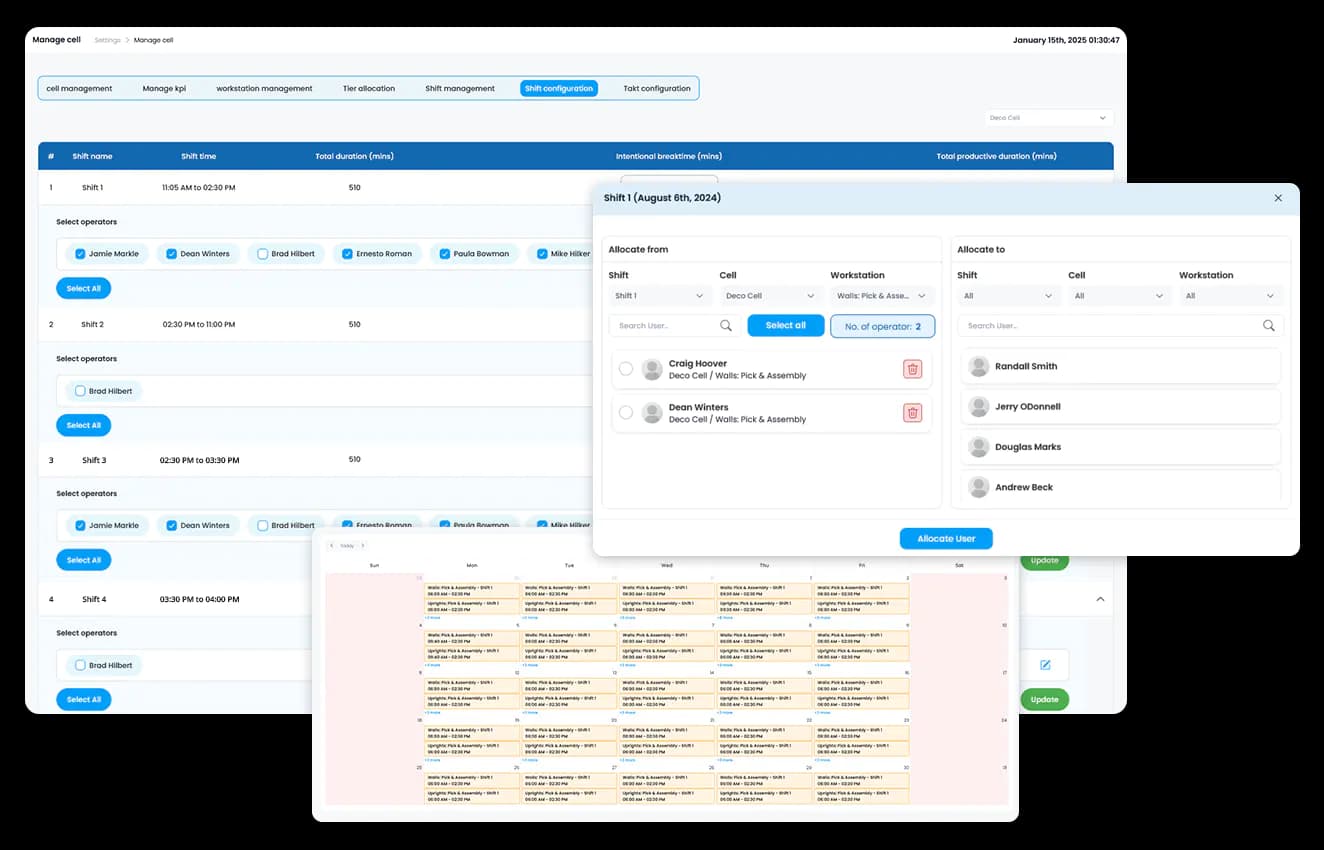
Empower your team with dynamic, real-time shift management
Unlock your workforce's full potential with precision planning

Automated shift time calculation
Computes productive time by integrating shift duration with intentional break times.

Dynamic data population
Instantly generates complete shift schedules for seamless planning.

Real-Time scheduling updates
Continuously adjusts shift data based on current production demands.

User-Friendly interface
Simplifies the process of assigning employees to shifts.

Integrated performance tracking
Connects with other Data Point modules for a holistic view of operational efficiency.

Customisable parameters
Allows adjustments to shift times and break durations to fit your operational needs.
Shift Management Tool : The Complete Guide to Workforce Scheduling, Shift Handover and Production Efficiency
Learn how Shift Management tool helps automate scheduling, optimise productive time, streamline handovers, manage workforce allocation, improve operational visibility, and support efficient multi-site manufacturing operations.
How does automated productive time calculation account for breaks without manual adjustment?
Calculating productive time by hand means someone has to manually subtract every scheduled break from the shift duration before the figure is usable. Done across multiple shifts and multiple lines, that calculation either eats time or gets approximated, and approximated productivity figures are not reliable enough to act on.
Automated productive time calculation factors scheduled break periods directly into the shift duration, producing an accurate available production time figure without manual subtraction. The benefit compounds when break durations or shift structures vary by site or department. Each configuration calculates correctly against its own parameters rather than relying on a single formula applied uniformly across operations that do not actually run the same way.
How does flexible data entry handle overtime and non-structural working days?
Standard shift structures assume a fixed pattern. Overtime, weekend cover, and ad hoc extended hours fall outside that pattern, which means a rigid system either rejects the entry or forces it into a category that does not reflect what actually happened. Either way, the productivity data for that period becomes unreliable.
Flexible data entry allows productive time to be logged accurately on days that fall outside the standard shift structure. Operators working overtime or extended hours can log their time without the system forcing it into a shift pattern that does not apply. This keeps the productivity record accurate across both routine and exceptional working periods, rather than treating exceptions as data the system cannot properly account for.
How does role-based access control work within shift and workforce data?
Workforce scheduling data often needs to be visible to some roles and restricted from others. A site manager needs visibility across their full site. A department supervisor needs visibility into their department only. Without that distinction, either everyone sees everything, which creates clutter and confusion, or access is so restrictive that the people who need the data cannot get to it.
Role-based privilege management allows access to be layered by site, department, and asset level, so each user sees the data relevant to their scope of responsibility. This also supports immediate filtering of site views to reduce clutter for users managing a single location, while still allowing broader access for roles that need a cross-site picture. The practical effect is that workforce data stays relevant and manageable for the person looking at it, rather than presenting the same undifferentiated view to every role in the organisation.
How does integrated performance tracking connect shift data to broader operational metrics?
Shift scheduling data that sits separately from production and KPI data creates a disconnect. A supervisor reviewing line performance cannot easily see whether a dip in output correlates with a specific shift pattern, an under-resourced shift, or a transition point between teams.
Integrated performance tracking connects shift management directly with other operational modules, giving a unified view of scheduling alongside performance data. This means workforce allocation decisions can be made with visibility into how previous staffing levels and shift patterns have actually performed, rather than relying on assumption or anecdote. For operations tracking KPI performance across SQDCP, this connection is what allows a People-related deviation to be traced back to a specific shift configuration rather than treated as an unexplained variance.
How does dynamic data population reduce scheduling errors at the start of a shift?
A shift schedule entered manually at the start of each day carries the risk of transcription error, missed entries, inconsistent formatting between whoever happens to be building it that day. Multiply that across multiple shifts and multiple sites, and the schedule data becomes unreliable before the shift has even started.
Dynamic data population generates complete shift schedules automatically, removing the manual entry step that introduces most scheduling errors. This matters most in multi-shift, multi-site operations, where custom shift patterns need to be configured per site and department without creating data contamination between locations. A site running three distinct shift patterns has each one populate correctly without anyone cross-checking that the right pattern was applied to the right team.
How does customisable shift configuration work across sites with different shift patterns?
A single shift configuration applied across multiple sites assumes every location runs the same way. In practice, one site runs three eight-hour shifts, another runs two twelve-hour shifts, and a third has a rotating weekend pattern. Forcing all three into the same structure produces inaccurate productive time figures at the sites that do not match the template.
Customisable parameters allow shift durations, break times, and patterns to be configured independently for each site and department. Configuration changes at one location do not affect another, and each site’s productivity calculations are based on its own actual operating pattern rather than an averaged or generalised structure. For organisations managing several sites with genuinely different shift structures, this is the difference between productivity data that reflects reality and data that has been forced into a shared format that fits none of them precisely.
How does shift handover documentation connect to supervisor acknowledgement?
A shift handover that is only verbal leaves no record of what was actually communicated. If an issue raised at handover is missed or forgotten by the incoming shift, there is no way to confirm whether it was ever passed or whether it was passed on and not acted on.
Shift handover notes with a built-in acknowledgement feature mean the incoming supervisor formally confirms they have received and reviewed the handover information. This closes the accountability gap that exists when handovers rely entirely on verbal communication. If an issue from the previous shift recurs, the handover record shows whether it was flagged and acknowledged, which removes the ambiguity that usually surrounds a missed handover item.
How does shift management support phased rollout across multiple sites with different levels of readiness?
Not every site in a multi-site organisation is ready to adopt a new shift management system at the same pace. One site may have clean historical data and a straightforward shift structure. Another may need custom configuration before the data is usable. Forcing a single rollout date across all sites risks pushing live data into a system before it has been properly configured for that location.
A phased rollout approach allows shift management configuration to be built and validated site by site, with manual data entry running in parallel to automated capture during the transition period. This means sites with more complex shift structures or legacy data issues are not held to the same timeline as sites that are ready to go live immediately, and it gives each site the opportunity to confirm its configuration is accurate before the data becomes the basis for performance reporting.
Hear it from our customers

MARC ROBINSON
Director, Global Operational Excellence


“By providing a central location to input, analyse and share our KPIs, 'Data Point' enables site management to more easily focus on the entire business as a team. Its ability to allow automated data entry and trend analysis gives us more time for improvement rather than just reporting numbers. Combined with a disciplined approach within our SQDC meeting process, I believe 'Data Point' will help us continually focus on key issues and drive business excellence in all areas.”
Streamline shift scheduling for maximum production efficiency
Experience the power of automated shift management with Data Point with simplified workforce scheduling by calculating accurate production time, auto-filling shift data, and aligning employee assignments with operational needs.
