Smart Production Planning Digital Tool to Streamline, Optimise, and Ensure On-Time Delivery
Automate production scheduling, streamline resource allocation, and minimise delays with Data Point’s smart Production Planning Module.
Streamline workflows with smart Production Planning
Production Planning feature of Data Point Balanced Scorecard ensures seamless production scheduling by enabling manufacturers to create, manage, and optimise production plans in advance. By aligning tasks, resources, and timelines, this module enhances efficiency, minimises disruptions, and ensures on-time deliveries.
- Improve production flow with structured planning.
- Reduce delays and resource shortages.
- Align production schedules with demand forecasts.
- Enhance coordination across teams and departments.
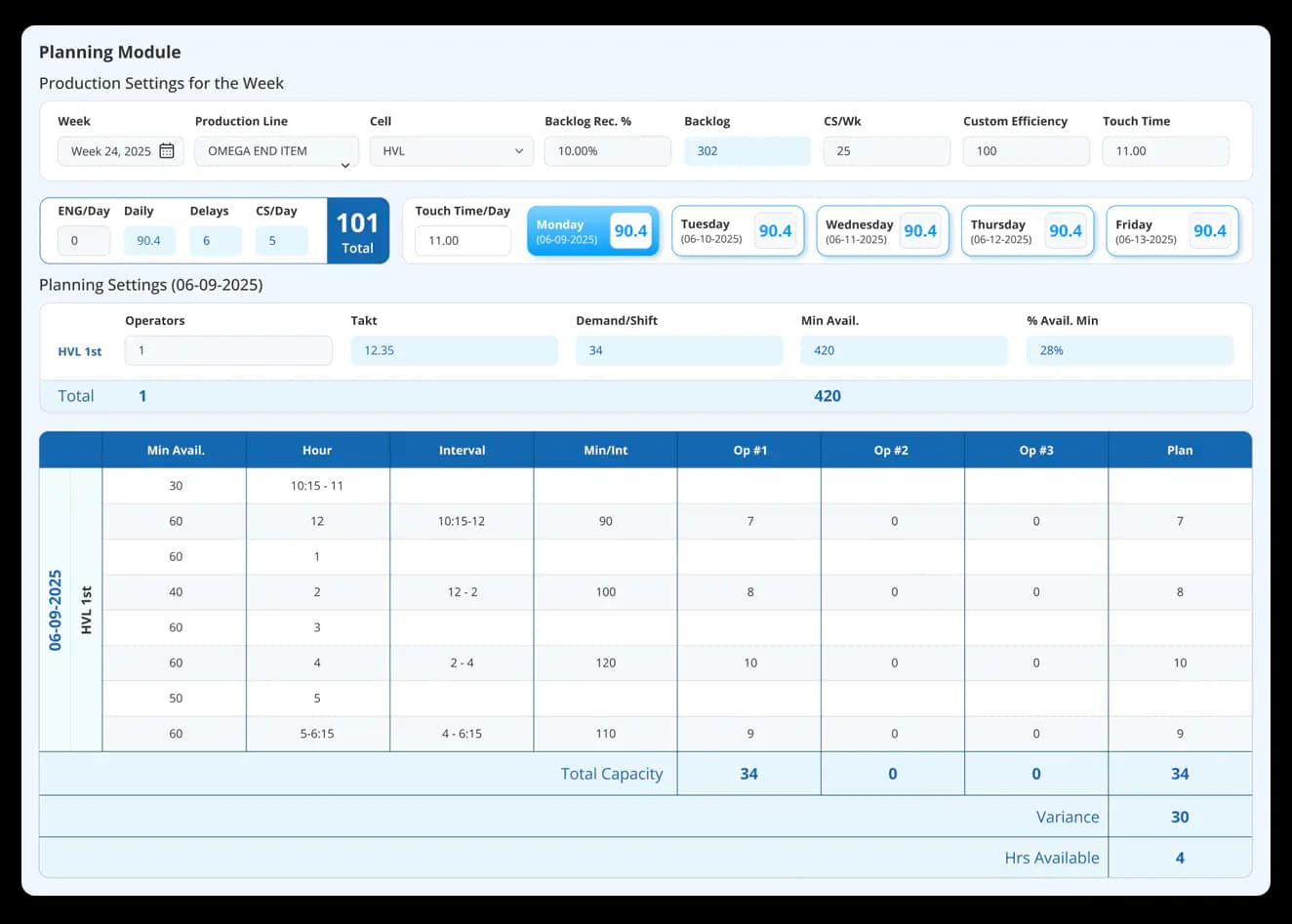
Optimise your production planning with Data Point
Plan like a pro: Keep your production flowing seamlessly
Track, analyse, and optimise every second of your production cycle with real-time insights, automated controls, and seamless shift transitions.

Advanced planning for production areas
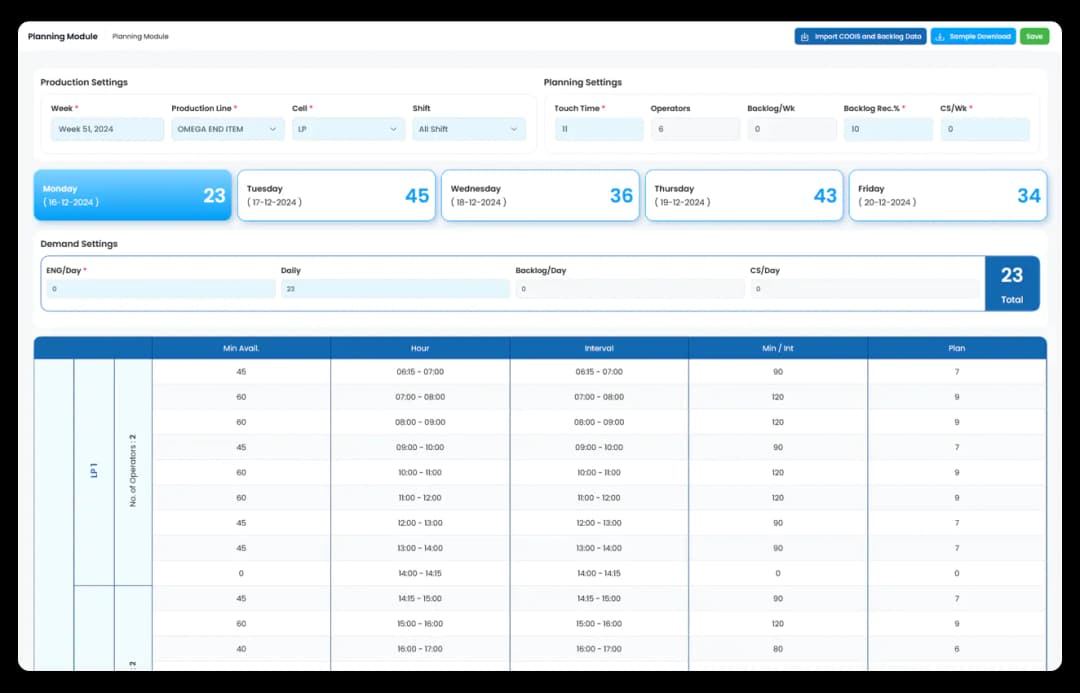
Prepare your production plans monthly, weekly or daily in advance, ensuring timely task allocation and efficient workflow execution.

Real-Time resource allocation
Assign machines, workforce, and materials effectively for the available production time, reducing bottlenecks and maximising resource utilisation.

Capacity planning & demand forecasting
Balance workloads by forecasting demand and optimising total production capacity to avoid overproduction or shortages.

Live monitoring & adjustments
Track ongoing production status and touch times, identify potential disruptions, and modify schedules dynamically for uninterrupted workflow.

Seamless shift coordination
Ensure smooth transitions between shifts by carrying forward production data and providing clear shift-wise task distribution.

Integration with MES & ERP
Sync with Manufacturing Execution Systems (MES) and Enterprise Resource Planning (ERP) platforms for automated data flow and decision-making.
Production Planning Software: The Complete Guide to Smarter Scheduling, Capacity Planning and On-Time Delivery
Learn how Production Planning software helps optimise scheduling, allocate resources, balance capacity with demand, monitor production in real time, integrate with MES and ERP, and improve on-time delivery performance.
How does advance production planning reduce disruption during the working shift?
A plan built on the day is a reaction. A plan built in advance is a decision. The difference is the window it gives you to resolve resource gaps, material shortages, and scheduling conflicts before they reach the shopfloor and interrupt production.
Monthly, weekly, and daily planning horizons serve different purposes. Monthly planning sets capacity expectations. Weekly planning allocates resources across production areas. Daily planning translates both into specific task assignments with clear ownership. When all three levels are aligned in the same system, a change at the weekly level updates the daily view automatically rather than creating a disconnect that a shift supervisor has to resolve manually at the start of the shift.
How does capacity planning connect to demand forecasting, and why do both fail when they run separately?
Capacity planning tells you what your operation can produce. Demand forecasting tells you what it needs to produce. When the two are managed in separate systems or separate conversations, the gap between them is only visible after it has already caused problem: an overload line, a material shortage, or a missed delivery commitment.
Running capacity planning and demand forecasting in the same platform means the total production capacity available is balanced against forecast demand in real time. The practical outcomes are:
- Overproduction is visible before it creates inventory build-up
- Shortages are identified early enough to adjust schedules or escalate to procurement
- Workload is distributed across available capacity rather than concentrated on lines that are already at risk of overrunning
For operations managing capacity across multiple production areas or organisational units with different visibility requirements, this integration is what makes it possible to plan at scale without losing sight of individual resource constraints.
How does shift coordination work when production data needs to carry forward across handovers?
The handover between shifts is one of the most information-intensive moments in a production day. The outgoing shift has context about what happened, what changed, and what the incoming shift needs to know. Most of that context is transferred verbally, which means it is filtered, abbreviated, and inconsistent depending on who is handing over and who is receiving.
Carrying production data forward automatically across shift transitions means the incoming shift starts with a complete picture rather than a summary:
- Task status and progress from the previous shift is visible immediately
- Shift-wise task distribution is clear from the start of the shift, not assembled through conversation
- Any disruptions or deviations logged during the previous shift are part of the handover record, not dependent on a verbal briefing that may not cover everything
For operations running three shifts, the consistency of that handover across every transition is what determines whether production continuity is maintained or rebuilt from scratch at the start of each shift.
How does MES and ERP integration remove the manual data entry that most production planning systems still depend on?
A production planning system that requires manual data entry at the start of every shift is creating two problems simultaneously. First, the plan is only as accurate as the data the person entering it has access to. Second, the time spent entering data is time not spent managing production.
Integration with MES and ERP systems remove that dependency. Production targets flow from the schedule automatically. Actual output data flows back out to the reporting layer without requiring a separate input step. This means:
- The planning system and the execution system are working from the same data in real time
- Schedule changes made in the ERP are reflected in the production plan without manual synchronisation
- The data used for performance reviews and KPI reporting is derived from the same source as the plan, not reconciled from two separate systems after the shift ends
How does real-time resource allocation differ from fixed shift scheduling?
Fixed shift scheduling assigns resources at the start of a period and does not change until the next planning cycle. It assumes every resource will be available as planned, every task will take as long as expected, and no disruption will occur between now and the end of the shift. In most manufacturing environments, none of those assumptions hold consistently.
Real-time resource allocation adjusts as conditions change. When a machine goes down, a material shortage is flagged, or an operator is unavailable, the plan updates to reflect what is actually available rather than what was planned. Machines, workforce, and materials are assigned against available production time rather than against a static schedule, which means:
- Bottlenecks are identified before they cause a stoppage
- Resource utilisation is maximised across the shift rather than locked to an initial allocation that no longer reflects reality
- Supervisors spend less time manually reassigning work and more time managing production
How does live monitoring allow schedules to be adjusted dynamically rather than reactively?
A production schedule reviewed once at the start of a shift and not revisited until something goes wrong is a baseline, not a management tool. By the time a disruption surfaces in an end-of-shift report, the opportunity to recover within that shift has already passed.
Live monitoring of production status and touch times means disruptions are visible as they develop rather than after they have compounded. When a task is running longer than planned or a resource becomes unavailable mid-shift, the schedule can be adjusted dynamically:
- Alternative scheduling options are identified before a bottleneck causes a stoppage
- Priority management allows supervisors to drag and drop tasks based on current conditions rather than working from a locked sequence
- The impact of a schedule change on downstream tasks is visible before the change is committed
How does production planning connect to takt time tracking on the shopfloor?
A production plan sets the target. Takt time tracking shows whether the line is meeting it. Without a connection between the two, a plan that was accurate at 6 am can diverge from reality by 9 am and not be formally acknowledged until the shift summary.
When production targets flow from the planning module into the takt time tracker on the shopfloor, the connection between what was planned and what is actually happening is live. The takt time clock is running against a target that reflects the current production schedule, not a manually entered figure that may not have been updated after the last plan change. Deviations from the plan are visible at the moment they occur, which gives the team to adjust within the shift rather than reporting the gap after it has become unrecoverable.
How does production planning support on-time delivery performance as a measurable KPI?
On-time delivery is the outcome that production planning is ultimately accountable for. A planning system that does not connect to delivery performance data cannot tell you whether the plans it produces are actually working. The plan is executed, the delivery either goes out on time, or it does not, and the relationship between the two is only visible in a retrospective review.
A planning module connected to live KPI dashboards means delivery performance is tracked against the schedule in real time. When a production area is running behind and a delivery commitment is at risk, the system surfaces that before the deadline rather than confirming it after. That early visibility is what gives planners the time to adjust resources, reschedule lower-priority tasks, or escalate to the customer before the missed delivery becomes a fact rather than a risk.
Hear it from our customers

MARC ROBINSON
Director, Global Operational Excellence


“By providing a central location to input, analyse and share our KPIs, 'Data Point' enables site management to more easily focus on the entire business as a team. Its ability to allow automated data entry and trend analysis gives us more time for improvement rather than just reporting numbers. Combined with a disciplined approach within our SQDC meeting process, I believe 'Data Point' will help us continually focus on key issues and drive business excellence in all areas.”
Transform your Production Planning with Data Point
Discover how Data Point’s intelligent Production Planning Module can streamline your scheduling, optimise resource allocation, and help you deliver on time—every time.
Get Started
Your Questions, Answered!
How does Data Point Production Planning work?
- Select your area: Choose the production area and plan the schedule (day/week/month).
- Assign operators: Allocate operators based on efficiency and capacity.
- Automated scheduling: Let the system create and manage task assignments.
- Optimise in real-time: Continuously adjust plans to minimise downtime.