QC Planning and Scheduling Software: A Complete Guide to Laboratory Features, Use Cases, and Selection Criteria
Learn about QC planning and scheduling software, its key features, laboratory applications, and how to select the right solution for your quality team.
Contents
- What is QC planning and scheduling software?
- Types of QC planning and scheduling approaches
- Key features of QC planning and scheduling software
- How QC planning and scheduling software works
- QC laboratory use cases and examples
- How to use QC planning and scheduling software
- How LTS Data Point supports QC planning and scheduling
Last updated on : November 11, 2026
Learn what QC planning and scheduling software is, which features and use cases matter, and how to choose, implement and measure it in a manufacturing QC laboratory.
See how LTS Data Point brings QC planning, resources and skills into one real-time view.
QC planning and scheduling software matches quality control testing demand with laboratory capacity, then turns that plan into timed assignments for analysts and instruments. It helps a lab decide what testing it can take on, who carries it out, on which instrument and when.
So, what does a QC lab need to decide every day?
What is QC planning and scheduling software?
A QC lab does not run on tests alone. Every test depends on a qualified analyst, a suitable instrument and a free slot, and all three have to line up before any work starts. QC planning and scheduling software works on four things: work, people, equipment and timing.
- Work: The samples, and the tests each one needs.
- People: The analysts qualified to run those tests, and the shifts they are on. This is the core of analyst scheduling.
- Equipment: The instruments suited to each test, and when they are free. This is instrument and equipment scheduling.
- Timing: The planned duration, sequence and due date of every activity, and which sample goes first. That ordering is QC sample prioritisation.
When a planner selects a test, the software narrows the choice. Only analysts qualified for that activity, on that shift, appear. Instruments are listed by occupancy and calibration plan. The time slot is worked out from the standard time for the test.
Planning and scheduling are two separate decisions, and QC laboratory planning and scheduling needs both. Planning looks at capacity against load across technologies. That is QC lab capacity planning. Scheduling puts a name, an instrument and a time on each task.
Planning sets the boundary. Scheduling works inside it.
Four roles mainly use this software:
- QC planner: Builds the schedule and reworks it when priorities move.
- Supervisor or team lead: Assigns tasks by capacity, availability, skill and shift.
- Laboratory head: Watches demand against capacity. This is laboratory workload management.
- Analyst: Works from their own task list for the shift.
It is not production scheduling. A production schedule is built around orders and lines. A QC lab schedule is built around the test line items on each sample, with every one tied to an analyst and an instrument. QC lab scheduling software is set up for that.
Types of QC planning and scheduling approaches
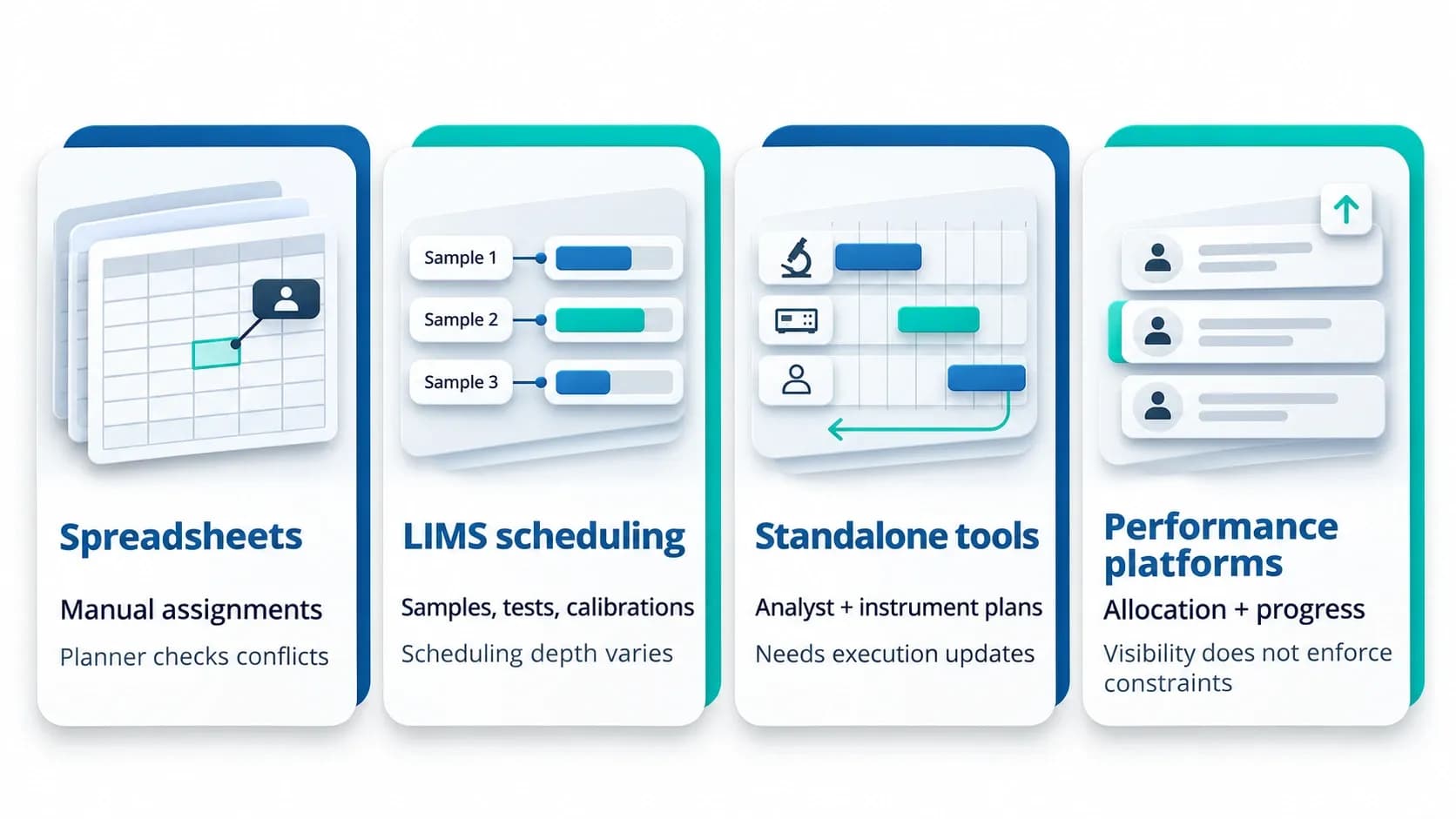
Labs plan QC work in four main ways. Most use more than one. The LIMS may hold the sample records while a spreadsheet or a scheduling layer holds the plan.
- Spreadsheets: Planners keep assignments, dates and availability in a workbook. This is manual QC scheduling in Excel. Updates and conflict checks rely on the planner.
- LIMS scheduling functions: Some QC laboratory management software assigns samples, tests and calibrations to people and instruments within set time windows. How far it goes on capacity planning and rescheduling varies by system.
- Standalone scheduling tools: Laboratory scheduling software forecasts capacity and builds analyst and instrument schedules, often from LIMS test requirements. The weak point is how execution updates reach the schedule.
- Performance platforms: Task assignment, resource views and progress tracking for daily management, with resource allocation and operator scheduling alongside task escalation. A platform can display qualifications, instruments and capacity without enforcing them.
Spreadsheets are where most labs start. Daily scheduling is manual, so allocating work across departments and shifts gets harder, and work is easier to overlook. A performance platform gives a team leaders a live view of who is allocated and what has to be delivered. It works with the LIMS, not instead of it.
Every approach rests on the same data. A LIMS export can arrive with no product description, so the planner matches records by product code and test name. When team mappings or test definitions are incomplete, the work shows in the planner but cannot be assigned.
Key features of QC planning and scheduling software
These are the features to look for in QC scheduling software.
Task-level planning
- Activities planned separately: preparation, set-up, execution and review, each with its own standard time
- Resources needed: each activity needs its own mix of analyst, reviewer and instrument time, and some need no analyst at all
- Why it matters: planned as one block, a test ties up an analyst who is not needed
Capacity and workload visibility
- Laboratory workload management: A calendar shows who is booked for the day and who is free.
- Available time made visible: Shifts, training slots and planned commitments come off contracted hours.
- Overload warning: Flagged, not blocked, because a warning is not a feasible plan.
Skills and qualifications
- Analyst qualification tracking: Not trained, under training, trained, or able to train others.
- Analyst scheduling: Only the last two levels are planned onto that test.
- Skill expiry: A validity window resets the skill if the test is not run, and certificates are uploaded and flagged.
- Coverage target shows gap early: Four skilled analysts against ten expected, a gap visible before a sample arrives.
Instruments and equipment
- Instrument and equipment scheduling checks: Availability, not just idle time.
- Equipment calendar: Maintenance, calibration, downtime and analyst usage.
- Downtime log: Logged by type and reason, with each entry cutting maximum hours.
- Usage capture: Task card, instrument, LIMS or manual entry.
Priorities and rescheduling
- QC sample prioritisation: Urgency and due date decide who gets the resources first.
- Urgent sample scheduling: A rush job or retest moves ahead of queued work.
- Reassignment: A reassigned task leaves the first analyst's list.
- Ad hoc work: Carries product, test, standard time and analyst, straight to that analyst's queue.
Shifts and handovers
- Laboratory shift planning: Sets a pattern per analyst across dates, such as mornings one day and evenings the next. Shift management also needs start and end times, so an assignment outside the shift can be blocked.
- Cross-shift work: Dependencies and handovers coordinated across shifts and sites.
- Handover record: A timestamp at each handover, with status assigned, in progress or completed.
Dashboards
- QC dashboard: Planned work against progress, from a daily assigned-versus-completed count up to lab-wide views, with QC testing turnaround time, utilisation and faults.
- Zero activity: Can mean no work or missing data, and delay reasons show which.
None of these works alone. They run on the same master data and the same rules.
How QC planning and scheduling software works
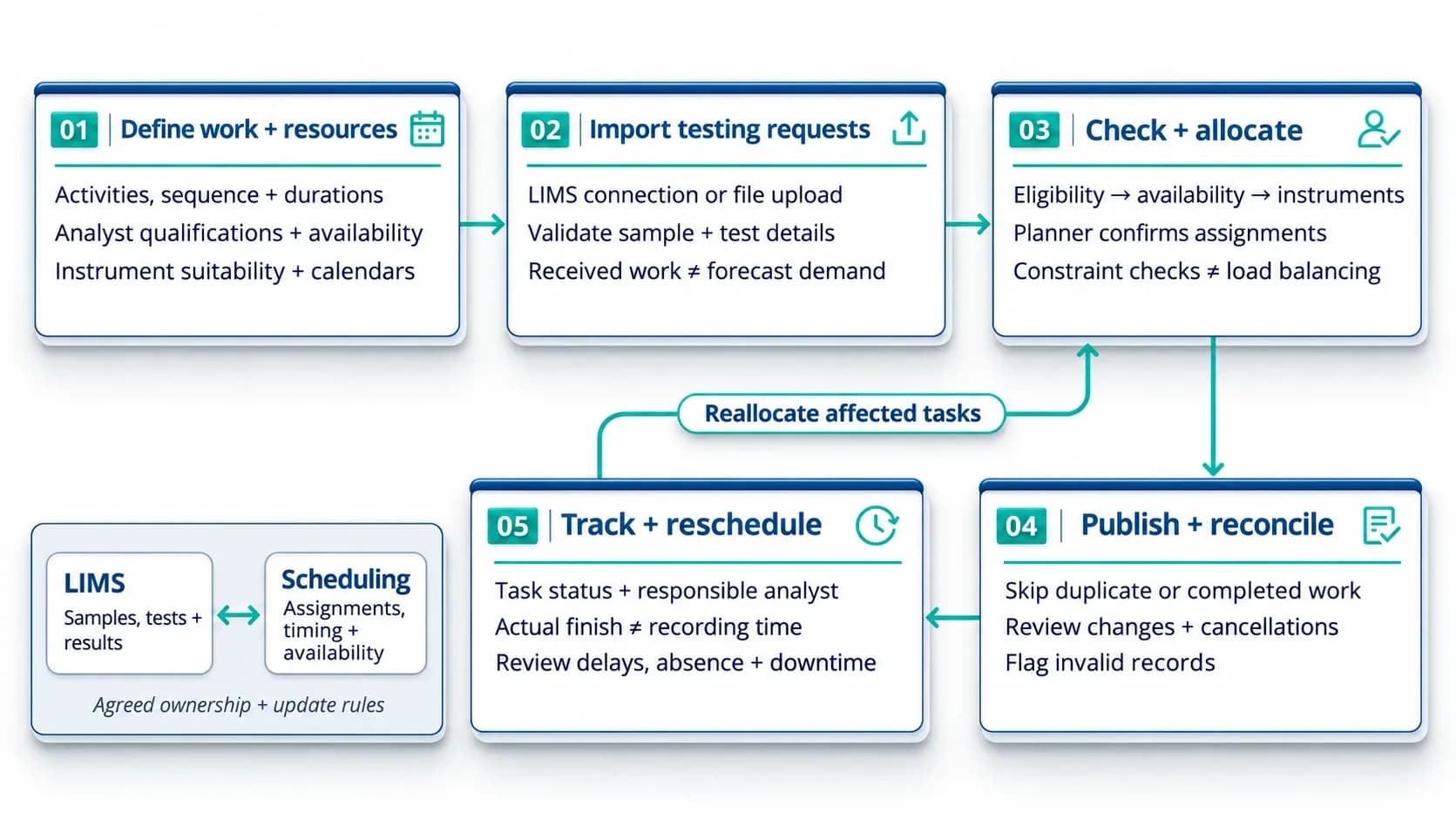
The software combines testing demand with activity definitions, qualifications and availability. It then supports assignment, execution tracking and schedule updates. Allocation can be planner-led, rules-assisted or automated, depending on the system.
Define the work and the resources
- Tests are set up with their activities, sequence and planned durations.
- Analysts carry qualifications and availability. Instruments carry suitability and booking calendars.
Bring testing requests in
- Work arrives by file upload or a configured connection. This is LIMS scheduling integration.
- Each request carries the test type, product stage, sample ID, dates and status.
- In one setup, only received samples come in. Received work is not forecast demand, so planning ahead needs expected volumes too.
- In one lab, each test has its own number, and a retest adds a new one.
- Field mappings, selection rules and refresh intervals vary by system. "Connected" does not always mean instant.
Check constraints and allocate
- Eligible analysts come first. Each sample has a standard time, so skill filters who can be allocated. Qualification makes an analyst eligible. It does not guarantee the test finishes in that time.
- Working windows and existing assignments come next.
- Instruments come last. Mapping instruments to test types checks suitability. Booking and downtime checks stop overbooking.
- The planner makes the allocation. The software narrows the choice.
- This is constraint-based laboratory scheduling. It checks assignments against set constraints. It is not automatic load balancing.
Publish and reconcile updates
- In one setup, a repeat upload leaves assigned tasks as they are. Items the system already holds are skipped.
- A line item the LIMS shows as completed is not assigned again.
- Not every update can be ignored. Changes and cancellations need agreed rules.
- Invalid records are flagged for review.
Record execution, handovers and delays
- Each task shows its status and its responsible analyst.
- The planner can see instrument double-bookings and resolve them in real time.
- A task closed late can show as completed and delayed. A manager can correct the timing.
- Late entry is not late testing. When the work finished and when it was recorded are separate facts.
- Delays, absence and downtime call for dynamic laboratory rescheduling. The planner reviews the affected tasks.
QC scheduling software vs LIMS
- The LIMS holds samples, test records and results.
- The scheduling side holds assignments, timing and availability.
- In one setup, the scheduling system runs on top of the LIMS and pulls its data directly.
- Either way, each record needs one owner, and updates between the two need agreed rules.
QC laboratory use cases and examples
QC labs handle recurring tests, deadline-driven requests and non-routine work with the same people and instruments. Each use case arrives differently. Each needs a different scheduling decision.
- Routine and in-process testing: Routine testing creates recurring demand. In-process quality control scheduling has to fit the production run. The planner view splits received samples by stage, with ad hoc work kept in its own list. Expected arrivals belong in the plan too, not just samples already received.
- Batch release and urgent samples: Batch release scheduling matches outstanding tests with release deadlines. It supports timely testing but does not authorise release. An urgent sample takes slots from other work, so the plan has to show what moves.
- Stability and calibration: Stability testing scheduling turns the stability programme into expected demand. Forecast formats can carry a molecule-type column, so forecasts can be filtered. Calibration scheduling books instrument ahead. A dashboard can leave it out of downtime figures, but the instrument is still unavailable for testing.
- Retests, investigations and other non-routine work: This work adds demand the routine plan did not include. Long-running tests and investigation samples are often not captured in existing systems. Investigation testing follows a set procedure, not an automatic repeat. Method transfer and validation add workload of their own.
- Multi-site and multi-shift labs: One site can run several operating units, each with its own instrument categories. A first rollout can cover several labs, with more joining on little setup. At one plant, shift timings were the same everywhere, so one shift master served every department. Multi-site laboratory scheduling adds network-wide capacity views. Local calendars, qualifications and instruments still apply.
Real-world example: Moving from Excel to digital planning
One QC lab planned its testing through manual QC scheduling in Excel. It had no unified view of analyst utilisation, equipment use or skill compliance. The lab moved its managers and analysts onto one shared system. Early feedback was clear on one point: they can see what work is planned each day. The lab expects that to help with task assignment. It is early feedback, not a measured result.
How to use QC planning and scheduling software
Using it well rests on three things: reliable planning data, a plan kept current each day, and measures defined the same way every time.
Implementing QC planning and scheduling software
Laboratory scheduling software implementation follows four steps.
Gather and reconcile master data
- Names have to match across source files. One lab made name matching case-insensitive, so capitalisation differences stopped causing rejects and rework.
- Real records come first. In one rollout, the lab shared two months of master data and line items so uploads could be tested before user acceptance.
Agree the standard workflows
- Activity order, who does what, handover information and completion rules are set up front.
- Moving from Excel is more than importing worksheets. The way work is done has to be agreed first.
Test real scenarios
- Planners can import Excel files and start scheduling against the skills matrix. Live testing in one lab surfaced import errors from duplicate records.
- The test set includes duplicates, an unavailable instrument, an analyst without the qualification, a task running across shifts and an urgent request.
- A successful upload does not mean the schedule works.
Train users and phase the move from Excel
- One rollout ran from a staging test on four sample types, to user acceptance, to training, to a first release for one group of users. Their feedback fed later updates.
- Excel and the new system cannot both stay live. At cutover, one record is the plan, because two live versions drift apart.
Running it each day
- A QC planner opens the planner view, sees how many samples wait for testing by stage and assigns them. The status updates as analysts work. This is laboratory workload management at its simplest.
- A leader sees how many tasks exist, how many are assigned and how many are done. Clicking through opens the list with productivity and adherence.
- A short daily huddle meeting compares progress with the schedule. Overdue or at-risk work, blocked activities and changed capacity each get an owner and a next action.
- Issues a team cannot fix locally go up a tier. Cadence and levels depend on the lab.
Measuring performance
- QC testing turnaround time runs from an agreed start to an agreed end, such as sample receipt to approved result. The lab decides whether it counts calendar or working time.
- QC due date adherence is the share of items finished by their due date. Schedule adherence is a different measure. It asks whether activities ran when planned.
- Analyst utilisation compares recorded time with available time. Standard time earned is not the same as time spent.
- QC instrument utilisation can be read from usage charts by instrument category. They show the top instruments and those left vacant, and filter by month, six months, 12 months or year to date.
- Queue time is the wait between an activity becoming ready and starting. Waiting for a prerequisite is not waiting for a resource.
- The level of calculation matters. A figure worked out per line item hides the sub-activity detail.
- Definitions come before charts. In one lab, the charts could not be built until the utilisation logic was agreed. Formulas stay visible, and the calculation level is stated, because a figure worked out per line item hides sub-activity detail.
- Observed times feed back into planning. Standard times are reviewed after go-live.
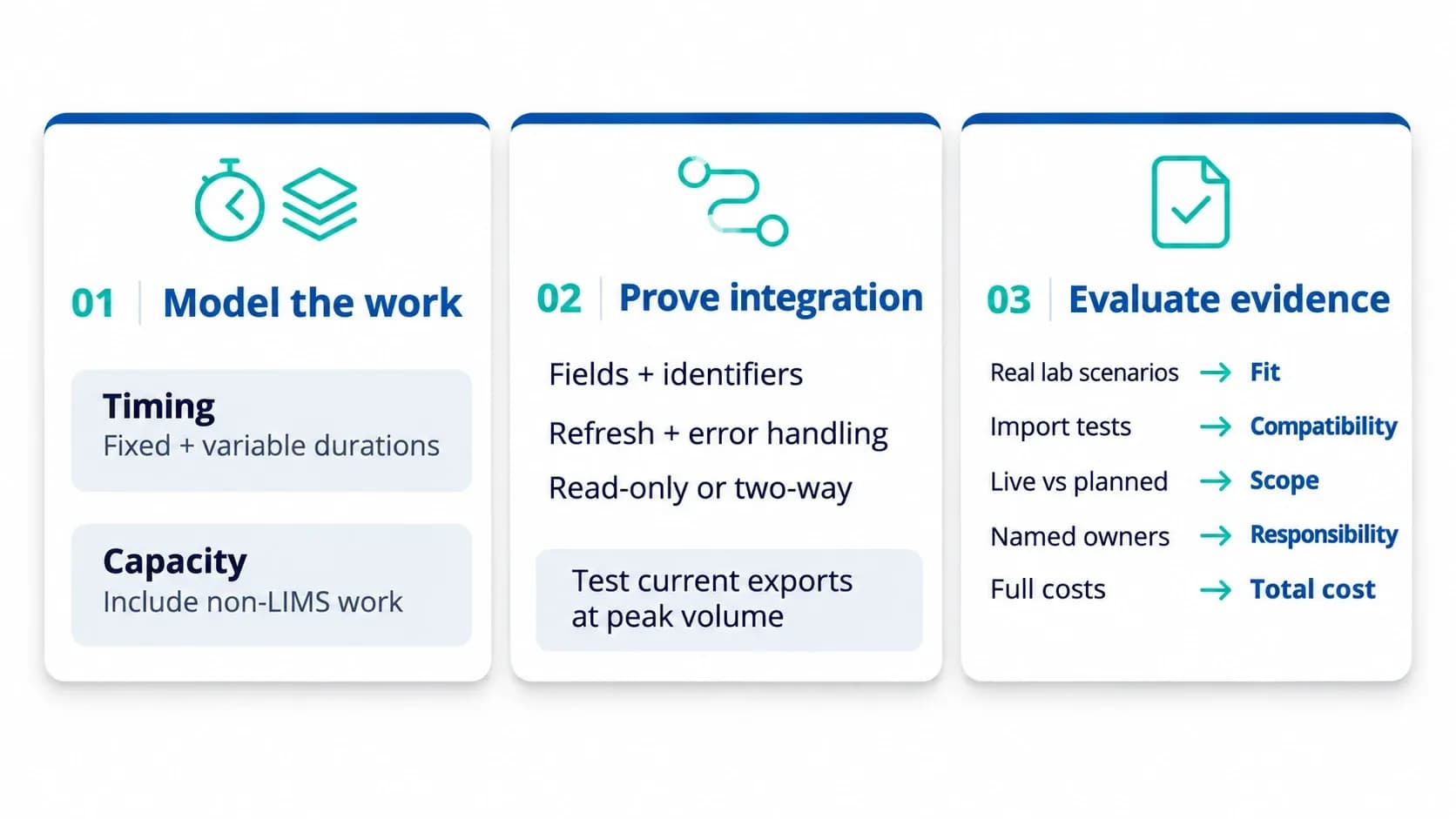
Most tools list the same features. What separates them is how each one models the lab’s work.
Laboratory scheduling software requirements that differ between tools
The timing model differs. Some tools use fixed durations, some variable, some both. Microbiology activities needed both.
Work outside the LIMS is another difference. A tool either counts it against capacity or leaves it invisible.
Integration
Integration with LIMS is defined by its data contract: fields, identifiers, refresh frequency and error handling, and whether the exchange is read-only or two-way.
Compatibility is proven on current exports at peak volume. One system built on an early Excel format later met LIMS samples that did not match it.
QC scheduling software evaluation checklist
A narrow first scope limits delivery risk. One lab began with sub-activity assignment and calendar tracking, and its leadership preferred a practical start to a perfect one.
How LTS Data Point supports QC planning and scheduling
LTS Data Point is a performance management platform. It gives organisations real-time visibility, accountability and alignment from shopfloor to boardroom. It connects people, data and decisions across every tier, brings Lean thinking into everyday operations, and turns daily performance data into structured action.
- Planning: Resource allocation and operator scheduling, with delivery adherence dashboards and project tracking with milestones and dependencies.
- Instrument utilisation: A dashboard of instrument usage, with multi-level access set by organisational role.
- Skills Matrix: Competency planning.
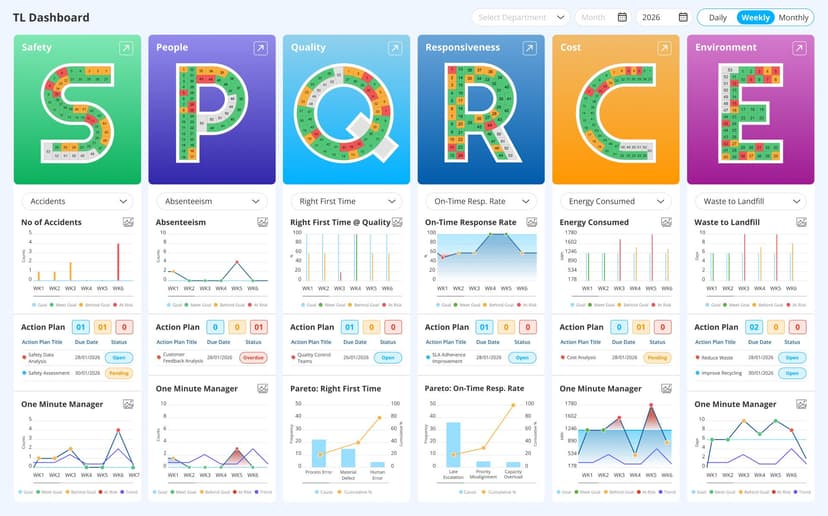
- Tier management: Aligned dashboards across every tier, with configurable datasheets for departments, assets and shifts. Daily huddles run on live SQDCP boards from Tier 1 to Tier 3, with issues escalated on time and actions followed through.
- KPI dashboards: Plan vs actual in daily, weekly and monthly views, with trend analysis and Pareto root cause analysis.
- Integration: Connects to any system or manual input, including MES and ERP platforms, CRM and BI.
A QC schedule holds when it reflects who is qualified, what is genuinely available and what is urgent. Reliable data and agreed definitions decide whether it keeps holding. The tool worth choosing is the one that proves this on the lab's own work.

Abel Jiménez, Lean Consultant
Abel is a Lean Consultant with over 30 years of expertise in operational analysis, process improvement, and organisational change across Mexican industries. Currently serving as Director of Insurance Promotions at CESCEMEX, he helps organisations leverage technology and lean practices to improve efficiency and manage change with continuity.