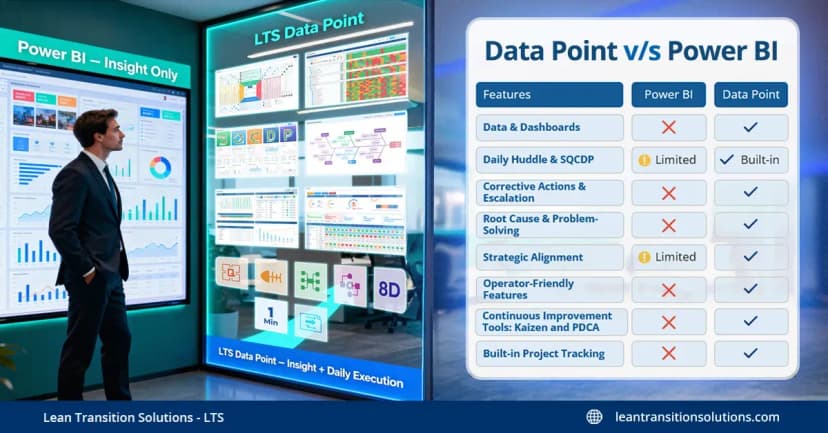
What is manufacturing process flow and how to digitise it right?
Last updated on : August 25, 2025
Ever walked through a factory and felt like everything was moving in perfect rhythm—materials coming in, machines humming, teams in sync, and finished goods rolling out seamlessly? That’s not luck. It’s the result of a well-designed manufacturing process flow—the invisible architecture that drives every action on the shop floor.
In this blog, we explore the concept of manufacturing process flow, understand how it's different from general process flows or production workflows, and show you how to visualise, map, and optimise it using digital process flow tools.
What is process flow in manufacturing?
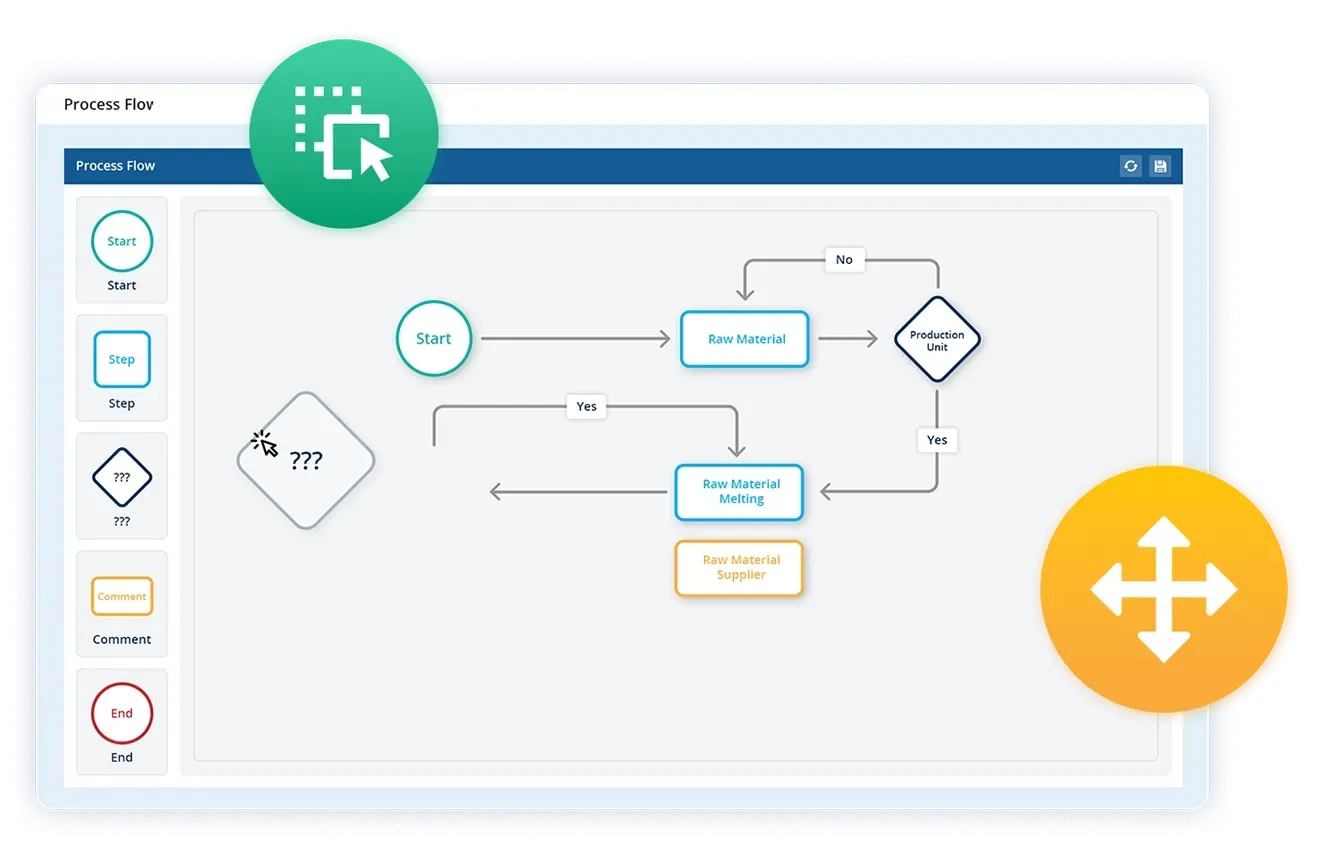
A manufacturing process flow is structured steps in sequential order that outlines how raw materials are transformed into finished products of value. It visually represents the operational flow and production process, from sourcing inputs, moving through machines and workstations, to final packaging and dispatch using- shapes, symbols, and arrows to show the order of operations.
Think of it as a roadmap for your production line, showing every step, decision point, and handoff in the manufacturing journey. It is typically illustrated through process flow diagrams, objective flowcharts, or workflow mapping tools with simple symbols and arrows making it easier to analyse inefficiencies, standardise operations (SOPs), and drive continuous improvement.
Process flow creates a bigger picture of the entire process along with explaining the relationship between each step, leading to process optimisation.
But here's where confusion often arises, terms like workflow, production flow, flow production or continuous production are often used interchangeably with manufacturing process flow. While they’re all related, they are not identical and understanding their differences is crucial for operational excellence and clarity.
Process flow vs. Workflow: What’s the difference?
Process flow describes the overall sequence of activities in a process—it focuses on procedures like what happens, in what order, and why and illustrates the manufacturing process of the product. In manufacturing, this means tracking how materials physically move and transform—from raw inputs to finished goods. It's typically visualised using flowcharts, process maps, or value stream mapping tools.
Workflow, in contrast, is more about workforce task execution—who does what, when, and how information flows. It’s commonly used in administrative or digital processes.
In short:
- Process flow = The steps and sequence of manufacturing operations or procedures
- Workflow = The execution logic and roles involved in workforce tasks
Boost efficiency from shop floor to top floor—start with smart process flow mapping today
Different types of manufacturing processes
So now that you’ve understood the difference between process flow and workflow, it’s time to explore how different manufacturing setups use various types of process flows. Not all factories operate the same way—and the structure of your production flow depends heavily on what you produce, how often you produce it, and how standardised or customised your output needs to be.
Let’s take a closer look at the five primary types of manufacturing processes:
1. Job shop manufacturing
This setup is designed for low-volume, high-customisation production. Products follow unique, non-linear paths across the shop floor, with frequent routing changes depending on customer requirements. It demands skilled labour and flexible machinery. Common examples include tool rooms, machine repair shops, and prototype labs where process mapping is crucial for clarity.
2. Batch manufacturing
Here, production happens in defined quantities or batches. Equipment is used for one batch at a time, then adjusted for the next. While more structured than job shops, this model still allows flexibility for product variation. Examples: Food and beverage, pharmaceutical, and chemical sectors.
3. Flow production /Assembly line
Also called mass production or flow manufacturing, this model features a fixed, sequential process where products move station to station with minimal interruption. It’s ideal for high-volume manufacturing of standardised products—example- cars, electronics, or packaged goods. It's often optimised using lean manufacturing techniques to reduce waste and improve cycle time.
4. Continuous manufacturing
This is the most automated and uninterrupted method of manufacturing. Processes run round-the-clock with little variation, often in industries where stopping production is expensive or technically challenging—e.g. oil refining, steel making, or chemical processing. The process flow here is constant, making equipment reliability and real-time shop floor data collection vital.
5. Discrete manufacturing
Discrete manufacturing focuses on assembling individual, countable items—such as washing machines, aircraft parts, or smartphones. The process may be repetitive or change frequently depending on the product mix. It relies heavily on standard operating procedures (SOPs), clear operational flow, and often integrates with MES, ERP software for traceability and control.
Fix the process flow, fuel the factory—use Data Point to eliminate bottlenecks
Manufacturing process flow with Digital tool: Data Point user manual
A truly efficient manufacturing process flow doesn't start on the shop floor, it begins with product design and planning, runs through to distribution and continuous improvement. To streamline this end-to-end flow, smart manufacturers need both clarity in their process structure and powerful tools for execution. That’s exactly what LTS Data Point software and Lean Transition Solutions deliver.
Better process flow with Data Point: A step-by-step guide
Product design and development
Before production even begins, Data Point balanced scorecard supports the design team in capturing design specifications, linking SOPs, and documenting every process step required to bring the idea to life.
How Data Point helps:
Start by clarifying your long-term goals. Use LTS strategy map/ mind map and Hoshin Kanri X Matrix tools to break down high-level objectives into measurable targets across departments and procedures. Line-of-sight alignment ensures everyone—from shop floor to top management —knows how their daily actions impact business outcomes.
2. Raw material sourcing
The process flow should capture sourcing timelines, supplier details, and inventory status. With Data Point, procurement teams can visualise delays, stock levels, and purchase cycles in real-time.
How Data Point helps:
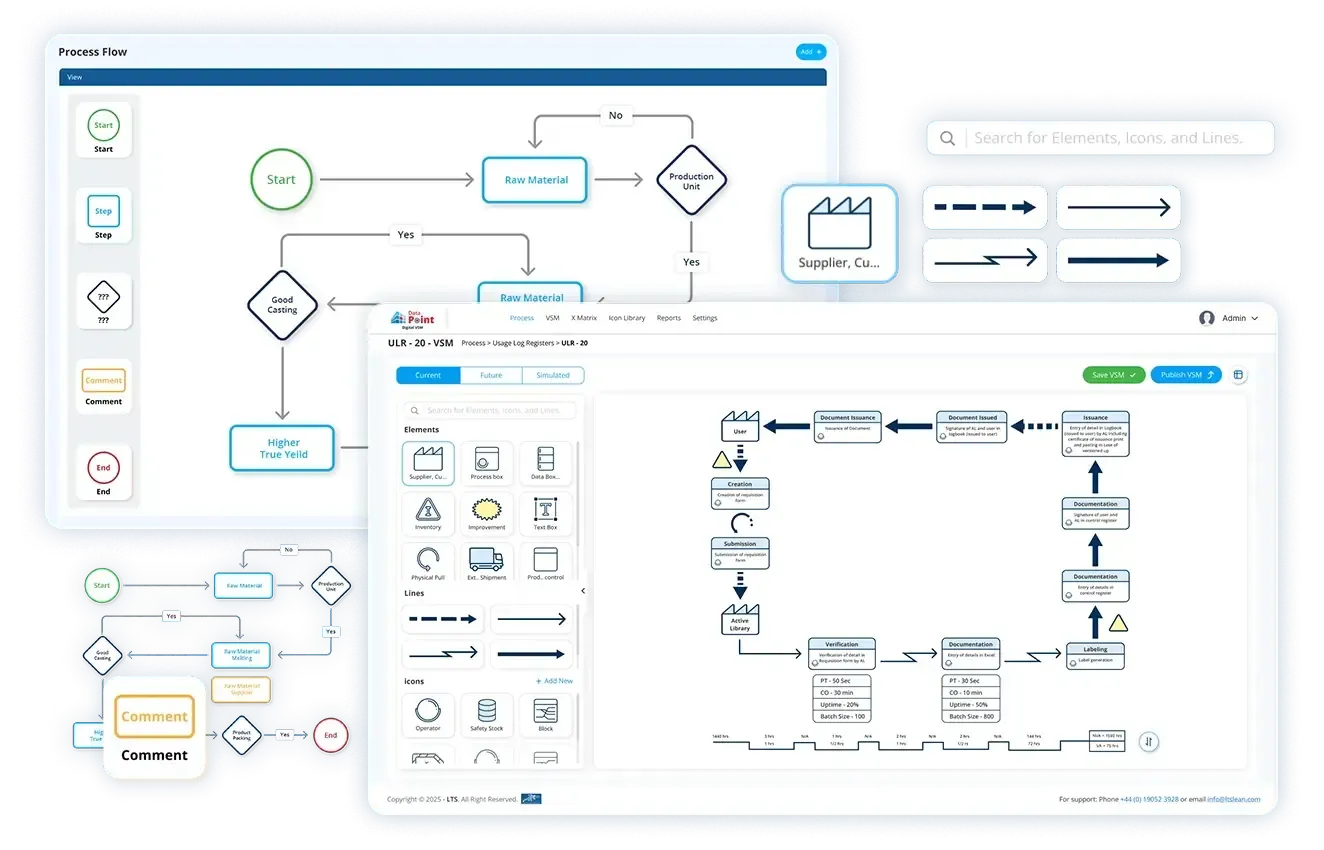
Visualise how raw materials, information, and tasks move across departments using enterprise flowcharts, gemba walks and Value streaming map (VSM). Identify redundancies, bottlenecks, and areas with high wait times.
3. Production planning
Planning the production schedule is critical for on-time delivery and efficiency. Data Point enables you to build production planning dashboards, allocate resources, and align lean process flows techniques with shift schedules.
How Data Point helps:
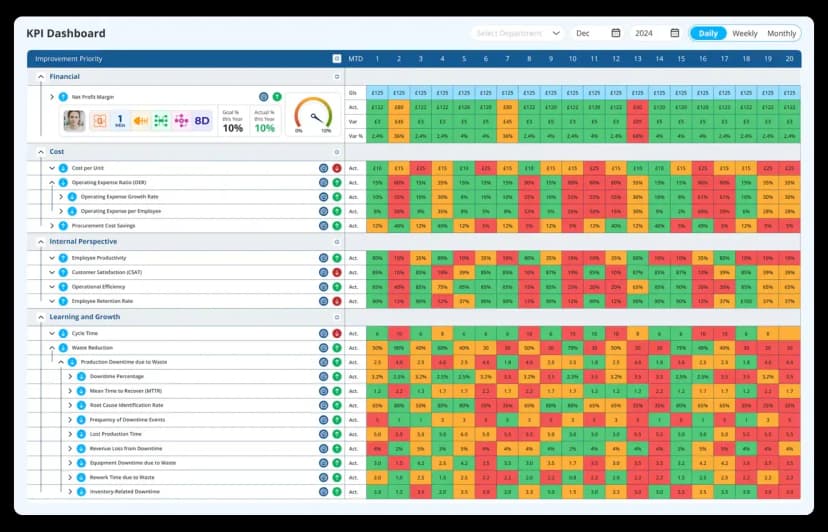
Assess the current process using SQDCP (Safety, Quality, Delivery, Cost, People) frameworks and PDCA (Plan-Do-Check-Act) principles. Track real time data through KPI tracking software and management dashboards, thus making strategic planning and execution of every step easier.
4. Manufacturing process execution
This is the core of your process flow—the actual transformation of materials into finished goods with value. Data Point digitises each production step, ensuring SOP adherence, visibility, traceability and real-time KPI tracking across departments for strategic execution.
How Data Point helps:
The software boosts shop floor efficiency by displaying real-time work instructions, tracking cycle time, scrap, downtime, and productivity, and enabling mobile reporting with instant alerts. This ensures every step in the manufacturing process flow is executed accurately, monitored continuously, and adjusted quickly leading to smoother operations, reduced waste, cost and faster decision-making across the production line.
Ready to optimise? Grab the process flow template and take control with VSM
Quality control and testing
Maintaining consistent product quality is vital. With Data Point, QA teams can log test results, initiate corrective actions, and connect quality issues directly to the production process.
How Data Point helps:
Data Point strengthens manufacturing process flow by capturing quality checkpoints, sending real-time alerts for deviations, and supporting CAPA workflows. It also tracks WIP to ensure smooth operations and prevent bottlenecks.
Packaging and labeling
Packaging isn’t just the final step but part of the operational flow. Data Point integrates this stage with visual SOPs, compliance checklists, and barcode tracking.
How Data Point helps:
It streamlines the packaging and labeling stage by linking customised frameworks to specific product types. Its built-in labeling templates ensure compliance with regulatory and customer requirements, while real-time tracking of packaging defects and rework enables quick corrective actions. This integration reduces errors, improves packaging accuracy, and enhances the overall efficiency of the manufacturing process flow.
Storage and inventory management
Once packaged, products must be stored efficiently. Data Point allows you to link warehouse inventory levels with production output and automate reordering and space allocation.
How Data Point helps:
Data Point ensures smooth process flow by tracking real-time inventory status, monitoring shelf-life, and sending alerts for low stock or expired items—reducing delays and preventing material waste.
Distribution and shipping
Data Point supports the final stage of your production flow—ensuring products reach the customer accurately and on time. The software links distribution with packaging, shipping documents, and route plans.
How Data Point helps:
Streamlines shipping by linking dispatch with production batches, tracking outbound goods, and flagging delays. It aligns production with delivery timelines through logistics KPIs and ERP integration, ensuring on-time, efficient distribution.
Continuous improvement
No process is perfect. Smart manufacturing ensures your process flow evolves with business needs. Data Point uses 5 Why techniques that enable feedback loops, performance tracking, and PDCA boards from shop floor to top management.
How Data Point helps:
Data Point fosters continuous improvement by capturing team ideas, tracking real-time KPIs, FCIL frameworks, supporting Kaizen, Kanban and PDCA cycles. Integrated with digital huddle boards, it connects shop floor insights to leadership for fast, accountable action.
Visualise, track, improve: Use Data Point to bring clarity to complex manufacturing
16 Key benefits of implementing process flow
- Improved efficiency and productivity
- Consistent output & quality control
- Reduce waste and cost
- Flexibility, scalability and accountability
- Better inventory management
- Enhanced safety, data security & compliance
- Environmental sustainability
- KPI-based performance tracking with live dashboards
- Accurate production planning & scheduling
- Real-time data & analytics
- Visual process mapping
- Stronger communication and collaboration
- Enhanced employee training & onboarding
- Process standardisation
- Continuous process optimisation
- Improved customer satisfaction
5 Tips to improve process flow performance
- Make it data-driven- use real-time data from MES software like data point to monitor cycle times, defects, and downtime—then act fast with insights.
- Standardise and simplify processes- create clear SOPs and eliminate unnecessary steps. Standardisation boosts consistency, quality, and speed.
- Involve every tier and team-empower operators, supervisors, and managers through tier meetings, feedback loops, and shared KPIs.
- Break down goals into actionable tasks- align daily shop floor actions with broader business objectives using visual tools like strategy maps or huddle boards.
- Find and eliminate operational friction- use root cause analysis, kaizen, and employee input to identify what's slowing you down and fix it permanently.
Choosing the right software for manufacturing process flow is not just a technical decision but a strategic one. Manufacturers today face several challenges in process flow: disconnected data, manual tracking, delayed decisions, inconsistent performance visibility, and a lack of standardisation across teams. To overcome these, it's essential to select a solution that enables real-time visibility, automates workflows, tracks performance, and integrates across departments—from shop floor to leadership.
In conclusion, an efficient manufacturing process flow demands a solution that not only maps operations but also drives improvement. With Data Point and other Lean Transition tools—like PDCA cycles, huddle boards, value stream mapping, root cause workflows (RCA), and live dashboards - you can eliminate bottlenecks, enhance visibility, and transform your operations into a lean, agile, and data-driven powerhouse. Tracking takt time alongside these tools ensures the pace of the process flow itself stays matched to real customer demand, not just the individual steps within it.
Streamline your production flow—Let Data Point turn every step into progress
FAQs
1. How does manufacturing process flow software help?
Manufacturing process flow software helps visualise, standardise, and optimise each step of the production process. It supports process mapping, KPI tracking, and automation for improved operational efficiency and real-time decision-making.
2. What is process flow diagram software?
Process flow diagram (PFD) software is a tool used to visually represent the sequence of operations or steps in a process. It helps identify inefficiencies, improve workflows, and communicate processes clearly using flowcharts and diagrams.
3. How does Data Point software help in process flow?
Data Point streamlines process flow by providing real-time data visibility, automated KPI tracking, and digital dashboards. It helps identify bottlenecks, monitor performance at every stage, and ensures smooth coordination between teams, leading to faster decisions and continuous process improvement.
4. What is a process flow chart?
A process flow chart is a visual diagram that shows the sequence of steps in a workflow or manufacturing process using symbols like arrows, rectangles, and diamonds. It helps standardise procedures, spot inefficiencies, and improve team communication.
5. How do you make a process flow chart?
Steps include-
- Define the process scope and goal
- List key steps in sequence
- Use standardised symbols (e.g., start, process, decision)
- Connect steps with arrows
- Validate with stakeholders and optimise Software like Data Point or tools like VSM makes this process faster and more accurate.
6. What is the purpose of process flow?
The purpose of process flow is to streamline operations, improve clarity, identify bottlenecks, reduce waste, and ensure consistency. It serves as a visual guide for training, planning, and continuous improvement in manufacturing.
7. What are the 7 steps of manufacturing?
The typical 7 steps in the manufacturing process include:
- Product design and development
- Raw material sourcing
- Production planning
- Manufacturing/production
- Quality control and testing
- Packaging and labeling
- Distribution and shipping
8. What is Muda, Mura, and Muri?
These are core concepts in lean manufacturing used to identify and eliminate inefficiencies in production systems:
- Muda means waste—any activity that doesn’t add value.
- Mura is unevenness—inconsistencies in workflow or demand.
- Muri is overburden—overloading people or machines beyond capacity. Eliminating these three helps achieve lean manufacturing excellence.
9.What is an example of a manufacturing process flow chart?
An example is a flow chart for an assembly line where raw materials enter, move through cutting, welding, painting, quality checks, packaging, and finally dispatch. Each step is shown with symbols and arrows to map the entire production flow.
10.How do you optimise, process flow in lean manufacturing?
Optimise by using lean tools like value stream mapping, PDCA cycles, and Kaizen. This helps eliminate waste, standardise SOPs, improve cycle time, and align shop floor activities with business goals for continuous improvement.

Amer Jumah, Senior Lean Consultant
Amer is co-founder of Agile Solutions and a certified Six Sigma Black Belt, Lean Black Belt, and PMP, with over nine years of experience implementing Lean, Six Sigma, and Agile principles across diverse industries. He specialises in process optimisation, waste elimination, and delivering cost savings through organisational change.