How to Calculate the ROI: A Complete Guide to Formulas, Costs, Benefits, and Real-World Examples
Learn how to calculate the ROI of manufacturing operations software, including costs, benefits, payback periods, key formulas, and practical examples.
Contents
- What is ROI for manufacturing operations software?
- Why calculate ROI before you invest
- Types of benefit in an ROI calculation
- Costs and investment components
- ROI formulas: Net value, ROI percentage and payback period
- How to calculate the ROI of manufacturing operations software, step by step
- Factors that change the ROI
- Worked ROI examples
- Common ROI calculation mistakes
- How to measure ROI after go-live: Tracking realised ROI
- How LTS Data Point supports ROI measurement
Last updated on : October 28, 2026
Learn how to calculate the ROI of manufacturing operations software, from baseline waste and benefit categories to formulas, payback and worked examples.
Return on Investment (ROI) shows whether the money spent on manufacturing operations software comes back, and how quickly. To calculate ROI, convert the improvement it creates into money and compare that with the cost of buying and running it.
The comparison is not with doing nothing, because doing nothing carries an annual cost too. So, what is the current way of working already costing?
That baseline acts as the starting point. From there, each benefit is converted into money, every cost is counted and the return is tracked after go-live.
Talk through the ROI case for your site
Speak with an LTS Data Point expert about your baseline, your inputs and where the return is likely to come from. You’ll leave with a clearer picture of what the ROI could look like for your operation.What is ROI for manufacturing operations software?
The ROI of manufacturing operations software is what a site gets back for what it puts in. It is a ratio. The earnings, after cost, are set against the money spent and shown as a percentage.
The earnings are not sales. They are hours the team gets back, losses that stop repeating and decisions made sooner. Each one has a money value, and that is where the calculation starts.
It helps to be clear about what the software is. It is not a reporting tool. It replaces scattered spreadsheets with one connected view, so everyone from operator to leadership works from the same KPIs. Daily data turns into action with an owner. It sits alongside ERP and connects to it. It does not replace it. So, the return is not more data. It is what teams do with the data they already have.
Does one number tell the whole story? No. A business case needs an annual benefit, a payback period and an ROI percentage. Net value shows the gain. The percentage shows how hard the money works. Payback shows how long it stays at risk.
The percentage alone can mislead. It takes no account of how long the return takes. Two options can show the same figure. One pays back in a year. The other takes five. Same percentage, very different risk.
So, a high ROI percentage does not make the software worth buying. It makes it efficient. Whether it is worth buying depends on speed and scale too.
That is what the ROI measures. So, why build the case before the money is spent?
Why calculate ROI before you invest
Why is the case so hard to prove? The gains do not arrive as one visible saving. Software benefits tend to build gradually, and the link between a productivity gain and the software behind it often stays unclear. A review that finishes sooner or an issue that closes faster rarely shows up as a line in the budget.
That is why the case has to start with what a site already carries. Waste sits inside daily management before any software arrives. It takes four forms. Time waste is hours lost to meeting preparation, manual KPI updates and searching for information. Decision delay is slow escalation and unclear ownership. Performance loss is downtime, missed delivery and quantity problems that return. Improvement loss is projects that slip and actions that never close.
Staying as things are, has a yearly cost too. It comes from three places. Issues take too long to resolve. Failures repeat. Projects run late. Each one has a price, and each one is already being paid.
Many teams assume that if nothing changes, nothing is spent. That is the misconception. The spend is simply hidden in hours, delays and repeat problems.
So, the baseline is there before the business case for manufacturing software starts. The next question is what the software would actually change, and what counts as a benefit.
Types of benefit in an ROI calculation
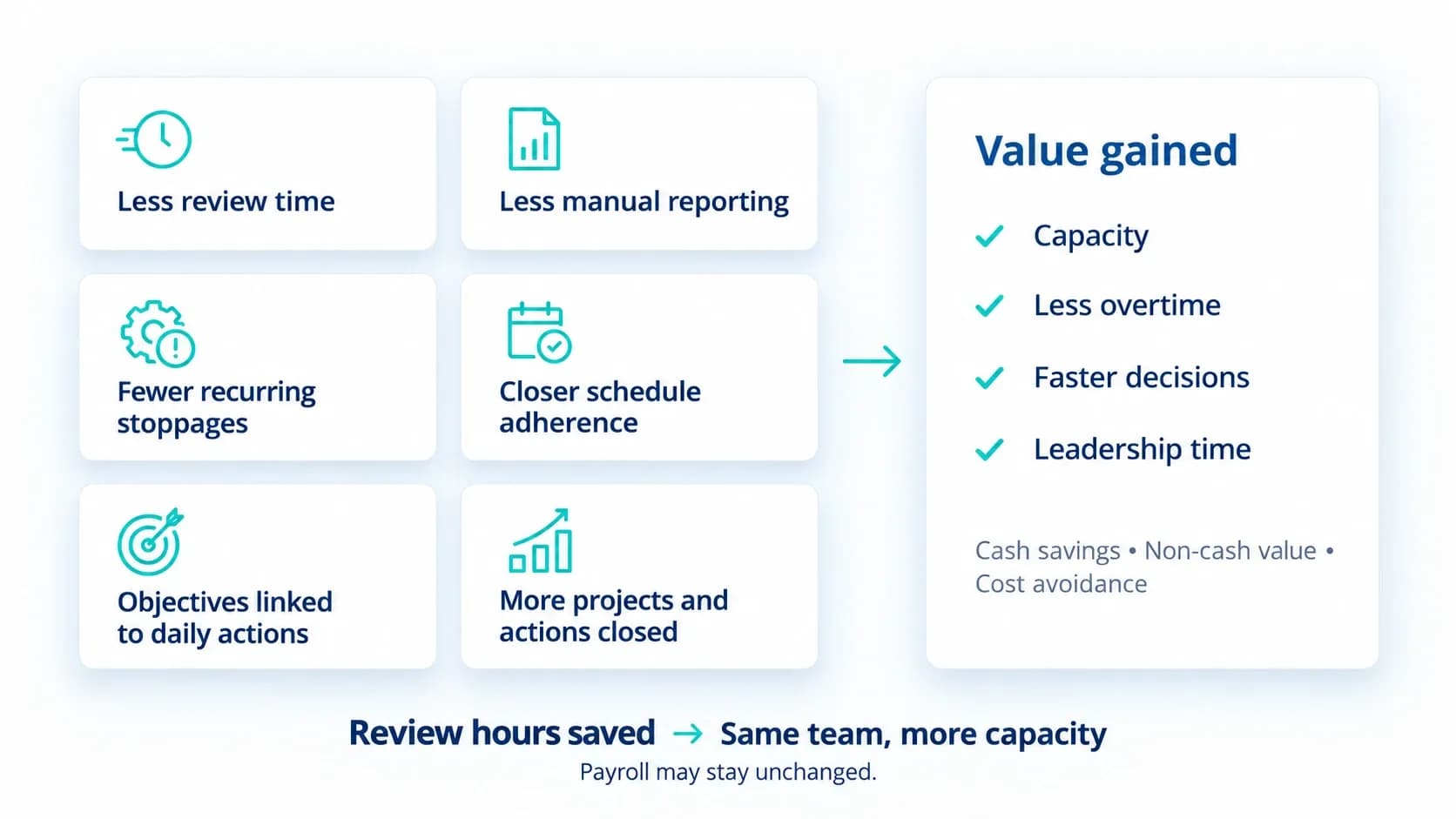
Where does the money come from? Manufacturing productivity savings come from six places, and not all of them look like savings.
- Meetings and communication: The time spent preparing, running and following up reviews.
- Visual management and reporting: The effort of building and updating numbers by hand.
- Downtime and recurring losses: Stoppages and problems that keep coming back.
- Planning and execution: How closely a site keeps to its schedule.
- Strategic execution: How well objectives reach daily KPIs and actions.
- Improvement governance: Whether projects and actions actually close.
Not every benefit land as cash. Value may appear as capacity, less overtime, faster decisions or more leadership time. It does not have to mean a smaller payroll. Where a hard figure is difficult to assign, organisations weigh hard and soft savings together and often treat the result as cost avoidance.
Take a team that gets hours back from its reviews. The headcount stays the same. The hours are still real, even though no payroll line shrinks.
That is why saved hours do not always mean fewer people.
That is why saved hours do not always become cost savings.
Costs and investment components
What does the software really cost? More than the first invoice. Four items make up the total cost of ownership.
- Implementation costs: The one-time work of configuration, data integration, branding and onboarding. Training sits inside this work too.
- Integration costs: Connecting the software to the systems a site already runs. They sit inside the setup work, so they need their own time.
- Training costs: The sessions themselves, and the hours people spend away from their normal work to attend them.
- Ongoing maintenance and support costs: A monthly subscription that covers hosting, backups, data security, user management, training resources and support.
The subscription is the easiest cost to see. It can also rise as headcount or functionality grows. The harder costs to see are the soft ones. They include internal staff time, lower productivity during rollout and training. A team learning a new way of working delivers a little less while it learns. That dip belongs in the circulation.
Spend does not have to arrive in one block. Some operations software is built in modules. A site starts with core daily management and adds more as the need grows. Each stage has its own cost and its own benefit. So, the cost side should list each stage, not one lump sum.
That is the cost side. What happens when it meets the benefit side?
ROI formulas: Net value, ROI percentage and payback period
Benefits and costs meet in one calculation. It runs in four stages. The baseline sets what the current way of working costs today. The improvement is what changes: time saved, faster response, fewer repeat issues. Conversation puts a money value on each of those changes. The return sets that value against the investment.
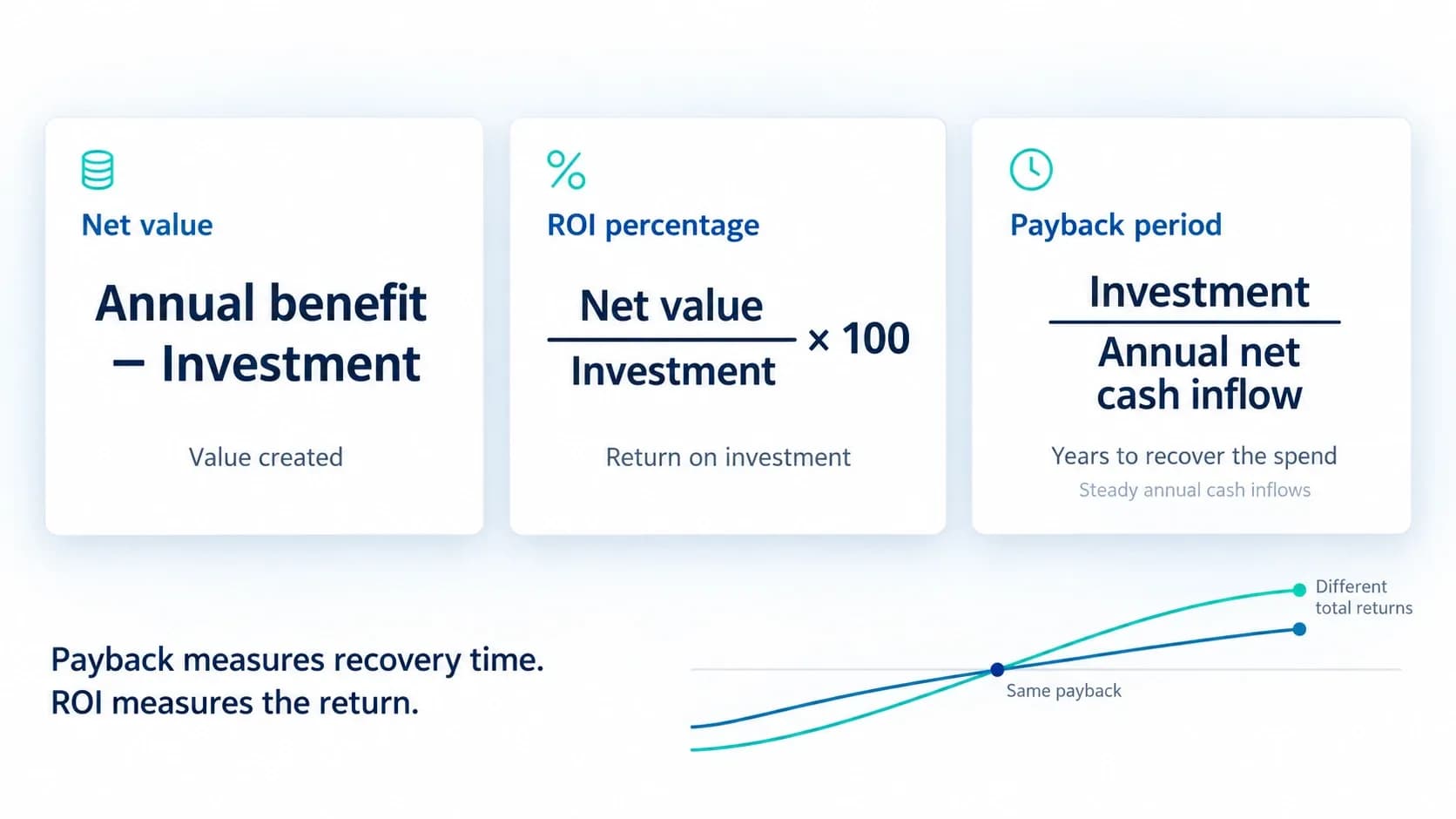
The ROI formula produces three results, and each answers a different question.
- Net value: Annual benefit minus the investment. This is the net benefit calculation, and it shows how much value is created.
- ROI percentage: Net value divided by the investment, shown as a percentage. It shows how hard the money works. This is the core ROI calculation formula.
- Payback period: The investment divided by the annual cash flow, which gives the time to break even. It shows how long the spend stays at risk.
Time changes the picture, so a single year rarely tells the whole story. Annualised ROI spreads the same ratio over the number of years the investment runs. Run it for the first year, then for three. The answer changes, because more years of benefit sit against the same spend. Finance teams may go one step further and ask for net present value. It counts the time value of money when it compares inflows with outflows, and it is the base of discounted cash flow analysis.
One result needs care. Payback ignores everything that comes after break-even. Two options can pay back at the same time and still return and still return very different totals. A fast payback is not always the better investment.
How to calculate the ROI of manufacturing operations software, step by step
What goes into the calculation? A baseline first, then each loss converted into money, one step at a time.
Measure the baseline
Record how the site performs today, before anything changes. Every saving is measured against this baseline, so it comes first. This baseline performance measurement comes first.
Gather the inputs
Collect three groups. Operational inputs cover meeting cadence, users and shifts, downtime levels and reporting effort. Financial inputs cover labour assumptions, production value, and quality and delay cost. Technology inputs cover existing systems, integration maturity and automation opportunity. Add the scrap and rework rate and the weekly hours spent on manual reporting where the site records them.
Value the time saved
For meetings, multiply attendees by hours per review, by reviews per year, by the blended hourly cost. For manual reporting time savings, multiply the recovered hours by local cost. If those hours replace overtime, use the overtime rate to value the overtime cost reduction.
Value the downtime
Multiply weekly unplanned downtime hours by 52, then by the cost per hour. That gives the annual cost to improve on, and the base for downtime reduction savings.
Value the repeat failures
Multiply the failures removed by the cost per failure.
Value the planning gain
Multiply the improvement in schedule adherence by the cost of the disruption avoided.
Apply a range you can defend
Do not use the best case. Take the annual cost of each loss and multiply it by the share you expect to recover.
Phase the value
The first return usually comes from management discipline and less admin effort, such as automated KPI updates. It rarely comes from production gains. Count that layer first, then add the others as they go live.
Once the last step is done, the calculation is complete. The same steps work for any site, but the answer will not be the same. So, what changes it from one site to the next?
Factors that change the ROI
The method stays the same from site to site. The assumptions do not. A plant in the UK, the US or India follows the same steps, but its numbers differ. Hourly cost by role is different. So, is the cost of downtime, quality failure and delay. The number of people, meetings, shifts and sites changes the result, and so does how far automation have come.
Three more things sit behind the result. Maturity is where the site starts. Deployment scope is how much of the site the software covers. Adoption level is how many teams use it day to day. All three change the value.
The approach also scales. It can run for one team, then a plant, a region and the whole enterprise, using the same standard way of measuring. The result is built up level by level.
With this many moving inputs, test the answer. Change one input at a time and watch what happens. This shows which assumptions the result depends on and how much room for error there is. That is ROI sensitivity analysis. It tells you which number deserves the closest check.
The method, the inputs and the factors are now in place. What does the calculation look like with numbers?
Worked ROI examples
Numbers make the method easier to follow.
Look at what happened. The same investment gives 12.8 per cent in the first year and 88 per cent over three. A modest first year does not mean a weak case. It means the timeframe matters, which is why net value and payback sit beside the percentage.
The numbers are only as good as the inputs behind them. So, where do these calculations usually go wrong?
Common ROI calculation mistakes
Most ROI mistakes happen before the formula is used. They are also why some software investments fail to deliver ROI.
Three come up again and again.
- Counting the same benefit twice: One change can improve several outcomes. Its money value should be counted once, unless the benefits are shown to be independent. A shorter review is a simple example. Those hours cannot be claimed under meetings and again under faster decisions.
- Treating benchmarks as the decision: Benchmarks are a fair place to start the conversation. The decision needs the site’s own, verified inputs.
- Skipping the baseline: Falling to record baseline data before launch is the most common way ROI measurement goes wrong. Without it, any improvement is a claim with nothing to compare against.
None of the three is a maths error. All of them are about the inputs. A case that avoids them holds up at approval. Does it hold up after go-live?
How to measure ROI after go-live: Tracking realised ROI

Approval is not the end of the ROI. Software benefits realisation starts there.
- The first worksheet is forecast. Whether it was right only shows when projected ROI vs actual ROI sit side by side, with the real savings tracked against the original baseline.
- One reading is rarely enough. An earl check measures the learning curve, not the software. A fairer picture comes from looking shortly after launch, again after a few months and once more after a year, always against the same baseline.
- Savings need someone behind them. A loss is spotted, an owner takes it, the root cause goes, and only then does the benefit show up. Without an owner, the saving stays on paper.
- The work around it needs a thread too. When every action and project traces back to an objective and a KPI, a result can be tied to what produced it, which is how software ROI is proved to finance.
That turns the ROI from a forecast into a record. But who keeps this going every day, not just at review time?
How LTS Data Point supports ROI measurement
Every part of the ROI calculation needs something to stand on every day. LTS Data Point gives it that footing. It is connected performance management, not a reporting tool. It turns daily performance data into action with an owner, and that is what makes savings measurable.
- Losses are followed through: The 4C workflow takes each concern through cause, countermeasure and confirmation. Every action is assigned, tracked, escalated and closed, with a full audit trail. When a saving is claimed, the action behind it can be shown.
- KPIs have owners: Each KPI is tied to an owner, a deadline and a corrective action, with RAG status visible at every tier.
- Strategy reaches the daily numbers: In the Strategic Monthly Reviews module, the X-Matrix connects objectives, KPIs and initiatives. Bowler charts set monthly targets against actuals.
- Downtime is measured live: OEE combines availability, performance and quality into one figure, and many companies operate far below the 85 per cent world-class sites reach. The Downtime Monitoring module shows OEE in real time and logs root causes with escalation.
- Planning has a number behind it: The Planning module covers master production scheduling and delivery adherence, so the planning gain in the ROI calculation can be measured.
- The data comes from systems already in use: Data Point connects to any system or manual input, from ERP and MES to BI platforms, and brings the KPIs into one real-time view. Power BI sits alongside it for executive analysis.
The calculation, the tracking and the evidence then sit in one connected system.

Geandra Queiroz, Operations Management Consultant
Geandra is an Operations Management Consultant at Lean Transition Solutions, specialising in Lean philosophy, Lean Six Sigma, and strategic planning across manufacturing and healthcare. She is currently completing her PhD in Industrial Engineering at the Federal University of São Carlos, researching the integration of Operations Strategy, Lean, and Green Manufacturing.