What Is a Master Production Schedule? A Practical Guide for Modern Manufacturing
Understand what a master production schedule (MPS) is, what it includes, how it works, and how it compares to MRP and S&OP in today’s manufacturing environment.
Contents
- What is a master production schedule, and where does it sit between S&OP and MRP?
- Master production schedule dashboard
- What are the benefits of master production scheduling software?
- What features should master production scheduling software have?
- What goes into a master production schedule?
- How does a master production schedule work? A worked example
- Forecast, customer orders and time fences: Which demand should the schedule trust?
- How do you build a master production schedule?
- What should manufacturers look for when choosing master production scheduling software?
- How LTS Data Point supports master production scheduling
- From ERP demand to a schedule the floor can run
Last updated on : October 22, 2026
A structured plan that sets what a plant will build, how much and when, so operations teams can balance forecast demand, customer orders and capacity before committing materials and labour.
A master production schedule (MPS) is a plan that shows which finished products a plant will build, how many, and when. It uses the demand forecast and confirmed customer orders, then checks them against stock and production capacity.
It sits between sales and operations planning and material requirements planning. It turns an agreed volume into specific items and dates.
Sales wants more volume. Planners see the limits of the lines. The production lead time on key items will not shrink to suit. The master production schedule settles this into one plan the whole plant can follow.
See Master Production Scheduling in Action
Still rebuilding the master schedule by hand? See how Data Point MPS turns ERP demand into a capacity-feasible scheduleWhat is a master production schedule, and where does it sit between S&OP and MRP?
A master production schedule is the middle layer of manufacturing production planning. It takes the volume agreed above it and hands something specific to the layers below.
Sales and operations planning sets the overall volume by product family, usually months to a couple of years ahead. It answers how much the business should make and sell.
The master production schedule breaks that volume into finished items or key modules, by week. It answers which items, how many, and when. Building and maintaining this plan is known as master scheduling.
Material requirements planning then works out the components, sub-assemblies and raw materials needed, following each item’s lead time.
Detailed scheduling sits at the bottom. It assigns jobs to machines, lines and shifts, and tests whether the floor can deliver what the schedule promised.
An MPS is not a forecast or a sales target. The forecast is an input. The schedule is a commitment, and it only holds if the plant can build what it says.
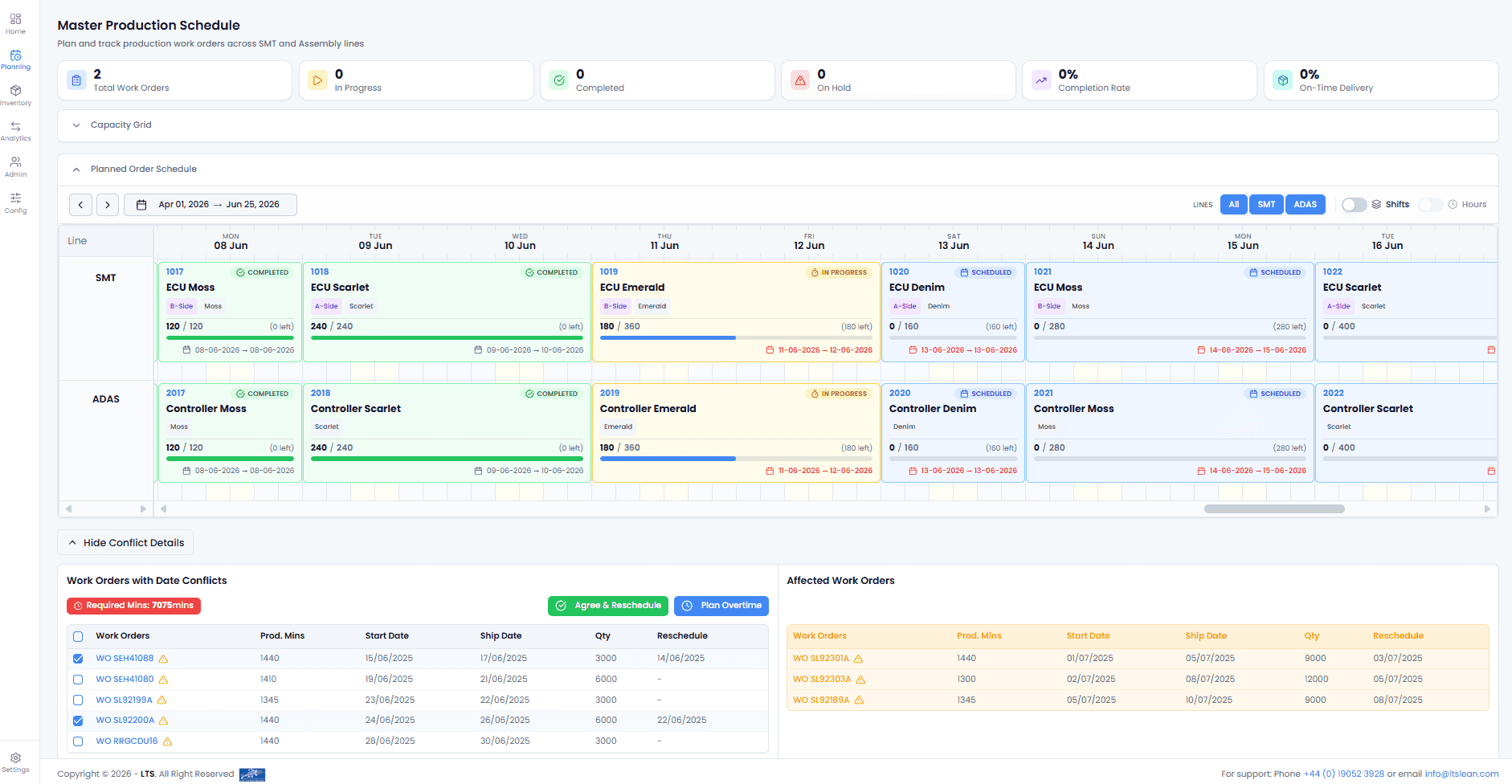
Master production schedule dashboard
What are the benefits of master production scheduling software?
Master production scheduling software keeps the schedule current as demand, stock and capacity change. The benefits show up in five places.
- Stable supplier plans: A stable schedule gives suppliers a stable plan to work to. When the schedule holds, they stop chasing changes.
- Early warning: Orders change and capacity is limited. Done by hand, an overload can stay hidden until delivery is at risk. Software shows it while there is still time to act.
- Credible dates: Demand sets the requirement. It does not prove the floor can meet it. A schedule checked against capacity gives sales dates that production can keep.
- Less rebuilding: The software drafts the plan. The planner adjusts it, locks firmed work, reruns it and commits it.
- Fewer false promises: An order that cannot be met is held back. It can still be analysed, but it is not published as a promise.
Each benefit comes from the same check – the schedule is tested against capacity and data before it is published.
What features should master production scheduling software have?
Good master production scheduling software does six things. Each one answers a weakness of the spreadsheet.
- Real capacity: Shift and calendar management turns available time into production capacity the schedule can use.
- Conflict sorting: Blockers stop an order from being scheduled. Warnings, such as an overload, a due date miss or a material shortage, leave the decision with the planner.
- Dependencies: Sub-assemblies are placed before the parent orders that need them.
- AI support: Research on AI-based scheduling points to real-time planning that could be more flexible and economical.
- ERP connection: Start with the data you have, such as a spreadsheet upload. Add ERP or API order import later. The ERP stays where it is.
- Data health: Sync monitoring shows when data is out of date or wrong, so the schedule rests on data that can be trusted.
A schedule is only as good as the data behind it.
What goes into a master production schedule?
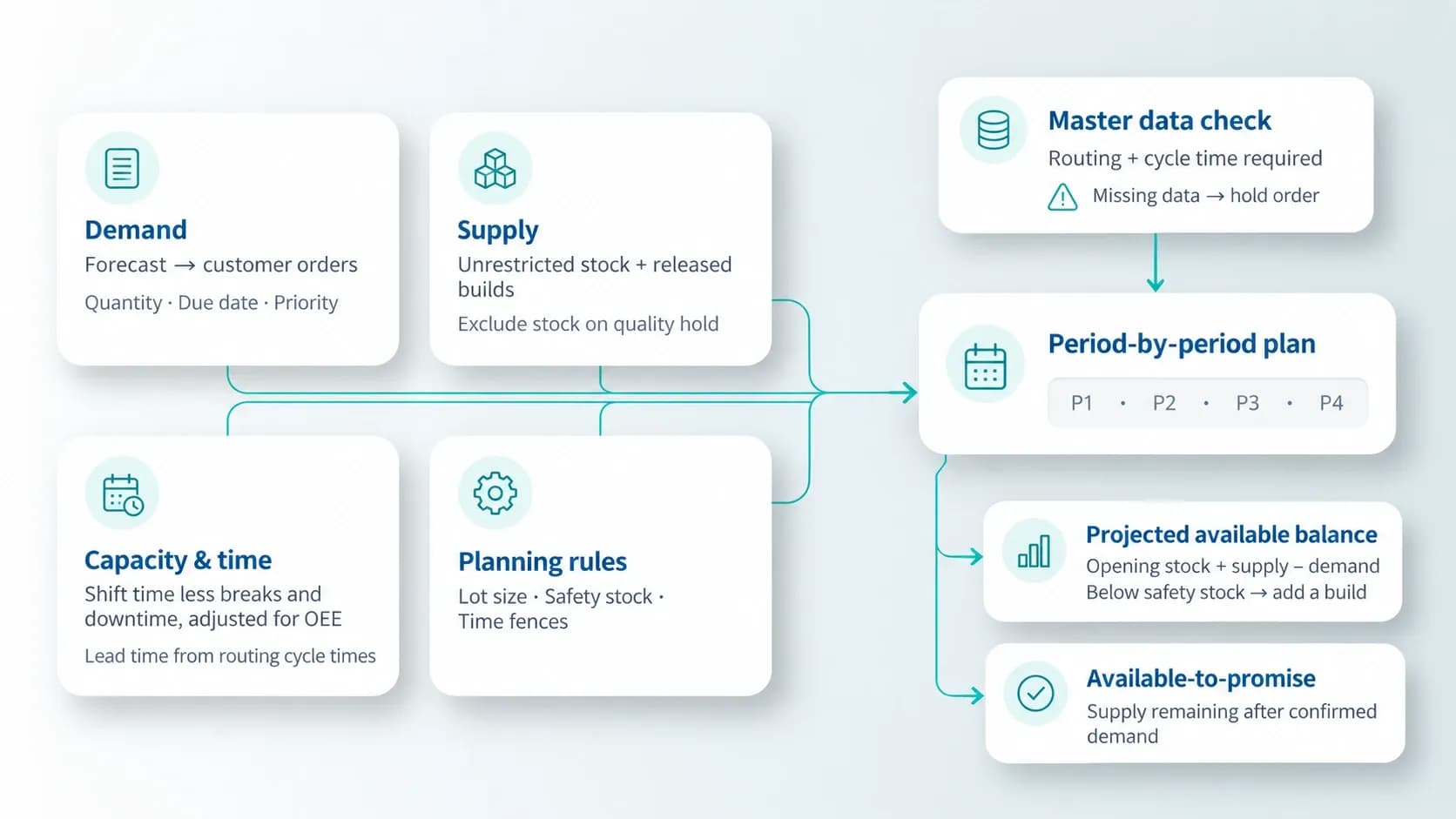
A master production schedule combines demand, supply, capacity and planning rules into one period-by-period plan.
- Demand: The demand forecast covers periods with no orders yet, and customer orders replace it as they arrive. Each line carries a quantity, due date and priority. Priority decides who gets capacity first.
- Supply: Finished goods inventory plus builds already released. Only unrestricted stock counts, so stock on quality hold is excluded.
- Capacity and time: Production capacity is shift time less breaks and planned downtime, adjusted for OEE. Production lead time is built from routing cycle times, summed across operations.
- Rules: Lot sizing sets the build quantity. Safety stock triggers a build before stock reaches zero. Time fences lock the near term.
Two rows come out of this. The projected available balance is opening stock plus supply, less demand, and a build is added when it falls below safety stock. Available-to-promise is what remains after confirmed demand.
Underneath sits master data. An item with no routing or cycle time cannot be given a date, so the order is held instead of published.
How does a master production schedule work? A worked example
A master production schedule nets demand against supply, one week at a time. A build is added only when the projected available balance would fall below safety stock.
Consider a simple master production schedule example: one product with 40 units in stock, a safety stock of 20, and builds in lots of 100.
A basic master production schedule template needs the same six fields.
Demand used is the larger of the demand forecast and customer orders. In week 1, orders of 35 have used up the forecast of 30, so 35 drives the plan. In week 3, orders of 20 sit under a forecast of 40, so the forecast drives. Orders using up the forecast in their own week is forecast consumption.
The master production schedule calculation is the same every week: the balance is last week’s balance, plus any build, minus demand used. In week 1, 40 minus 35 leaves 5, below the safety stock of 20, so a build of 100 is planned. That makes 105. Week 4 follows the same rule.
Available-to-promise is the stock sales can still sell. In week 1 there are 140 units: 40 in stock plus a build of 100 units. Customers have already ordered 80 for weeks 1 to 3, so 60 are left to promise.
Small changes have large effects. If the week 3 forecast rises from 40 to 70, the next build moves from week 4 to week 3. Materials ordered for week 4 may now arrive too late.
Before release, each build is checked for a valid routing and cycle time, available capacity and a due date it can meet. Problems go to the planner to decide.
Forecast, customer orders and time fences: Which demand should the schedule trust?
The schedule trusts customer orders close in, and the demand forecast further out. Time fences mark where that changes, and who may change the plan.
Neither signal works alone. A forecast on its own builds for demand that may never arrive. Orders on their own react too late for items with a long production lead time.
So, the plan blends them. Close in, it follows orders. Further out, it uses the larger of the forecast and orders. A forecast of 50 with orders of 30 gives a plan of 50. Orders of 70 give a plan of 70.
The nearest weeks, often two to four, form the frozen zone. The plan follows confirmed orders there, and changes are extremely hard to make. Beyond it, changes are allowed, but each one needs a trade-off agreed. Past the last fence, the planner can change the plan freely.
Every change inside the fences passes through MRP into supplier reschedules and expedites. If a customer asks to double next week’s order, the fence shows the cost before anyone agrees.
How long should a fence be? Long enough to protect committed work and materials, and short enough to leave room to react. The right length depends on lead times and how flexible the operation is.
Time fences protect schedule stability. Inside them, a change is a decision with a cost.
How do you build a master production schedule?
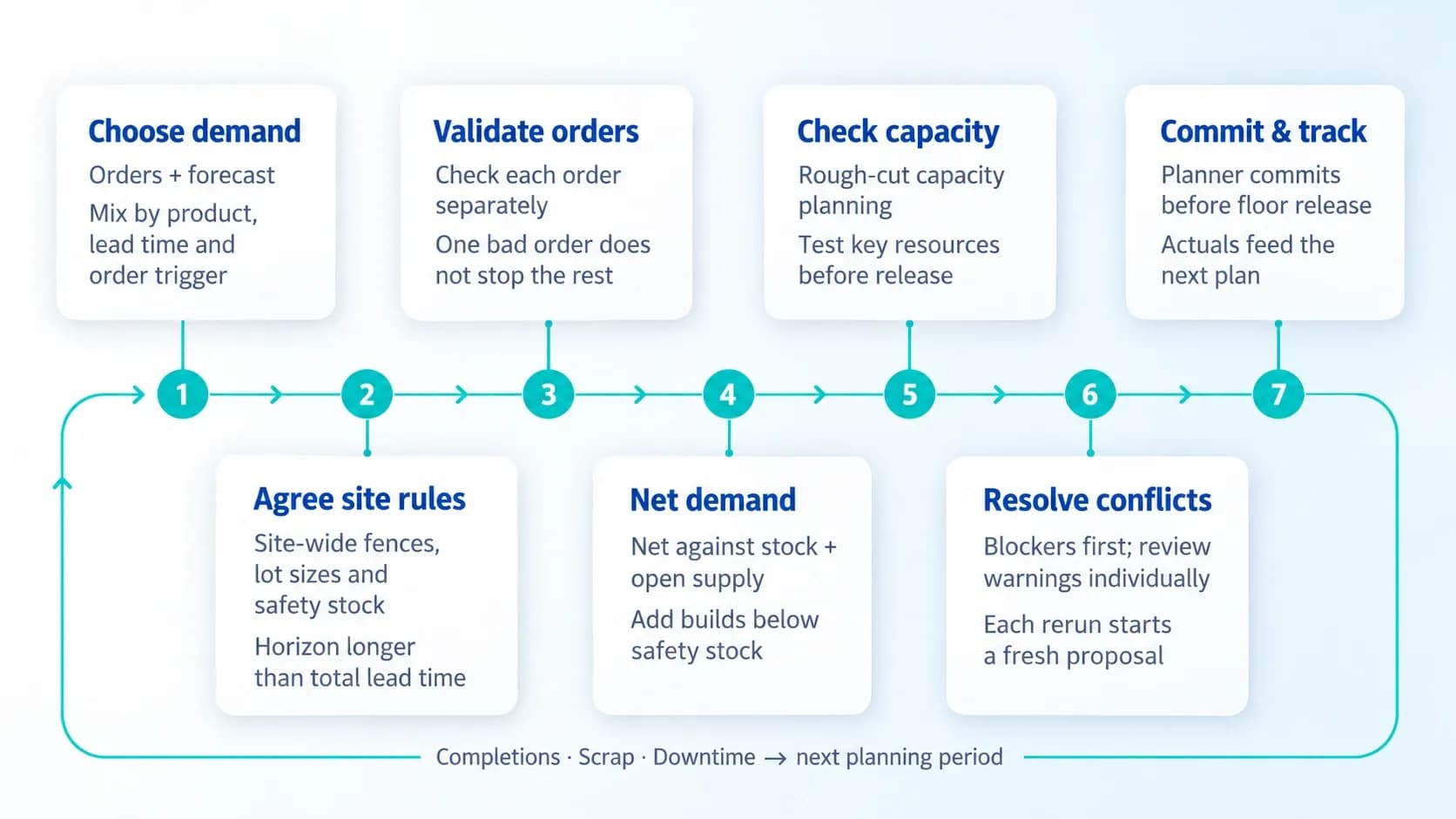
The same cycle runs each planning period. Each step feeds the next.
- What to plan: Confirmed orders and forecast can both feed the schedule. The right mix depends on the product, its lead time and how much production individual orders trigger.
- Rules: Fences, lot sizes and safety stock are agreed once per site, so every planner gets the same answer from the same data. The planning horizon should run longer than the item’s total lead time.
- Data check: Each order is validated on its own. One bad order does not stop the rest of the run.
- Demand and builds: Demand is netted against stock and open supply. A build is added when the balance would fall below safety stock.
- Fit: Rough-cut capacity planning checks the draft against key resources before release.
- Conflicts: Blockers come first, because they stop scheduling. Warnings are decided one by one. Each rerun is a fresh proposal, so old conflicts do not carry over.
- Commit and track: Nothing reaches the floor until the planner commits. After release, completions, scrap and downtime feed back into the plan.
What should manufacturers look for when choosing master production scheduling software?
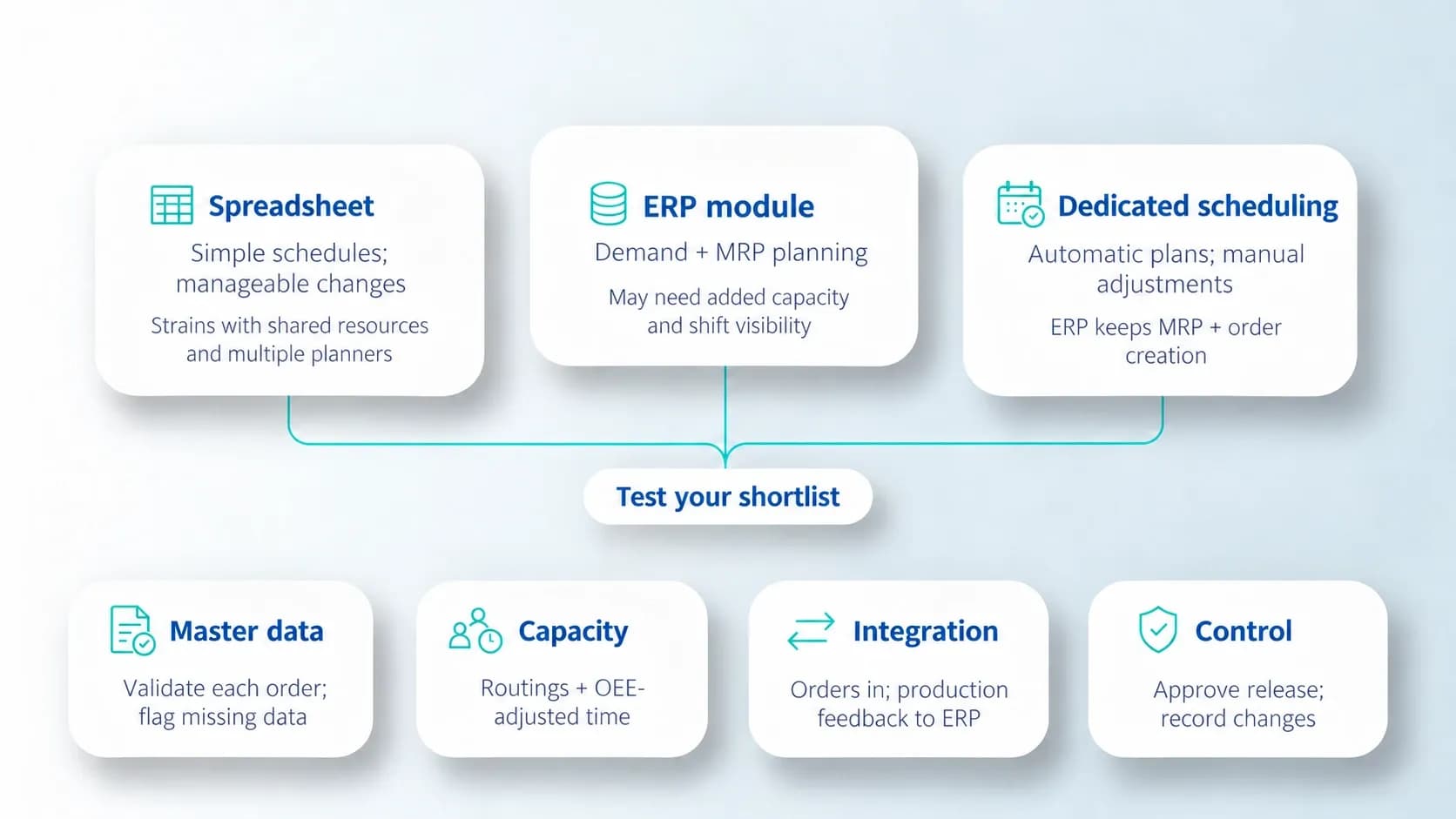
The right tool depends on how many planners, products and constraints the schedule has to carry. Start with the options, then test a shortlist.
Spreadsheet, ERP module or dedicated software?
A spreadsheet can carry a simple schedule when volumes, constraints and changes are manageable. It strains when several planners share resources, keep data current and need to judge a change across orders.
An ERP module holds demand and MRP planning. Capacity-aware scheduling, OEE-adjusted time and shift visibility often have to come from somewhere else.
Dedicated software fills that gap. It generates the schedule automatically and lets the planner adjust it by hand. The ERP keeps MRP and order creation, and the tool schedules the demand it receives.
Checks before choosing
Start with master data. Does the tool validate each order before it calculates a date? When something is missing, does it name the gap, or publish a false schedule?
Then look at capacity. Is it built from routings and OEE-adjusted time?
Next, integration. How do orders arrive, and how does production feedback return to the ERP?
Finally, control. Who approves the schedule before release, and is there a record of what changed?
A tool that fails these checks leaves the planner with a plan nobody can trust.
How LTS Data Point supports master production scheduling
LTS Data Point MPS turns demand into a capacity-feasible schedule. It sits between the ERP and the shopfloor. The ERP keeps MRP and order creation, and Data Point MPS schedules the demand it is given. Each site agrees its planning rules once, so every planner gets the same behaviour from the same data.
From ERP demand to a schedule the floor can run
Orders are scheduled using routing-based durations and OEE-aware capacity, and they are split across shifts when they need to be. Capacity comes from shift and calendar management, so every planned hour sits on a realistic working calendar. Controlled setup of product and routing, and of capacity and reason codes, keeps scheduling decisions consistent. The typical planning horizon is 26 weeks, shown in calendar and table views.
The planner works in one workspace. Line, day and shift views, filters, order cards and capacity validation put work-centre capacity, scheduled orders and delivery risk in the same view. The planner sees the effect of a change before the floor does.
Blockers, warnings and planner control
Every order is validated before a date is calculated. A missing routing, a missing cycle time or an invalid work centre is a blocker. The order is held, with the reason named, instead of being given a false date. Warnings stay visible for the planner to resolve – overload, a due date miss, a material shortage, a dependency issue or a collision with firmed work.
The planner stays in control. Manual adjustment, locks and firming, reruns and commit policy are all available, and an audit trail records the changes. Firmed and locked work is protected, and the engine schedules around it. Only achievable orders are committed. Problem orders stay visible but are not published. Auto-commit is optional, for approved clean runs.
Connecting to the ERP and closing the loop
A plant can start with a CSV or spreadsheet upload of work orders and reference data. ERP or API order import comes later, when it creates clear value. Material, routing, BOM, inventory and production versions can be synchronised, and sync monitoring checks data quality. No rip-and-replace programme is needed.
Once the plan is committed, execution feeds it back. Plan versus actual, completions and remaining quantity, good units and scrap, production history and downtime or OEE feedback show how the floor is doing, and rescheduling is the route when it slips. Production records and finished-goods declarations flow back to the ERP, and performance and capacity reports sit beside the planning report.
Intelligence and a phased start
Data Point AI monitors KPI trends in the scorecard and flags a slipping delivery score before it crosses a threshold. Each recommendation stays a suggestion, and a person approves the action.
The pathway is phased. A plant starts with the planning control it needs now, then adds integration, intelligence and execution feedback as it is ready.
A master production schedule is a promise about what the plant will build and when. It holds only when demand, capacity and data agree, and when changes are caught early, at the desk, before the floor feels them. Whatever tool carries it, the test is the same: