Huddle vs Meeting: Why the Difference Decides Whether Your Shift Ends in Action or a List of Unanswered Problems

Last updated on : May 13, 2026
Most of my time is spent on conducting unproductive team meetings and not solving issues. What am I doing wrong?
This issue must’ve brought you down to your knees often finding it hard to juggle everything. This might be because you collapse the huddle and the meeting into one session. You end up reviewing trends, analysing data, and assigning actions all at once.
The result? Nothing gets done properly on time.
The solution? Understand the difference.
Huddle vs meeting sounds like a simple distinction until you are the one running both. This difference determines whether your team leaves the session with owners and deadlines, or just a shared understanding that something is wrong.
See how LTS Data Point separates your daily huddles from your meetings with purpose-built tools for every format and every tier
The core difference between a huddle and a meeting and how it should shape every shift
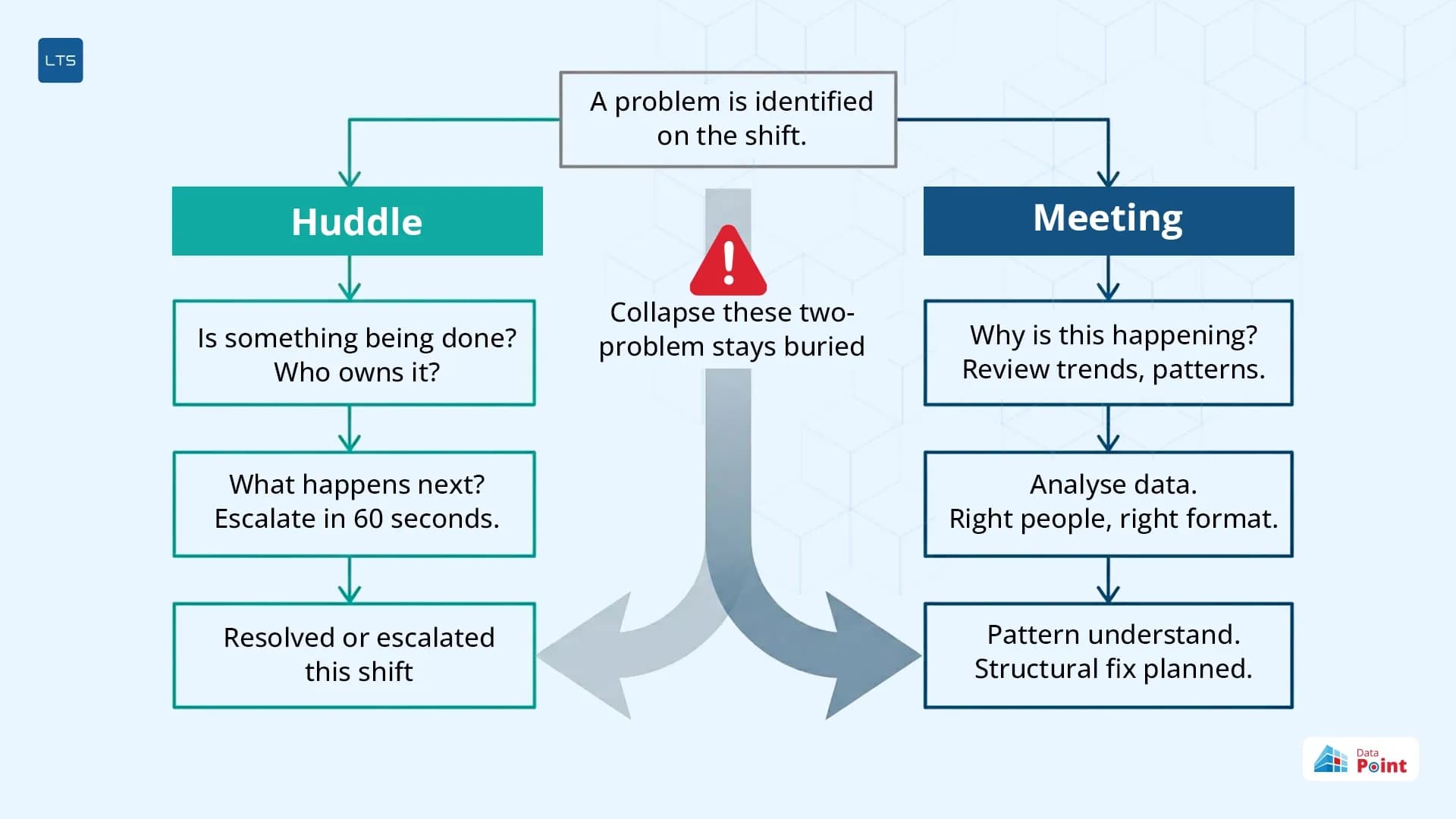
A huddle and a meeting might look similar and even interchangeable, but in reality, it is not. Both of them raise entirely different questions.
Meeting: Why is this happening?
Huddle: Are we doing something about it?
When a huddle tries to answer why, it stops answering whether. This keeps the issues that required a 60 second escalation buried inside a trend review. This results in the problem being unresolved and follows into the next shift.
A meeting reviews trends, questions patterns, and analyses data. It demands time, the right people, and a different format.
A huddle is built for a different purpose. It finds if something has already been done about it. It shows what is red, who owns it, and what happens next.
Collapsing these two into a single session only makes things worse. It takes too much time out of a shift, and the problem remains buried until it piles up into something huge and difficult.
When to call a huddle and when to call a meeting
Let's look at this with a simple example.
A quality manager conducts a huddle at the start of each shift. He assigns owners and keeps track of the progress. But in every huddle, the same red mark reappears. This kept repeating for four consecutive huddles without a permanent fix.
Here, the issue is not the huddle format itself but not knowing when the format changes from a huddle to a meeting. Calling a meeting too late keeps a resolvable issue circling in huddles and calling one too early wastes the time of the executives on something the shift could have solved itself.
What a huddle should never be used for
Huddles work best when they remain within their boundaries. Understanding what sits outside those boundaries is what keeps them sharp, fast, and worth attending.
- Not a problem-solving session: The moment a team begins discussing root causes and fixes, it has crossed over to the meeting territory. This results in the shift losing its action window.
- Not a reporting session: Going through every KPI – green, amber, red – turns a 10-minute huddle into a 30-minute status update that produces no action.
- Not a decision-making forum: Decisions require context, authority, and analysis – none of which a 10-minute standing session is designed to produce. The huddle is the moment to confirm action, not to understand failure.
- Not a training session: Explaining how something works or why a process exists mid-huddle pulls the team out of action and into learning mode.
- Not a conflict resolution space: Disagreements over ownership or disputes about process belong in a separate conversation. Stuffing them in a huddle only drags the purpose and dilutes it.
- Not a progress review: Detailed updates on progress do not belong in a huddle. Huddle focuses on surfacing today’s problem and escalates it before the next shift. Detailed progress reviews require decision-makers and a higher tier, not team leaders.
- Not a place for good news: Celebrating a red turning green, acknowledging the owner performance all have value. But forcing them here, only takes the huddles out of focus.
How a team leader runs a huddle that actually moves things forward
Knowing how to run a daily huddle is less about what to say and more about choosing what not to say.
For a team leader, this means the daily huddle format has a repeatable structure: open on hierarchy, filter to reds, confirm ownership, record the action, move to the next level. This same structure can then be repeated every day, every shift.
A team leader at a components plant used to begin every morning huddle with a full KPI walkthrough, reporting green, amber, and red, explaining why something went wrong and consuming valuable time without any real action. Owners were not assigned, no action happened, and the problems that should have escalated on time, kept recurring. Team members failed to reach a conclusion at the end of the session and the issues crossed over to the next shift, creating more problems.
What she did next was restructure the session. Instead of going through a complete KPI walkthrough, she focused only on the red KPIs. Green ones were acknowledged and went silent. All issues were assigned with an owner and a deadline, with proper follow-up, and repeating issues were escalated immediately. This drastically reduced the time frame from 30 minutes to 11. Moreover, the session strictly kept this repeatable structure of a huddle that made this session more productive in fewer minutes. Every note, every action, and every owner assigned during the huddle was saved against the KPI. The shift huddle had a structure, and the record existed where the data lived.
Why escalation and not discussion is the huddle’s only upward job
The mindset of a team leader running daily huddles should sound like this.
I'm focused on my team and my department. If something is wrong, escalate it. I'm not here to think about what is wrong. I'm just escalating.
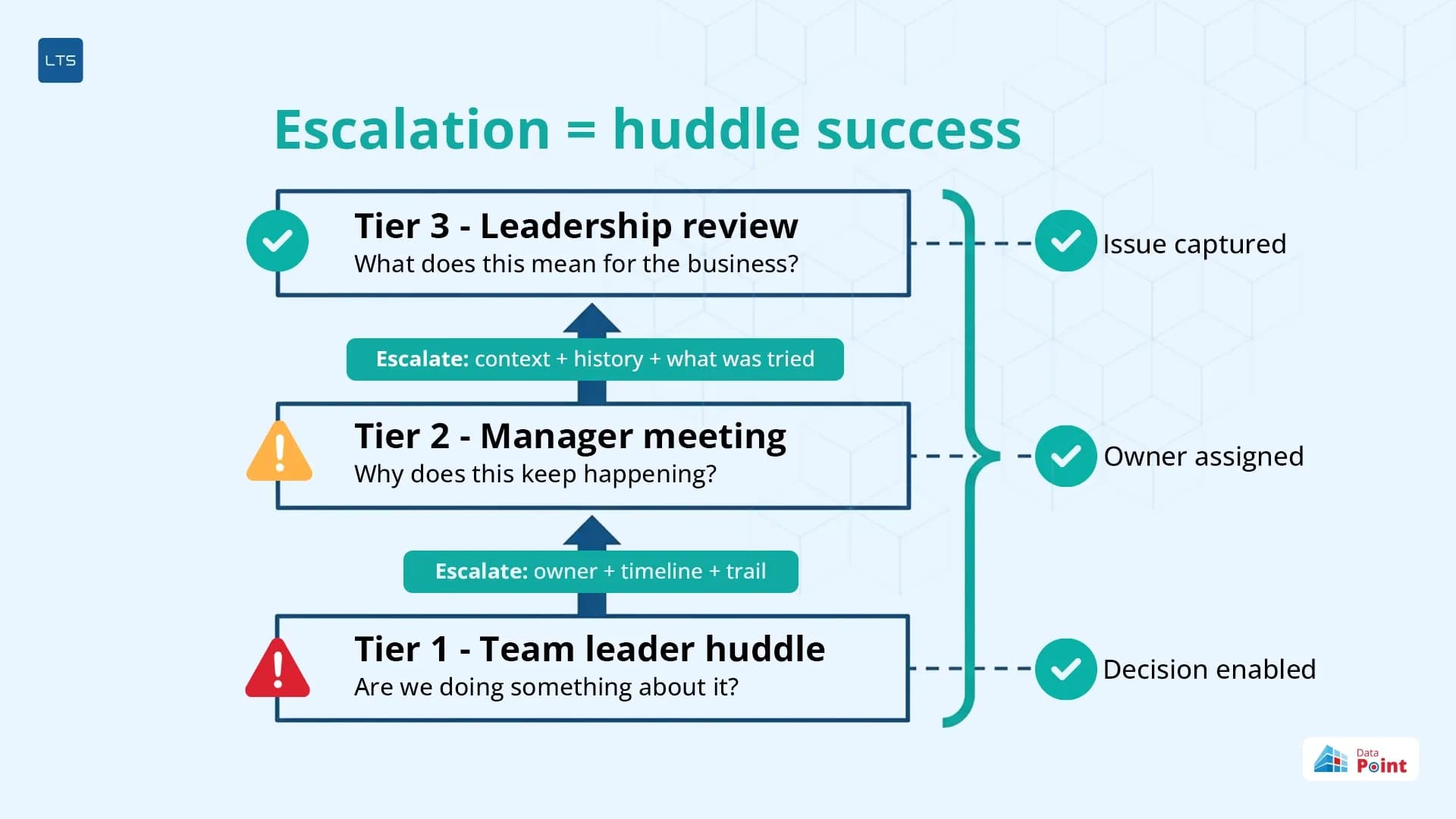
Proper escalation does not indicate the daily huddle has failed. It shows that the daily huddle is a success.
A correctly escalated problem moves from the team leader’s huddle directly to the manager’s meeting along with an owner, a timeline, and a documented trail. This helps the tier above begin from where the huddle has left off. The manager can see what is red, since when, and what has already been tried at the shift level.
This escalation path confirms that daily huddles are not the end of a problem, but the beginning of its journey upward. A well-documented escalation at Tier 1 is what gives the manager at Tier 2 the context to act, and the leader at Tier 3 the data to decide. A huddle that escalates well keeps tiered daily meetings informed, connected, and moving in the same direction.
How LTS Data Point structures daily huddles across every tier
Most platforms treat huddles and meetings as the same session in the same tool. LTS Data Point does not. Each format has a dedicated tool built around the question it is designed to answer.
- The huddle board is the tool that addresses the question what is being done about the problem. It instantly surfaces red, navigates by hierarchy with a single click, and saves every note, action, and owner directly against the KPI.
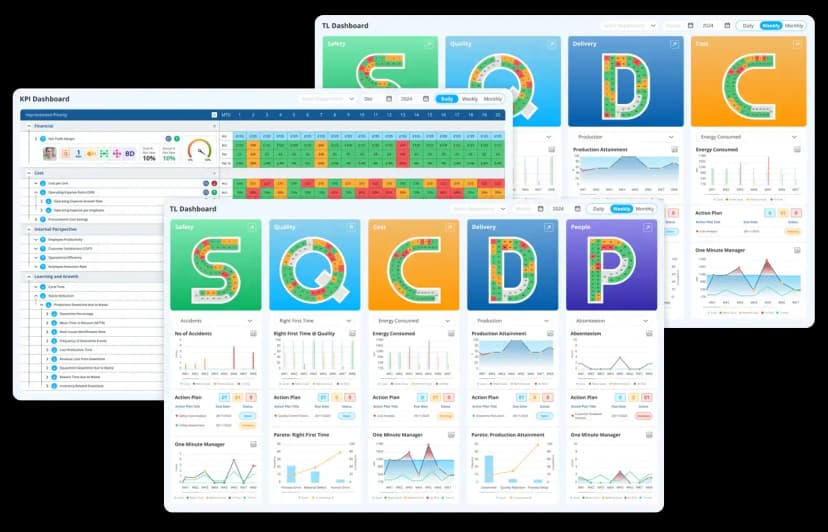
- Actions assigned in the huddle boards feed into a central action plan module which can be filtered by the department and sorted by overdue with photo uploads and timelines. This enables the tier above to see what was assigned and whether it was closed.
- When an issue moves from a huddle to a meeting, the KPI dashboard takes over. It reviews trends, drills into hierarchy, and displays goal vs actual vs variance with owner visibility.
- At the meeting level, One Minute Manager captures KPI notes across users, Quad Chart annotates trend outliers and failure reasons, and Fishbone anchors root cause analysis – each saved per KPI per hierarchy level.
The huddle and the meeting are not interchangeable. One asks whether. The other asks why. Getting that distinction right is what separates a shift that closes its issues from one that carries them forward, and a team leader who runs the floor from one who is run by it.
Not sure which LTS Data Point tool fits your current daily management structure?
FAQs
1. What is the biggest mistake team leaders make when running a huddle?
Treating it as a meeting. The moment root causes are discussed, trends are reviewed, or decisions are made, the huddle has already failed its purpose.
2. Is a daily standup the same as a huddle?
Not exactly. A standup typically covers what each person did yesterday and plans today. A huddle focuses on KPI performance, reds, and ownership, not individual task updates.
3. How is a huddle different from a Gemba walk?
A Gemba walk takes the leader to the floor to observe. A huddle brings the team to the data. Both are daily management tools, but they serve different visibility purposes.
4. Do remote or hybrid teams need a different huddle format?
The structure stays the same – focus on reds, assign owners, escalate. The difference is the platform. Without a shared visual board, remote huddles lose the shared data focus that makes them effective.
5. How does a huddle fit into a lean daily management system?
The huddle is Tier 1 of a lean daily management system – the daily operational heartbeat that feeds escalation upward through tiers.
6. Can digital huddle boards replace physical whiteboards entirely?
Yes. Digital huddle boards save every action and note against the KPI automatically, giving the tier above a live trail that a physical whiteboard cannot provide.

Geandra Queiroz, Operations Management Consultant
Geandra is an Operations Management Consultant at Lean Transition Solutions, specialising in Lean philosophy, Lean Six Sigma, and strategic planning across manufacturing and healthcare. She is currently completing her PhD in Industrial Engineering at the Federal University of São Carlos, researching the integration of Operations Strategy, Lean, and Green Manufacturing.